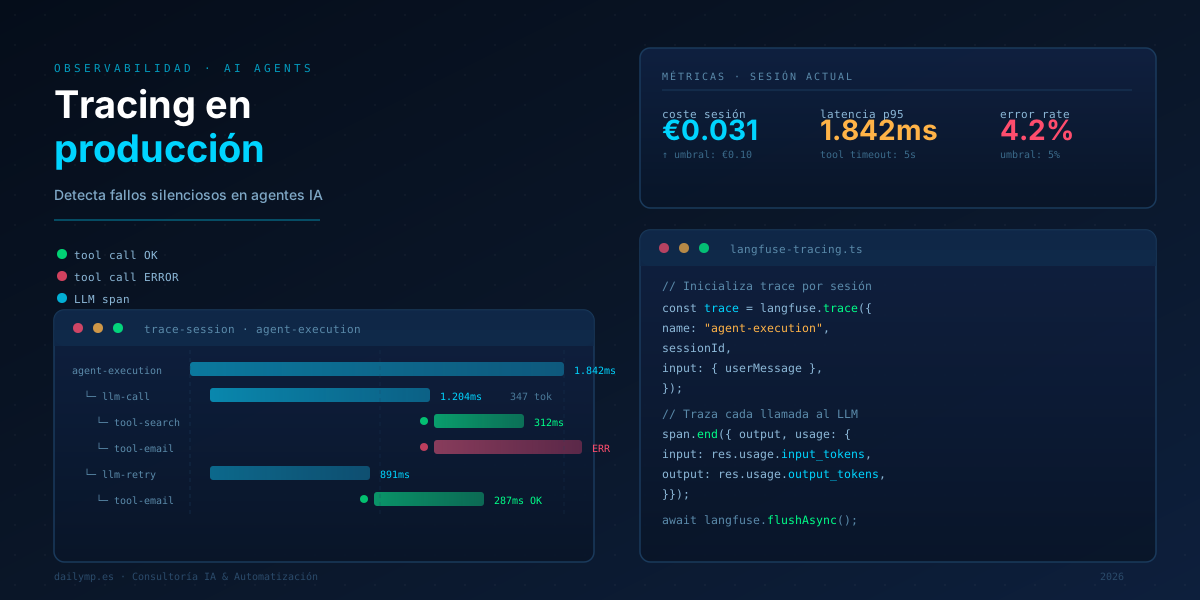
AI Agent Observability: Trace What Fails in Production
The agent works locally. Staging passes. You deploy. A week later, a user sends you a screenshot: the response makes no sense.
You open the logs. There's a 200 OK. The process completed without errors. The LLM responded. And you have no idea what input it received, what context it had, what tool call it made before, or why it returned that.
That's an AI system without observability. And in production, it's exactly as useful as flying blind.
Why AI Agents Fail Differently From Regular Software
Classical software fails in predictable ways: null pointer, timeout, 500 response. When something breaks, there's a stack trace, a log, a cause.
AI agents fail in ways that don't trigger any alarm:
- The LLM received a poorly structured context and generated a plausible but wrong response
- A tool call returned empty data and the agent assumed it as valid
- The conversation history grew so large that the model lost track of the first messages
- A model version update changed the behavior of a prompt that previously worked fine
None of these are technical errors. They're semantic failures. Without observability, they're invisible.
Three Failure Vectors You Can't Detect Without Tracing
1. Context Loss
Agents with memory accumulate context per session. If you don't control the context window size, eventually the model truncates from the beginning. The oldest messages disappear. If the agent's reasoning depended on those first instructions, it can't maintain coherence anymore.
The symptom: the agent responds correctly to short questions but fails at tasks requiring coherence across multiple turns.
2. Silent Tool Call Failures
A tool returns an empty JSON, a 404, or a null field nobody expected. The agent reads it, decides no data is available, and responds to the user generically.
Without tracing, you see the final response. You don't see the {} the tool returned that caused it.
3. Behavioral Drift via Prompt Decay
Prompts you wrote in January for a specific model may behave differently in July after a weight update or version change. The model keeps responding. It doesn't fail. It just responds differently.
Without a recorded baseline — the reference inputs and outputs you define as "correct" — you have no way to detect when an agent starts drifting.
What to Instrument From Day One
Before deploying any agent to production, you need to capture these four things per execution:
Full prompt sent to the LLM. Not just the user's message — the system prompt, history, tool definitions, everything. It's the only thing that lets you exactly reproduce what the model saw.
Full LLM response. The text and, if there are tool calls, the JSON of each call with its arguments.
Result of each tool call. What the tool returned, how long it took, whether it succeeded or failed.
Call metrics. Input tokens, output tokens, latency, model used, estimated cost.
With this, you can reconstruct any conversation. You can find exactly what the model saw right before giving a wrong answer.
Real Implementation: Tracing with Langfuse in TypeScript
Langfuse is the most widely used open-source tool for LLM tracing. It integrates with the Anthropic SDK in under 20 lines:
import Anthropic from "@anthropic-ai/sdk";
import { Langfuse } from "langfuse";

const anthropic = new Anthropic();
const langfuse = new Langfuse({
  secretKey: process.env.LANGFUSE_SECRET_KEY!,
  publicKey: process.env.LANGFUSE_PUBLIC_KEY!,
  baseUrl: process.env.LANGFUSE_BASEURL ?? "https://cloud.langfuse.com",
});

async function runAgent(userMessage: string, sessionId: string) {
  const trace = langfuse.trace({
    name: "agent-execution",
    sessionId,
    input: { userMessage },
  });

  const span = trace.span({ name: "llm-call", input: { userMessage } });

  const response = await anthropic.messages.create({
    model: "claude-sonnet-5",
    max_tokens: 1024,
    system: "You are a business support assistant.",
    messages: [{ role: "user", content: userMessage }],
  });

  const output =
    response.content[0].type === "text" ? response.content[0].text : "";

  span.end({
    output,
    usage: {
      input: response.usage.input_tokens,
      output: response.usage.output_tokens,
    },
  });

  trace.update({ output });
  await langfuse.flushAsync();
  return output;
}
With this, every call is logged in the Langfuse dashboard with the full prompt, response, cost, and latency. You can filter by session, replay exact conversations, and compare behavior across agent versions.
If you're working with agents that invoke external tools, add a span per tool call:
async function callTool(
  toolName: string,
  args: Record<string, unknown>,
  parentTrace: ReturnType<typeof langfuse.trace>
) {
  const toolSpan = parentTrace.span({ name: `tool-${toolName}`, input: args });
  try {
    const result = await executeTool(toolName, args);
    toolSpan.end({ output: result, level: "DEFAULT" });
    return result;
  } catch (error) {
    toolSpan.end({ output: { error: String(error) }, level: "ERROR" });
    throw error;
  }
}
Alerts Worth Configuring in Production
Logging data without alerts is as useless as not logging at all. These four metrics justify an immediate alert in any production agent:
Cost per session above threshold. If a normal conversation costs $0.02 and a session costs $0.80, something is wrong — probably a tool call loop or an uncontrolled growing history.
Tool call latency above 5 seconds. A slow external service doesn't break the agent, but it degrades the experience and hides future timeouts that will break it.
Tool call error rate above 5%. A 5% failure rate on tools is a sign of an integration problem that won't fix itself.
Context size growing session over session. If input tokens grow linearly with each turn without a truncation mechanism, you'll hit a context overflow in production sooner than you expect.
At DAILYMP we include this instrumentation as standard in any AI integration project: the agent ships observable from day one, with dashboards and alerts configured before the first deployment.
What Changes When You Can See What the Agent Does
The practical difference isn't technical — it's operational. When you have traceability:
- The first bug report includes a trace ID, not "it sometimes fails with something weird"
- You can compare agent behavior before and after changing a prompt
- You can audit what data the agent processed in each conversation without rebuilding from scratch
- You can show the client exactly what the model saw and why it responded that way
AI agents deployed in production fail. They all fail at some point. The difference between a maintainable system and one that becomes an unmaintainable black box is that the first one fails visibly.
If you're building an AI agent for production and want to make sure it's debuggable from day one, let's talk in 30 minutes →