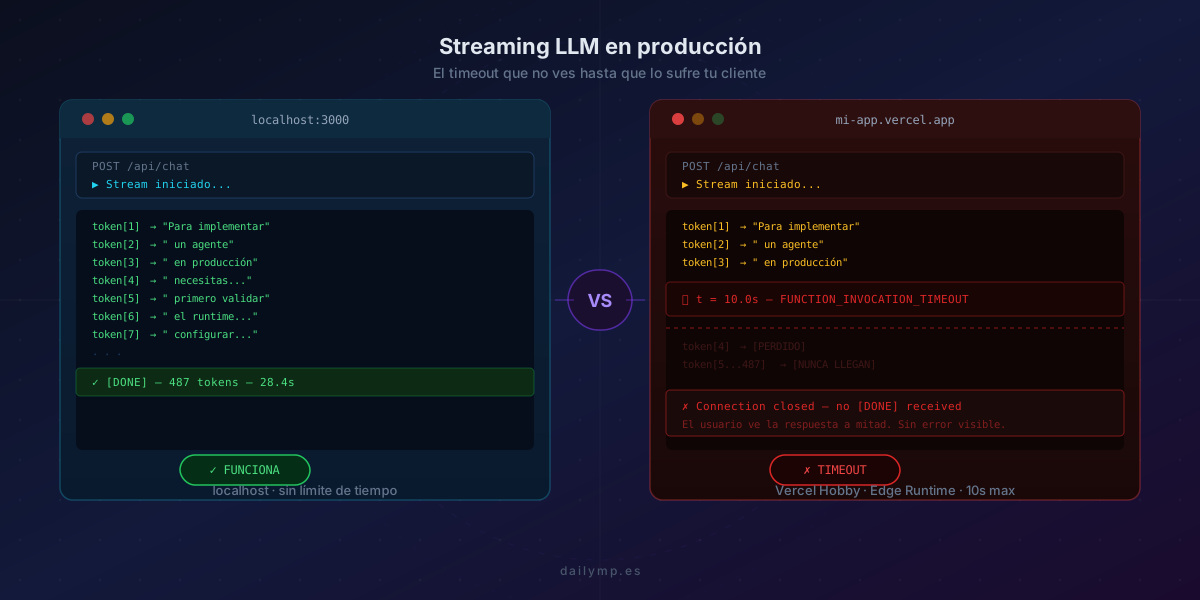
Your AI stream dies on Vercel. Here's exactly why.
Your AI agent works perfectly on localhost. The stream starts, tokens arrive one by one, the full response renders on screen. You deploy to Vercel. The first user tries it and after ten seconds the response freezes mid-sentence. No visible error. No exception in the logs. Just silence.
This bug has a name: FUNCTION_INVOCATION_TIMEOUT. The reason it doesn't appear in the logs is that Vercel kills the function without throwing any exception — it simply closes the connection. The LLM is still generating tokens on Anthropic's side. Your client never receives them.
Why streaming breaks in serverless
Traditional servers keep a connection open for as long as the stream lasts. A serverless function has a maximum duration. When that duration runs out, the function terminates regardless of where the stream was.
Default limits on Vercel:
| Plan | Runtime | Default timeout | Max extensible |
|---|---|---|---|
| Hobby | Node.js | 10s | 10s (not extensible) |
| Pro | Node.js | 15s | 900s |
| Pro | Edge | 30s | 30s (hard limit) |
| Enterprise | Node.js | 15s | 900s |
The most common mistake: using Edge Runtime because "it's faster for AI" without realizing it has a hard 30-second cap. If your LLM generates responses longer than 30 seconds — common when context is long or the model reasons across multiple steps — Edge Runtime is not a valid option for production.
The second mistake: not sending the [DONE] sentinel
When the function dies from timeout, the client receives no close signal. The EventSource or ReadableStream on the frontend simply stops receiving data. Depending on how the client is implemented, it may:
- Wait indefinitely (eternal spinner)
- Show the truncated response as if it were the full answer
- Attempt to reconnect in a loop until the user refreshes
None of these outcomes are acceptable in production.
The correct setup for LLM streaming in Next.js
1. Define runtime and maxDuration explicitly
// app/api/chat/route.ts
export const runtime = 'nodejs'; // NEVER edge for calls > 30s
export const maxDuration = 300;  // Pro: up to 900s. Hobby: ignored (max 10s)

import Anthropic from '@anthropic-ai/sdk';

const anthropic = new Anthropic();

export async function POST(req: Request) {
  const { messages } = await req.json();

  const stream = anthropic.messages.stream({
    model: 'claude-opus-4-8',
    max_tokens: 4096,
    messages,
  });

  const readable = new ReadableStream({
    async start(controller) {
      const encoder = new TextEncoder();

      try {
        for await (const chunk of stream) {
          if (
            chunk.type === 'content_block_delta' &&
            chunk.delta.type === 'text_delta'
          ) {
            controller.enqueue(
              encoder.encode(
                `data: ${JSON.stringify({ text: chunk.delta.text })}\n\n`
              )
            );
          }
        }
        // The sentinel MUST be sent before closing
        controller.enqueue(encoder.encode('data: [DONE]\n\n'));
      } catch (err) {
        controller.enqueue(
          encoder.encode(`data: ${JSON.stringify({ error: 'stream_error' })}\n\n`)
        );
      } finally {
        controller.close();
      }
    },
  });

  return new Response(readable, {
    headers: {
      'Content-Type': 'text/event-stream',
      'Cache-Control': 'no-cache, no-transform',
      'Connection': 'keep-alive',
      'X-Accel-Buffering': 'no', // Critical for Nginx in self-hosted setups
    },
  });
}
The try/catch/finally guarantees the controller always closes, even if the LLM stream throws an exception. Without finally, an error in the loop leaves the ReadableStream in an undefined state.
2. The client that doesn't know the stream died
The typical fetch + ReadableStream implementation on the client has a problem: it can't distinguish between "stream ended cleanly" and "connection dropped". You need to detect whether the [DONE] sentinel arrived before marking the response as complete.
// hooks/useStreamingResponse.ts
import { useRef, useState, useCallback } from 'react';

export function useStreamingResponse() {
  const [text, setText] = useState('');
  const [status, setStatus] = useState<'idle' | 'streaming' | 'done' | 'error'>('idle');
  const abortRef = useRef<AbortController | null>(null);

  const send = useCallback(async (messages: unknown[]) => {
    abortRef.current?.abort();
    abortRef.current = new AbortController();

    setText('');
    setStatus('streaming');
    let receivedDone = false;

    try {
      const res = await fetch('/api/chat', {
        method: 'POST',
        body: JSON.stringify({ messages }),
        headers: { 'Content-Type': 'application/json' },
        signal: abortRef.current.signal,
      });

      const reader = res.body!.getReader();
      const decoder = new TextDecoder();

      while (true) {
        const { done, value } = await reader.read();
        if (done) break;

        const lines = decoder.decode(value).split('\n');
        for (const line of lines) {
          if (!line.startsWith('data: ')) continue;
          const payload = line.slice(6);

          if (payload === '[DONE]') {
            receivedDone = true;
            break;
          }

          try {
            const { text: chunk, error } = JSON.parse(payload);
            if (error) throw new Error(error);
            if (chunk) setText(prev => prev + chunk);
          } catch {
            // malformed chunk — skip and continue
          }
        }
        if (receivedDone) break;
      }

      // If the stream ended without [DONE] → timeout or server error
      setStatus(receivedDone ? 'done' : 'error');

    } catch (err) {
      if ((err as Error).name !== 'AbortError') {
        setStatus('error');
      }
    }
  }, []);

  const cancel = useCallback(() => {
    abortRef.current?.abort();
    setStatus('idle');
  }, []);

  return { text, status, send, cancel };
}
The receivedDone flag is the critical piece. If the stream closes without [DONE] arriving, the hook sets status to 'error' instead of 'done'. That lets your component show a clear message to the user ("Response was interrupted — please try again") instead of displaying truncated text as if it were the complete answer.
The proxy that buffers everything
If your Next.js runs behind Nginx on a self-hosted server (not on Vercel), there's a second problem: Nginx buffers upstream responses by default. The user sees no tokens until the full response reaches the proxy, at which point everything appears at once.
The fix is a single header:
# nginx.conf
location /api/chat {
  proxy_pass http://localhost:3000;
  proxy_set_header X-Accel-Buffering "no";
  proxy_buffering off;
  proxy_read_timeout 300s;  # match your maxDuration
  chunked_transfer_encoding on;
}
On Vercel this doesn't apply since the platform handles buffering automatically. But in any self-hosted setup with Nginx or Apache, this is the first place to check when streaming "doesn't work".
The AbortController nobody implements
When a user navigates away while a stream is active, the server stream keeps running and consuming tokens even though nobody receives them. In production with multiple concurrent users, that's direct API cost.
The AbortController in the hook example above cancels the fetch when the component unmounts. The missing piece is the server side: detecting that the client closed the connection.
// Inside the route — client abort detection
const abortController = new AbortController();
req.signal.addEventListener('abort', () => {
  abortController.abort();
});

const stream = anthropic.messages.stream(
  { model: 'claude-opus-4-8', max_tokens: 4096, messages },
  { signal: abortController.signal }
);
With this, when the client cancels, the LLM call is interrupted too. Without it, every user navigation leaves an orphaned stream running until it completes or maxDuration kills it.
Production streaming checklist
Before deploying any LLM streaming endpoint, verify each point:
-
runtime = 'nodejs'— never Edge for responses longer than 30s -
maxDurationset explicitly (don't rely on the 10s default) - The
[DONE]sentinel is sent in thefinallyblock - The client checks whether
[DONE]arrived before marking asdone -
X-Accel-Buffering: noheader if Nginx sits in front -
AbortControllerwired in both client and LLM call - Fallback UI: what the user sees if the stream is cut short
The AI Integration service includes a review and fix of all these points before any production deployment. If you have an agent in production showing intermittent failures, misconfigured streaming is the first thing to rule out.
Why it doesn't appear in Vercel's logs
Vercel's timeout doesn't generate a catchable exception. The function simply terminates. In the Vercel dashboard it appears as "Duration: 10000ms" with a 200 status — because the HTTP connection was established correctly and the response started sending before the timeout hit.
To detect these cases, you need to instrument the number of tokens received on the client and compare against the expected total. If the client receives less than 90% of tokens without having received [DONE], that's a masked timeout.
The AI agent monitoring and observability service includes this kind of instrumentation: stream completeness metrics per endpoint, call durations, and timeout rates by model and context length.
What changes when it's configured correctly
Misconfigured streaming generates between 3% and 8% silent failed requests in production — users seeing truncated responses with no idea why. With the correct setup, that number drops to zero for responses within maxDuration.
For genuinely long responses (models reasoning across multiple steps, slow tools), the solution isn't to extend the timeout indefinitely: it's to design the pipeline to send partial results while processing continues. But that's agent architecture, not streaming configuration — and it's a different conversation.
If you have a streaming endpoint in production and see intermittent truncated responses, reach out. In 30 minutes we can diagnose whether it's a configuration issue, a runtime issue, or an architecture issue.