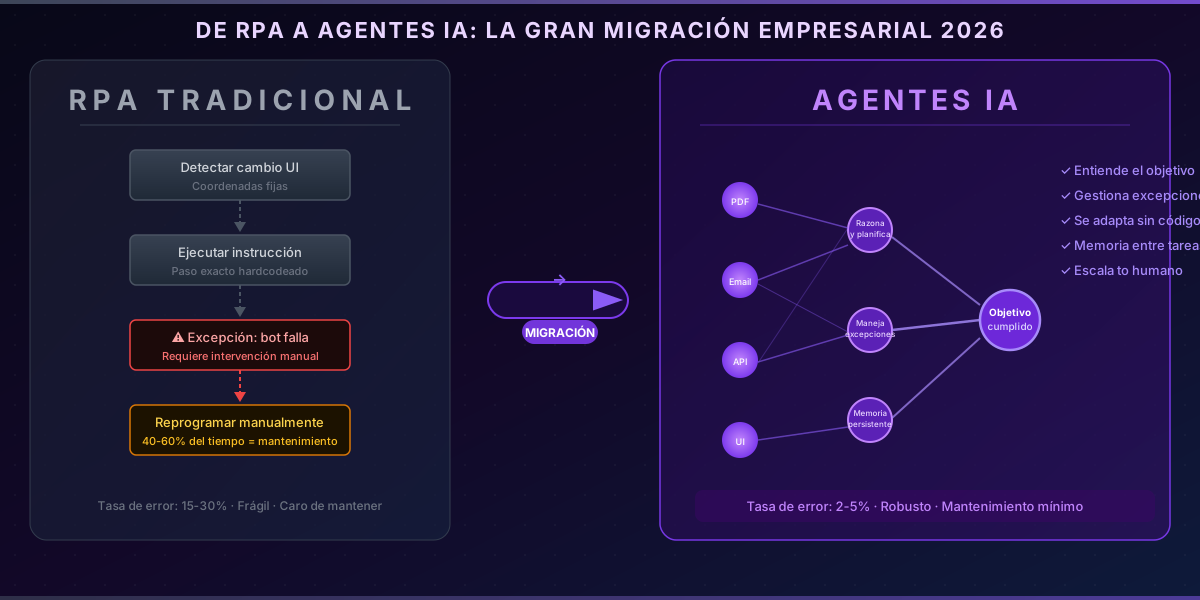
RPA vs AI Agents: The Great Enterprise Migration of 2026
Your software robots are no longer enough
You've been automating with RPA for years — UiPath, Automation Anywhere, Blue Prism. The bots work well when the process is stable. But as soon as a screen changes, a workflow gets updated, or an unexpected exception arrives, the bot fails. And someone on the team has to fix it.
In 2026, 67% of companies with RPA implemented report spending more time maintaining their bots than building new automations. The problem isn't your team — it's the technology. And there's an alternative already running in production at dozens of SMEs.
Why traditional RPA is hitting its limits
RPA was built to replicate human actions in graphical interfaces: clicking buttons, copying data between systems, filling out forms. It's brilliant at that — when the environment doesn't change.
The problem is the environment always changes.
The 3 most common RPA problems in 2026:
- Fragility to UI changes: A redesigned application, a new field in a form, or an OS update breaks the bot. You have to reprogram it from scratch.
- Inability to handle exceptions: If the process encounters an unexpected variation (a PDF in a different format, a blank field, an unexpected response), the bot stops. Someone has to review it manually.
- Maintenance costs that scale: Companies with 20+ bots spend 40-60% of their automation budget on maintenance, not on developing new automations.
RPA automates exactly what you already know how to do. It doesn't solve what you didn't anticipate.
What makes an AI agent different
An AI agent doesn't navigate interfaces pixel by pixel. It understands the goal of the task, plans the steps, executes actions, and adapts its behavior when something doesn't go as expected.
| Traditional RPA | AI Agent | |
|---|---|---|
| Handles exceptions | No (stops and waits) | Yes (reasons and adapts) |
| Resilient to UI changes | No | Yes (understands context) |
| Learns from past errors | No | Yes (with persistent memory) |
| Processes natural language | No | Yes (emails, docs, chats) |
| Requires explicit rules | All of them | Only the critical ones |
| Maintenance cost | High (40-60%) | Low (15-25%) |
The key difference: RPA executes instructions. An AI agent understands objectives.
When you tell an RPA bot to "download a file from this URL and upload it to the ERP," you need the URL to always be the same, the file to always have the same format, and the ERP to always show the same screen. When you tell an AI agent the same thing, it understands the intent, detects format changes, and knows how to adapt.
What migration looks like in practice
Migrating from RPA to AI agents doesn't mean throwing away everything you have. The approach that works is selective, impact-first prioritization.
Step 1: Identify your highest error-rate bots
Review your RPA platform logs and find processes that fail more than 10% of the time or require manual intervention at least once a week. Those are your priority candidates — they consume the most maintenance time and are where AI agents make the biggest difference.
Step 2: Replicate the process with an agent + tools
Instead of hardcoding every action, you define the tools the agent can use (read files, query the database, send emails, call APIs) and give it the goal. The agent plans and executes:
const agentTools = [
  {
    name: "read_invoice",
    description: "Reads and extracts structured data from a PDF or image invoice. Handles different formats automatically.",
    inputSchema: {
      type: "object",
      properties: { filePath: { type: "string" } },
      required: ["filePath"]
    }
  },
  {
    name: "validate_vendor",
    description: "Checks if the vendor exists in the ERP and returns their ID and payment terms.",
    inputSchema: {
      type: "object",
      properties: { vendorName: { type: "string" }, taxId: { type: "string" } },
      required: ["vendorName"]
    }
  },
  {
    name: "create_payment_order",
    description: "Creates a payment order in the ERP. ONLY use when the invoice is validated and the amount is within the approved limit.",
    inputSchema: {
      type: "object",
      properties: {
        invoiceId: { type: "string" },
        amount: { type: "number" },
        dueDate: { type: "string" }
      },
      required: ["invoiceId", "amount", "dueDate"]
    }
  }
];

// The agent receives the goal — not step-by-step instructions
const prompt = `
Process the invoice at ${filePath}.
Validate the vendor, verify the amount is within the approved limit
(€5,000), and create the payment order if everything checks out.
If anything doesn't add up, stop and notify with the exact reason.
`;
Step 3: Human-in-the-loop for critical decisions
Not everything should be 100% automated. For high-impact decisions — payments above a threshold, new contracts, unprecedented exceptions — the agent can escalate to a human with the full context already prepared:
// Agent notifies when it detects a critical exception
if (amount > AUTO_APPROVAL_LIMIT) {
  await notifySlack({
    channel: '#finance-approvals',
    message: `⚠️ Invoice from ${vendor} for €${amount} requires approval.`,
    context: {
      agentSummary: fullAnalysis,
      attachments: [invoicePath],
      recommendation: agentConclusion
    }
  });
  return; // Agent stops and waits
}
The difference from RPA: when an RPA bot stops, nobody knows why. When an agent escalates, it brings the full analysis done — the person just needs to approve or reject.
Real-world results: what to expect
Based on implementations across clients in different sectors (distribution, professional services, logistics), these are the typical ranges when migrating critical RPA processes to AI agents:
- Error rate: from 15-30% with RPA to 2-5% with AI agents
- Maintenance time: 60-70% reduction in the first year
- Processing capacity: 3-5x more documents per hour, because the agent doesn't stop at minor exceptions
- Cost per manually handled exception: over 80% reduction
Invoice processing is the most frequent use case, but the pattern applies to any process with variability: customer onboarding, order management, email-based customer support, extraction of data from contracts or delivery notes.
When does it make sense to keep RPA?
RPA isn't dead. It makes sense to keep it when:
- The process is 100% structured and the UI or data formats never change
- Volume is low and migration costs won't be recovered within 6 months
- The environment is highly regulated: in some sectors, RPA's auditability (every action is explicit and traceable) can be a regulatory advantage
Migration makes sense when error rates or maintenance costs are consuming real resources. If your bots "run themselves" without problems, leave them. If someone on your team spends more than 4 hours a week maintaining them, you already have your ROI calculated.
The time to migrate is now
AI agents for enterprise automation have moved from experimental prototypes to production systems in 2026. Companies that migrate first will have a real operational edge over those who wait: less friction in their processes, less time spent on maintenance, and more capacity to automate processes they never even considered before.
If you manage automated processes with RPA and are evaluating the switch to AI agents, we can audit your current bots and identify what's most worth migrating first — with a migration plan that doesn't disrupt ongoing operations.
You can also explore how we approach AI agent automation or discover our AI integration in existing systems.