Context Engineering for AI Agents in Production 2026
When Your AI Agent Fails, It's Rarely the Model's Fault
You've spent two weeks trying to get your agent to automate a task. Sometimes it works perfectly. Sometimes it produces completely different results for the same input. You switch models. You rewrite the prompt. Nothing works consistently.
The problem is probably not the model. It's the context you're giving it.
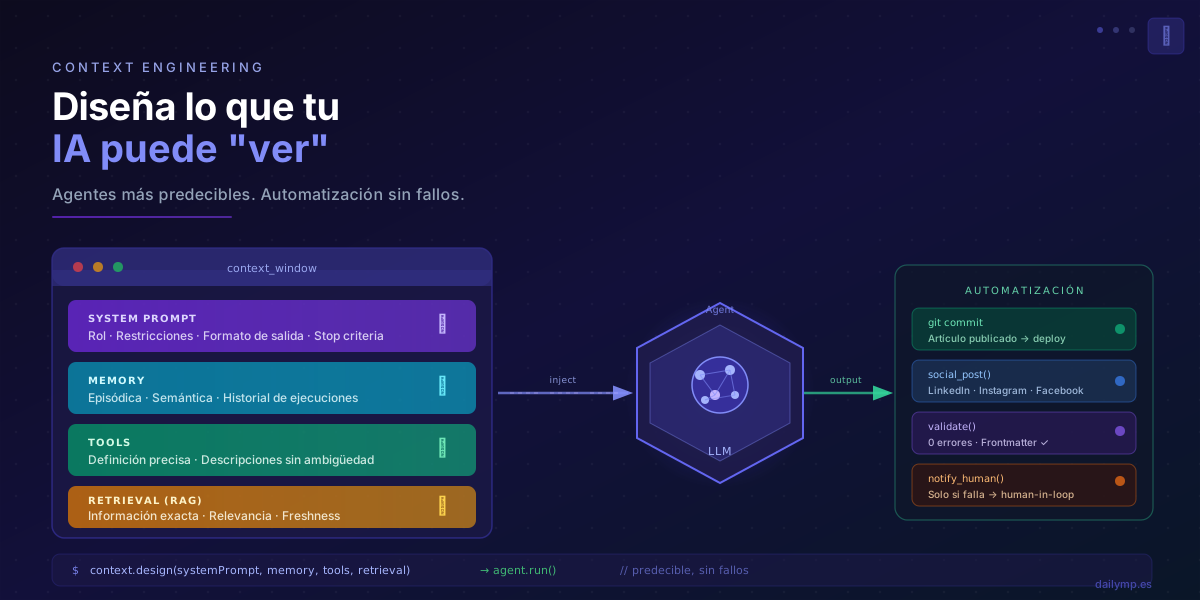
Context Engineering is the discipline that replaces old-school prompt engineering. It's not just about writing a good prompt — it's about designing everything the model receives: its role, its memory, its tools, the information it can retrieve, so it can reason correctly and automate without failure.
In 2026, with AI agents running in production at real companies, the difference between a system that works and one that doesn't usually comes down to context, not the model.
What Is Context Engineering (and Why It Replaces Prompt Engineering)
The context window of an LLM is everything the model can "see" at any given moment: instructions, conversation history, tool results, retrieved documents, examples.
Traditional prompt engineering focused on one piece: the instruction you give the model. Context engineering designs the entire information space:
| Element | What It Controls | Impact on Automation |
|---|---|---|
| System prompt | Role, constraints, output format | Behavioral consistency |
| Memory | What the agent knows from past interactions | Continuity between tasks |
| Tools | What actions the agent can execute | Automation scope |
| Retrieval (RAG) | What external information it can access | Decision accuracy |
| Examples (few-shot) | Correct input/output patterns | Output quality |
Every piece matters. A perfect system prompt with poorly implemented memory creates an agent that forgets what it just did. Well-defined tools with low-quality retrieval produce decisions based on incorrect information.
The 4 Pillars of Context in an Automation Agent
1. System Prompt as a Behavioral Contract
The system prompt is not a description of the agent. It's a behavioral contract: it precisely defines what the agent does, what it doesn't do, how it formats outputs, and when it should stop and request human confirmation.
const systemPrompt = `
You are a content publishing agent. Your role is:

YOU CAN:
- Format and validate MDX articles
- Publish to the Git repository via commits
- Verify that the Vercel deployment completed successfully

YOU CANNOT:
- Modify React component code
- Delete existing articles
- Publish to social media without prior human validation

OUTPUT FORMAT:
Always respond with structured JSON:
{ "status": "success|error|pending", "action": "...", "details": "..." }

STOP CRITERIA:
If the deployment fails 2 consecutive times, stop and notify.
`;
The golden rule: if two people on the team read the system prompt and reach different interpretations, you need more precision.
2. Memory: What the Agent Remembers Between Tasks
Automation agents need two types of memory:
- Episodic memory: what happened in previous executions (yesterday's commit, last week's errors)
- Semantic memory: domain knowledge (blog rules, brand voice)
A common mistake is not implementing memory at all, forcing the agent to "start from scratch" on every execution. The result: decisions without historical context and repeated mistakes.
// Episodic memory with Supabase
async function getAgentMemory(agentId: string, limit = 10) {
  const { data } = await supabase
    .from('agent_executions')
    .select('task, outcome, timestamp, details')
    .eq('agent_id', agentId)
    .order('timestamp', { ascending: false })
    .limit(limit);

  return data?.map(e =>
    `[${e.timestamp}] ${e.task}: ${e.outcome}`
  ).join('\n');
}

// Inject into context before each execution
const contextWithMemory = `
${systemPrompt}

RECENT HISTORY:
${await getAgentMemory('content-publisher')}
`;
3. Tool Definition: The Vocabulary of Automation
Tools are the actions the agent can execute. Their definition is critical: an ambiguous name or vague description produces tools that the model invokes at the wrong moment.
const tools = [
  {
    name: "publish_article",
    description: "Publishes an MDX article to the repository. ONLY use when the article is fully validated. Do NOT use for drafts.",
    input_schema: {
      type: "object",
      properties: {
        filename: {
          type: "string",
          description: "Filename without extension, e.g.: '57-my-article'"
        },
        content: {
          type: "string",
          description: "Complete MDX content including frontmatter"
        },
        lang: {
          type: "string",
          enum: ["es", "en"],
          description: "Article language"
        }
      },
      required: ["filename", "content", "lang"]
    }
  }
];
The description of each tool is part of the context. Write it as if you were explaining it to someone who doesn't know your system.
4. Retrieval: Precise Information at the Right Moment
An automation agent that retrieves incorrect information makes incorrect decisions. Retrieval (RAG) isn't just "finding things" — it's injecting the right information at the right moment.
Two critical principles for automation:
- Relevance over quantity: 2 highly relevant documents beat 10 mediocre ones
- Freshness awareness: if information can become stale, add timestamps and invalidation logic
Real Case: The dailymp.es Publishing Pipeline
This blog runs on an agent system that fully automates publishing: article generation → validation → commit → deploy → social media posting. The context of each agent is designed to make every step deterministic.
The validation agent, for example, receives in its context:
- System prompt: exact frontmatter rules (lengths, formats, required fields)
- Memory: recent validation errors to avoid repeating them
- Tools:
validate_frontmatter,check_slug_collision,verify_image_path - Retrieval: the last 10 published articles as a reference for correct formatting
The result: 0 articles rejected by the GitHub Actions workflow for format errors since implementing this context design.
Want to see how we apply this in real projects? Explore our AI integration service for React and Next.js or discover how we work with AI Driven Development.
Is Your Problem Model or Context?
Before switching models or rewriting your agent from scratch, ask yourself:
- Agent gives different results for the same input? → System prompt problem (ambiguity)
- Agent "forgets" what it did in the previous session? → Memory problem
- Agent invokes tools in the wrong order? → Tool definition problem
- Agent makes decisions based on incorrect information? → Retrieval problem
- Agent produces outputs in different formats? → Missing few-shot examples
In most cases, the problem is context. And context, unlike the model, is entirely within your control.
Start With Context, Not the Model
Context Engineering is not an advanced technique reserved for large companies. It's the fundamental practice that makes any AI agent — from the simplest to the most complex — work predictably and automate with confidence.
If you're building AI agents to automate processes in your business and results are inconsistent, the problem probably isn't where you think it is.
👉 Let's talk about designing the right context for your AI agents