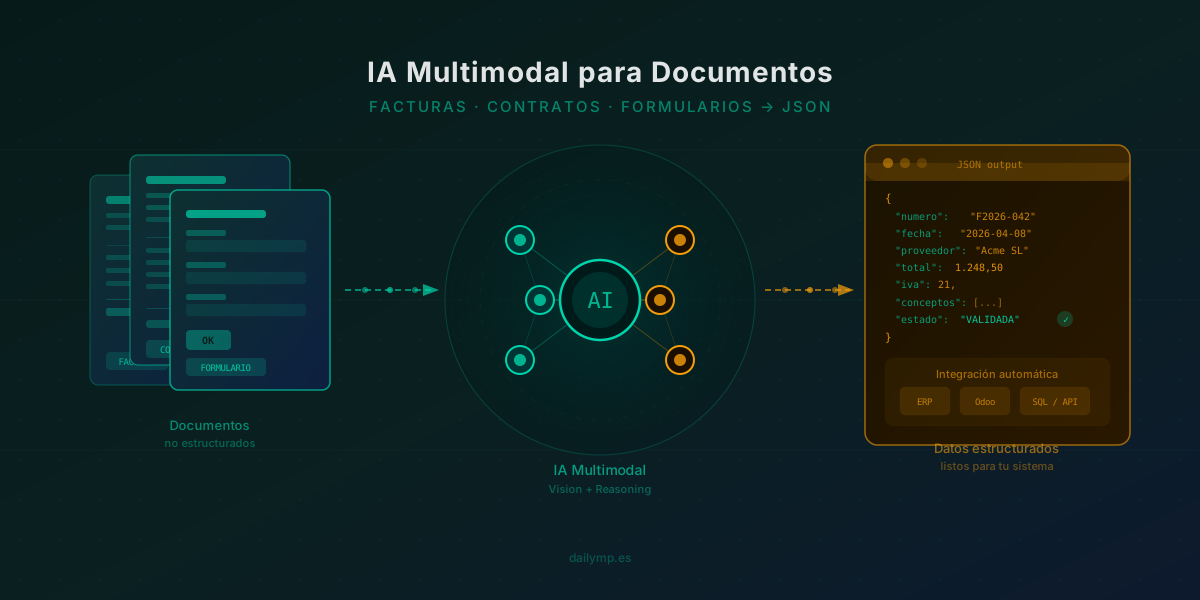
Multimodal AI: Automate Invoices and Contracts
Your team wastes more time on documents than you think
Every week, across thousands of small and medium businesses, someone manually copies data from a PDF invoice into an accounting spreadsheet. Another person extracts dates and parties from a contract to update the CRM. A third enters form fields into the ERP by hand.
These tasks seem minor. But they add up to 15 to 25 hours per week of mechanical work — with an error rate between 3% and 8% that then costs even more hours in corrections, disputes and reconciliations.
Multimodal AI has changed this completely. We are not talking about classic OCR that only recognises printed text. We are talking about models capable of reading, understanding and structuring any document — scanned, photographed on a phone or generated as a PDF — with the same comprehension a human would have.
Why classic OCR falls short: what multimodal AI changes
OCR has been around for decades. It works reasonably well on printed documents with fixed layouts. But in the real world, documents are messy:
- Supplier invoices in completely different formats
- Contracts with clauses that depend on earlier context
- Paper forms scanned at different orientations
- Delivery notes with handwriting mixed with printed text
- PDFs with complex tables where numbers must be interpreted in context
Classic OCR extracts text. Multimodal AI reasons about it: it understands that "50 units × £18.40" and "line total: £920.00" are the same thing expressed two ways. It knows that "signed in London on 15 January" is a date. It understands that if a field says "VAT inclusive", the net calculation is different.
This leap — from extracting to understanding — is what makes document automation genuinely useful.
From PDF to JSON in seconds: practical implementation
Here is the real implementation we use in AI integration projects for SMEs. The code reads an invoice image or PDF and returns a clean, structured JSON object ready to insert into any system.
import Anthropic from "@anthropic-ai/sdk";
import * as fs from "fs";

const client = new Anthropic();

interface InvoiceData {
  invoice_number: string;
  date: string;
  supplier: string;
  vat_number: string;
  net_amount: number;
  vat_rate: number;
  vat_amount: number;
  total: number;
  line_items: Array<{
    description: string;
    quantity: number;
    unit_price: number;
    amount: number;
  }>;
  validation_status: "valid" | "review" | "incomplete";
}

async function processInvoice(filePath: string): Promise<InvoiceData> {
  const imageBase64 = fs.readFileSync(filePath, { encoding: "base64" });
  const ext = filePath.split(".").pop()?.toLowerCase();
  const mediaType =
    ext === "png" ? "image/png" : ext === "webp" ? "image/webp" : "image/jpeg";

  const response = await client.messages.create({
    model: "claude-opus-4-6",
    max_tokens: 1500,
    messages: [
      {
        role: "user",
        content: [
          {
            type: "image",
            source: { type: "base64", media_type: mediaType, data: imageBase64 },
          },
          {
            type: "text",
            text: `Extract all data from this invoice and return ONLY a valid JSON with this exact structure:
{
  "invoice_number": "string",
  "date": "YYYY-MM-DD",
  "supplier": "string",
  "vat_number": "string",
  "net_amount": number,
  "vat_rate": number,
  "vat_amount": number,
  "total": number,
  "line_items": [
    { "description": "string", "quantity": number, "unit_price": number, "amount": number }
  ],
  "validation_status": "valid" | "review" | "incomplete"
}
Set "review" if data is inconsistent. "incomplete" if required fields are missing.`,
          },
        ],
      },
    ],
  });

  const jsonText =
    response.content[0].type === "text" ? response.content[0].text : "{}";
  return JSON.parse(jsonText) as InvoiceData;
}
With this code, an invoice image takes less than 3 seconds to become a clean JSON object, with built-in validation. The same applies to contracts, delivery notes or forms — simply adjust the output schema and prompt.
The key is the validation_status field: the model does not just extract, it also detects mathematical inconsistencies and missing data, adding an automatic quality control layer.
Real use cases for your business
Supplier invoices
The most immediate case. You receive invoices by email as PDFs. An agent downloads them, processes them and inserts them directly into your accounting system or ERP — with all fields correct, no human intervention. Only those flagged as "review" go to manual checking.
Real impact: from 45 minutes of daily manual data entry to zero. The person who did that work can focus on tasks that genuinely require human judgement.
Contracts and commercial agreements
Extracting parties, effective dates, termination clauses, amounts and payment terms from PDF contracts is tedious and error-prone. Multimodal AI structures it automatically, enabling searches, expiry alerts and contract portfolio analysis.
Customer and lead forms
Paper forms, scanned forms, PDFs with hand-filled fields — all can become structured records in your CRM automatically. No double data entry, no typing errors.
Delivery notes and work orders
In sectors like logistics, construction or technical services, paper delivery notes and work orders are a genuine bottleneck. Taking a photo with a mobile and processing in seconds is perfectly viable with today's technology.
Integration with your ERP or database
The JSON the document processor generates is the direct input for any system. The typical integration we implement has three steps:
- Ingestion: the agent monitors a folder, email inbox or webhook for new documents
- Processing: the AI extracts the data and validates consistency
- Write: data is inserted into your ERP, SQL database or sent to your internal API
If you use Odoo, we can integrate directly with the invoice module or any custom model — no additional middleware, using the Odoo API and Claude SDK. You can see how we approach these integrations in our Odoo customisation service.
For more complex systems, we build the complete agent with processing queues, error handling and a monitoring dashboard — all within the AI integration in React and Next.js service.
What you gain when you automate document management
The numbers speak for themselves in the projects we have already implemented:
- -90% of time spent on document data entry
- -95% of errors compared to manual entry (the model catches them before they reach the system)
- Immediate scalability: processing 10 or 1,000 documents per day has the same operational cost
- Full traceability: every document has a processing log showing what the model extracted and which validations it passed
The cost of implementing this type of automation is a fraction of the manual work cost it eliminates. In most cases, ROI is reached within the first month.
The next step is simpler than you think
You do not need to change your technology stack, hire a team of data scientists or wait months. A document processing agent can be operational in days, integrated with the systems you already have.
If you have a document intake process that consumes hours per week in your business, that is exactly the kind of problem we solve.
Message me on WhatsApp and tell me which documents you want to automate →