Context Overflow: When Your AI Agent Forgets Its Own Rules
Your agent passes every test. Five turns of conversation, happy path, correct results. You deploy to production.
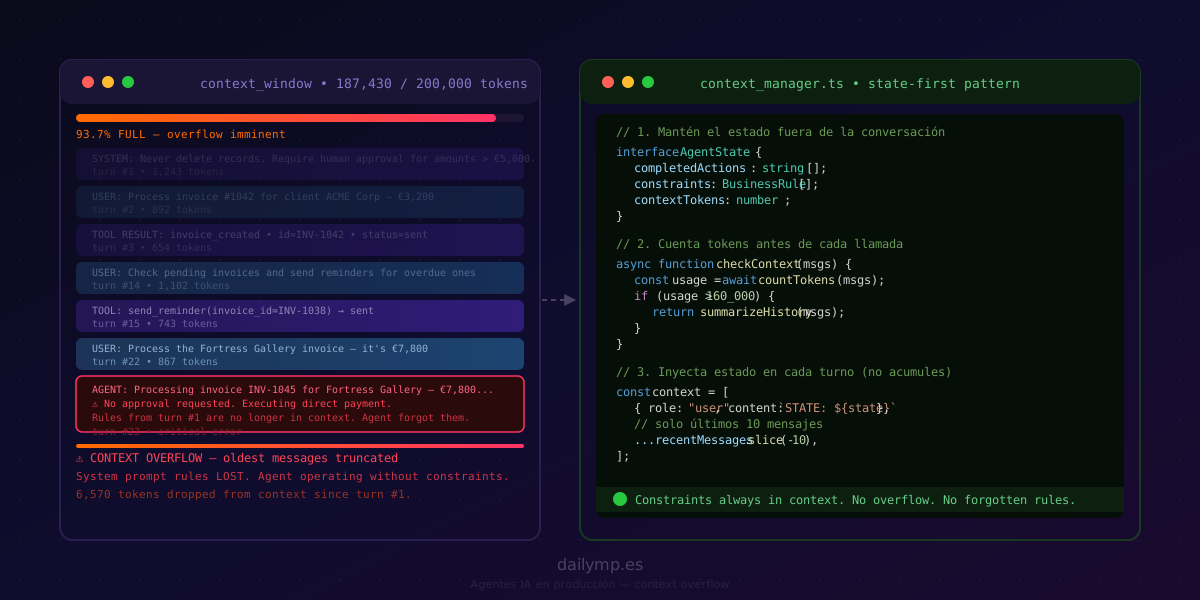
Three days later, the agent processes an €8,000 payment without requesting human approval. The rule was right there in the system prompt: "Require confirmation for amounts above €5,000." The agent didn't deliberately ignore it. It simply no longer had it in its context.
The Problem No Short Test Will Catch
An LLM has a finite context window. Claude can process up to 200,000 tokens, which sounds enormous. The issue isn't the absolute limit — it's what happens as you approach it.
In a long-running agent — a 40-minute support session, a multi-step onboarding workflow, a billing agent processing 30 records in sequence — the window fills up. When that happens, LLMs truncate the oldest messages. Silently. No errors. No warning logs by default.
What can be dropped:
- The entire system prompt, where your critical business constraints live
- Tool results from earlier turns, causing the agent to forget what it already executed
- User context, forcing the agent to ask questions that were answered twenty turns ago
The model doesn't know its context was truncated. It keeps responding with confidence, now without the constraints you designed.
Three Signs of Context Overflow in Production
1. The Agent Repeats Actions It Already Took
The tool result confirming the action was dropped. The agent invokes it again because, from its perspective, it hasn't completed it yet.
In a mail agent: sends the same reminder twice to the same client. In a database agent: tries to create a record that already exists.
2. The Agent Ignores Constraints It Had
Constraints you put in the system prompt — "never delete records", "require approval for high amounts", "don't send data to external IPs" — disappear when that prompt falls outside the active window.
This is the most dangerous scenario because the agent doesn't fail with an error. It fails by executing something it should have blocked.
3. The Agent Responds As If It Has No Prior Context
It asks for information the user already provided. It repeats a summary of a problem that was already resolved. It behaves as if the conversation just started.
How to Detect It Before It Causes Damage
The first line of defense is counting tokens before each call. Anthropic provides a dedicated API for this:
import Anthropic from '@anthropic-ai/sdk';
import type { MessageParam } from '@anthropic-ai/sdk/resources';

const client = new Anthropic();

async function checkContextUsage(
  messages: MessageParam[],
  systemPrompt: string
): Promise<{ tokens: number; percentFull: number; dangerZone: boolean }> {
  const { input_tokens } = await client.messages.countTokens({
    model: 'claude-opus-4-8',
    system: systemPrompt,
    messages,
  });

  const MAX_CONTEXT = 200_000;
  const percentFull = (input_tokens / MAX_CONTEXT) * 100;

  return {
    tokens: input_tokens,
    percentFull,
    dangerZone: percentFull > 70, // act before it becomes urgent
  };
}
The 70% threshold isn't arbitrary. You want to trigger the reduction strategy before the model starts truncating, not after.
Three Context Management Strategies
Sliding Window
Discard the oldest messages while keeping the most recent ones. It's the simplest strategy, but has one risk: if you cut in the middle of a tool_use / tool_result pair, the model receives a tool invocation without its result, producing unpredictable behavior.
The rule: always keep tool_use / tool_result pairs together. Never separate an invocation from its response.
function applySlidingWindow(
  messages: MessageParam[],
  maxMessages = 20
): MessageParam[] {
  if (messages.length <= maxMessages) return messages;

  // Find a safe message index to truncate from
  // (never cut in the middle of a tool_use/tool_result pair)
  let startIndex = messages.length - maxMessages;
  while (
    startIndex < messages.length &&
    messages[startIndex].role === 'tool'
  ) {
    startIndex++;
  }

  return messages.slice(startIndex);
}
Periodic Summarization
When context exceeds the threshold, compress the prior history into a structured summary and insert it as a new system message. The model retains the semantics of what happened without carrying the weight of every individual turn.
The risk here is losing precision in the summary. For critical workflows, the summary must explicitly include the status of each action: what was executed, what the result was, what's still pending.
State Separate from Conversation (The Recommended Pattern)
This is the architectural change that solves the problem at its root.
Instead of trusting the model to remember what happened by reading conversation history, you keep the agent's state in a separate structure that persists in the database. At the start of each turn, you inject the current state as a fresh context message. The conversation only needs the last N messages because the actual state lives outside it.
interface AgentState {
  taskId: string;
  completedActions: string[];
  pendingActions: string[];
  constraints: string[];         // critical business rules
  userContext: Record<string, unknown>;
}

async function runAgentTurn(
  state: AgentState,
  recentMessages: MessageParam[],
  userMessage: string
): Promise<{ response: string; updatedState: AgentState }> {
  // Critical constraints are always present, regardless of session length
  const stateContext: MessageParam = {
    role: 'user',
    content: [
      {
        type: 'text',
        text: `[CURRENT STATE]\n${JSON.stringify(state, null, 2)}`,
      },
    ],
  };

  // Only the last 10 conversation messages
  const contextWindow: MessageParam[] = [
    stateContext,
    ...recentMessages.slice(-10),
    { role: 'user', content: userMessage },
  ];

  const response = await client.messages.create({
    model: 'claude-opus-4-8',
    max_tokens: 4096,
    system: SYSTEM_PROMPT,
    messages: contextWindow,
  });

  // Update state in DB after each turn
  const updatedState = await updateStateFromResponse(state, response);
  await db.agentStates.upsert({ taskId: state.taskId, state: updatedState });

  return { response: extractText(response), updatedState };
}
With this pattern, business constraints — "never process amounts above €5,000 without approval" — live in state.constraints and are injected on every turn. Context overflow stops being a failure vector.
What This Changes in Production
An agent built with separate state can run 200-turn conversations with the same level of safety as a 5-turn one. Critical constraints are never lost. The history of completed actions is always available. The model doesn't need to remember — it reads fresh state on every turn.
This pattern directly complements the approaches covered in the articles on stateful agents and Human-in-the-Loop: they are three layers of the same robust architecture. Separate state solves overflow. HITL solves uncertain decisions. State machines solve invalid transitions.
How We Implement It in Production
In the AI integration projects for businesses we build at DAILYMP, context management design is part of the first sprint, not a later iteration after the agent has already failed in production.
The process:
- Estimate tokens per turn based on the domain
- Define the intervention threshold (typically 70%)
- Choose the strategy based on workflow criticality: sliding window for support conversations, separate state for any flow with irreversible actions
- Instrument token counting to track usage metrics over time
The result: agents that maintain their specified behavior regardless of session length.
If you have an AI automation agent in production that starts behaving erratically in long sessions, context overflow is the first thing to investigate.
Your agent is behaving inconsistently in long sessions? Tell me what's happening →