Structured LLM Extraction: JSON That Fails Silently
Your pipeline has been live for three weeks. Vendor invoice extraction is working: data flows into Supabase, reports generate automatically. This morning the accounting team sends you a message: the totals on 23 records are wrong. You check the logs. No exceptions. Everything shows green.
The problem: the LLM returned "amount_eur": "1847.30" — a string — instead of "amount_eur": 1847.30. Your code called JSON.parse() without type validation. The record was inserted. The aggregated report was wrong. Nobody noticed until someone cross-checked the numbers manually.
This isn't a bug. It's a statistical property of LLMs.
The mistake everyone makes when extracting data with AI
An LLM doesn't "return JSON." It generates text that, in most cases, looks like JSON. That distinction matters in production.
In local development, with ten or twenty test calls, the output is nearly perfect. In production, processing thousands of real-world documents — poorly formatted invoices, contracts with unusual encodings, emails with unexpected line breaks — the model starts making statistically predictable errors:
- Wrong type:
"amount": "1847.30"instead of"amount": 1847.30 - Renamed field:
"invoiceNumber"instead of"invoice_number"based on the input document's formatting - Missing field: the model "forgot" to include
due_datebecause it wasn't clearly visible in that specific document - JSON embedded in prose:
"Here's the extracted data: { ... }"—JSON.parse()throws an exception
None of the first three cases throw an error automatically. The incorrect value enters your system silently. You only discover the fourth when something downstream crashes — but by then the data is already there.
Why JSON.parse() isn't a sufficient defense
The most common pattern I see in new implementations:
// ❌ Brittle pattern — fails in production
const response = await anthropic.messages.create({
  model: "claude-sonnet-4-6",
  messages: [{ role: "user", content: `Extract the invoice data as JSON:\n\n${text}` }],
  max_tokens: 1024,
});
const raw = response.content[0].text;
const data = JSON.parse(raw); // Throws if there's extra text; doesn't validate types
await db.insert(data);        // Writes incorrect data without knowing it
JSON.parse() only checks that the syntax is valid. It doesn't verify that amount_eur is a number and not a string. It doesn't detect that invoice_number is missing. It doesn't warn you that the LLM used camelCase instead of snake_case. Your system accepts the data, persists it, and you discover the error three weeks later.
Three layers for reliable extraction
The solution is built in layers. Each layer catches a different category of error.
Layer 1 — Tool forcing: enforce the schema at the API level
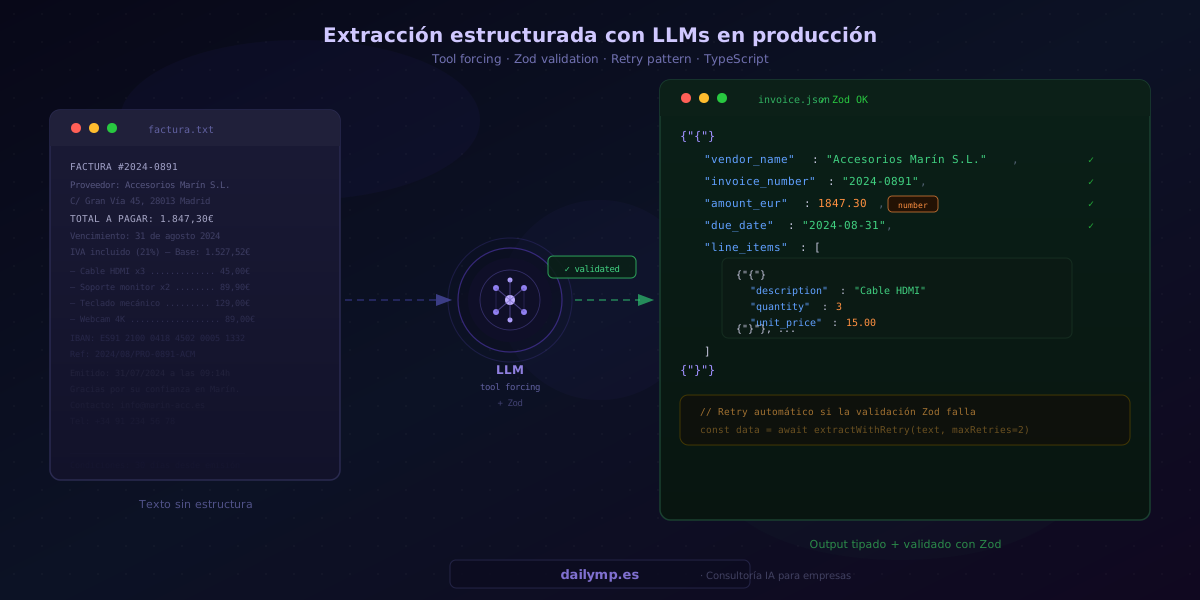
Instead of asking for text and parsing it, define the structure as a tool and force the model to use it. The API guarantees that the output is a valid JSON object following the defined schema — never free-form text.
import Anthropic from "@anthropic-ai/sdk";

const anthropic = new Anthropic();

const extractionTool = {
  name: "extract_invoice",
  description: "Extract structured data from the provided invoice",
  input_schema: {
    type: "object" as const,
    properties: {
      vendor_name:    { type: "string", description: "Vendor company name" },
      invoice_number: { type: "string", description: "Invoice number" },
      amount_eur:     { type: "number", description: "Total amount in EUR (number, not string)" },
      due_date:       { type: "string", description: "Due date ISO YYYY-MM-DD" },
      line_items: {
        type: "array",
        items: {
          type: "object",
          properties: {
            description: { type: "string" },
            quantity:    { type: "number" },
            unit_price:  { type: "number" },
          },
          required: ["description", "quantity", "unit_price"],
        },
      },
    },
    required: ["vendor_name", "invoice_number", "amount_eur"],
  },
};

async function callExtraction(text: string) {
  const response = await anthropic.messages.create({
    model: "claude-sonnet-4-6",
    max_tokens: 1024,
    tools: [extractionTool],
    tool_choice: { type: "tool", name: "extract_invoice" }, // Forces this specific tool
    messages: [{ role: "user", content: `Extract the data:\n\n${text}` }],
  });

  const toolUse = response.content[0];
  if (toolUse.type !== "tool_use") throw new Error("Unexpected model response");
  return toolUse.input; // Guaranteed object, never free text
}
The key parameter is tool_choice: { type: "tool", name: "extract_invoice" }. It forces the model to call exactly that tool — the result is always a structured object, never prose.
Layer 2 — Zod validation: check types and required fields
Tool forcing guarantees the JSON has the right shape, but not that the types are what you expect. Zod adds that layer:
import { z } from "zod";

const InvoiceSchema = z.object({
  vendor_name:    z.string().min(1),
  invoice_number: z.string().min(1),
  amount_eur:     z.number().positive(),
  due_date:       z.string().regex(/^\d{4}-\d{2}-\d{2}$/).optional(),
  line_items: z.array(z.object({
    description: z.string().min(1),
    quantity:    z.number().positive(),
    unit_price:  z.number().positive(),
  })).optional(),
});

type Invoice = z.infer<typeof InvoiceSchema>;

function validate(raw: unknown): Invoice {
  const result = InvoiceSchema.safeParse(raw);
  if (!result.success) {
    throw new ValidationError(result.error.format());
  }
  return result.data;
}
If amount_eur arrives as "1847.30" (string), Zod catches it and throws ValidationError before the data ever reaches the database.
Layer 3 — Retry with feedback: let the model fix its own error
When Zod validation fails, instead of propagating the error, feed it back to the model with context:
async function extractWithRetry(text: string, maxRetries = 2): Promise<Invoice> {
  let lastError: string | null = null;

  for (let attempt = 0; attempt <= maxRetries; attempt++) {
    const userContent = lastError
      ? `Extract invoice data. Previous attempt failed:\n${lastError}\nFix the issues.\n\nInvoice:\n${text}`
      : `Extract invoice data:\n\n${text}`;

    const raw = await callExtraction(userContent);

    try {
      return validate(raw);
    } catch (err) {
      lastError = err instanceof ValidationError
        ? JSON.stringify(err.issues)
        : "Unknown validation error";
    }
  }

  throw new Error(`Extraction failed after ${maxRetries + 1} attempts`);
}
In practice, retries with error feedback resolve more than 95% of validation failures — the model understands exactly which field had the wrong type and corrects it on the next attempt.
When to use structured extraction vs free-form tool calling
These two patterns aren't the same, even though they use the same tools API:
| Use case | Recommended pattern |
|---|---|
| Extract data from a document (invoice, contract, email) | Tool forcing + Zod |
| Classify intent or category from free text | Tool forcing with enum |
| Agent that autonomously decides to call external APIs | Free tool calling + parameter validation |
| Conversational response or explanation | Free text |
| Structured summary at the end of an analysis | Tool forcing for the final block |
The key distinction: in classic tool calling (like we covered in production tool-call validation), the model decides when and how to call a tool. In structured extraction, you force the tool from the outside — the model only has to fill in the fields.
What changes when the pipeline is reliable
When you implement these three layers in an AI integration, the behavior shifts fundamentally: type errors stop reaching the database, validation failures self-correct on retry, and when something genuinely fails (a completely unreadable document, for example), the system throws a clear, traceable error instead of silently writing garbage.
In production data extraction projects — vendor invoices, contracts, customer emails — combining tool forcing, Zod, and error-feedback retries reduces parsing errors to near zero. Not because the LLM becomes more precise, but because the architecture doesn't allow an incorrect output to reach the system.
If you have an AI data extraction pipeline that fails unpredictably — or you're planning to build one — I can tell you in 30 minutes exactly which layer you're missing and how to add it.