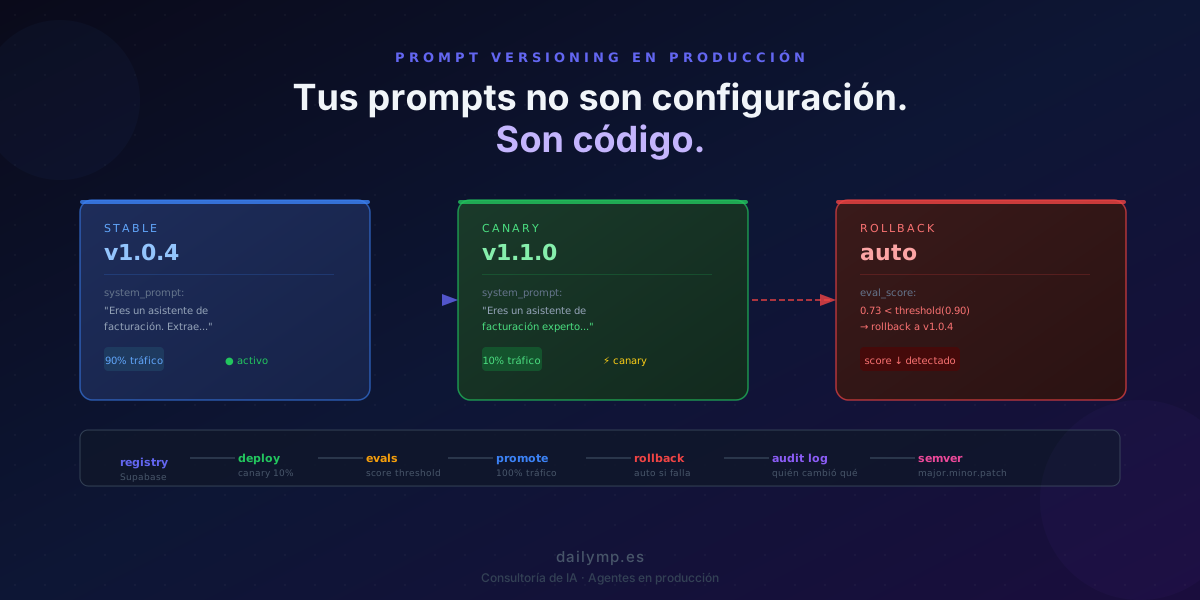
Your AI Prompts Aren't Config. They're Production Code.
Monday afternoon you change three words in the system prompt. "You are a billing assistant" becomes "You are an expert billing assistant." Sounds better. You test ten cases in staging — all pass. You deploy.
Thursday, the accounting team reports 47 invoices misclassified. You check the logs: no exceptions. The code is identical. Only three words changed.
This scenario plays out in 100% of teams that treat their prompts as configuration rather than code.
Why a System Prompt Is Production Code
Deterministic code has a clear contract: same input, same output. If you change parseDate(), tests fail or pass. You see it immediately.
A system prompt is not deterministic. It's an instruction the model interprets, and that interpretation shifts depending on context, the input document, and the exact model version. When you modify a prompt, you're not editing business logic. You're changing the statistical behavior of a system that decides what to do.
Three words of difference can mean the model, faced with an ambiguous document, makes different decisions. Not on the main case you always test — on the 5% of edge cases your clients encounter every week.
Teams that understand this manage their prompts with the same rigor as code: semantic versioning, controlled deployment, automatic rollback, audit log. Teams that don't do reactive hotfixes every time something breaks in production.
The Four Most Common Prompt Management Mistakes
1. The prompt lives in an environment variable or .env file
A .env has no history. You don't know who changed what or when. If something breaks in production, you can't correlate it to a specific prompt change. Prompts need to live in a system with explicit versioning.
2. The production prompt is changed directly
No staging for the prompt. No canary. No prior evals. The change goes live to 100% of traffic immediately. The first signal is a client complaint.
3. No audit log of changes
Who approved the current version? When was it deployed? How does it differ from the previous one? Without this log, debugging a production incident takes hours instead of minutes.
4. Versions aren't semantic
prompt_v2_final_DEFINITIVE is not versioning. v1.3.2 is: major for breaking behavior changes, minor for compatible improvements, patch for minor fixes.
Implementation: a Prompt Registry in TypeScript + Supabase
The most practical solution for mid-sized teams: a Supabase table that acts as a central prompt registry.
-- migration: create prompt_registry table
create table prompt_registry (
  id          uuid primary key default gen_random_uuid(),
  agent_id    text not null,       -- "invoice-extractor", "support-bot"
  version     text not null,       -- semver: "1.3.2"
  content     text not null,       -- the full system prompt
  traffic_pct integer default 100, -- % of traffic receiving this version
  is_active   boolean default false,
  deployed_by text,
  deployed_at timestamptz default now(),
  eval_score  numeric,             -- latest eval score (0–1)
  notes       text
);

create index idx_prompt_registry_active
  on prompt_registry(agent_id, is_active, traffic_pct);
The TypeScript client that loads the correct prompt:
import { createClient } from "@supabase/supabase-js";

const supabase = createClient(
  process.env.SUPABASE_URL!,
  process.env.SUPABASE_SERVICE_KEY!
);

export async function getActivePrompt(agentId: string): Promise<string> {
  const { data, error } = await supabase
    .from("prompt_registry")
    .select("version, content, traffic_pct")
    .eq("agent_id", agentId)
    .eq("is_active", true)
    .order("traffic_pct", { ascending: false });

  if (error || !data?.length) {
    throw new Error(`No active prompt found for agent: ${agentId}`);
  }

  // Two active versions = canary in flight, distribute traffic
  if (data.length === 2) {
    const rand = Math.random() * 100;
    return rand < data[1].traffic_pct
      ? data[1].content  // canary version
      : data[0].content; // stable version
  }

  return data[0].content;
}
This pattern allows two versions to be live simultaneously — stable at 90% traffic, canary at 10% — without any change to the agent's calling code.
Canary Deployment for Prompts
The controlled flow for a prompt change:
1. Create new version in registry (is_active: false)
2. Run evals against golden dataset → score ≥ 0.90
3. Activate with traffic_pct: 10 (canary)
4. Monitor 24h: eval_score, error_rate, latency
5. Score holds → scale to 50% → 100%
6. Score drops → automatic rollback (is_active: false)
The automatic rollback script, integrated in your monitoring job:
import Anthropic from "@anthropic-ai/sdk";

const anthropic = new Anthropic();

async function monitorCanary(agentId: string) {
  const score = await runEvalSuite(agentId, "canary");

  if (score < 0.90) {
    await supabase
      .from("prompt_registry")
      .update({ is_active: false })
      .eq("agent_id", agentId)
      .lt("traffic_pct", 100);

    console.error(
      `[ROLLBACK] ${agentId} canary score ${score} < 0.90 — reverted to stable`
    );
  }
}
This is exactly the kind of infrastructure we set up from day one in DAILYMP's AI agent projects — not as a patch after the first incident.
How This Connects to Your Evals
A prompt registry without evals is a versioning system with no quality criterion: you know what changed but not whether the change was good. If you don't yet have a golden dataset to evaluate your agents in production, start there.
The complete chain looks like:
evals define the quality threshold
→ prompt registry manages versions
→ canary controls exposure
→ automatic rollback if score drops
→ audit log explains what happened
Any missing link makes the system brittle. Many teams have agents running but none of these five in place.
What Separates a Prototype from a Maintainable System
An agent without prompt management is a system that works as long as nobody touches it. Every prompt change is a risk event with no safety net.
With a simple registry, explicit semver, and a 10% canary, every prompt change goes through the same rigor as a code deploy. Rollback takes seconds, not hours. The audit log answers "who changed this and when?" in a single SQL query.
The cost of building this infrastructure on a new project is measured in hours. The cost of adding it after the first serious incident is measured in days of reactive work — plus client trust.
If you have agents in production with uncontrolled prompt changes, we can audit the current state and build the right infrastructure: