Long-Running AI Agents: Async Jobs in Next.js
Your agent processes a 40-page PDF, extracts the relevant data, makes three LLM calls to analyze it, and writes a report to the database. It takes 2 minutes and 50 seconds. Your Vercel function has a 60-second limit.
The user sees a spinner. Then an error. You dig through logs, bump maxDuration to 300, and redeploy. Next week the PDF is 90 pages. The timeout is back.
This is the problem streaming doesn't solve. streamText() works well when the agent generates a long response in real time. It doesn't work when you need five chained LLM calls, wait times between tool executions, and multiple database writes scattered across the workflow.
Why Real AI Agents Break the Synchronous Model
The natural instinct when building an agent is to treat it like a standard API call: the client sends a request, the server processes, the client receives the response. That works for operations that last milliseconds.
AI agents in real-world workflows don't last milliseconds. An agent that processes invoices, drafts contracts, or coordinates sub-agents can easily run 1 to 10 minutes per execution. Three problems appear immediately:
- Serverless timeouts: Vercel Edge Functions cap at 25 seconds; even Pro-tier Serverless Functions hit practical limits as tool calls accumulate.
- Unstable HTTP connections: keeping an HTTP connection open for 3 minutes on a mobile device with inconsistent signal is a gamble you'll eventually lose.
- Stateless retries: if the client doesn't receive a response and retries, the agent runs the same work twice, burns double the tokens, and may write duplicate data.
The fix has existed in the HTTP spec for decades and is used by every API that handles heavy processing: return 202 Accepted and process in the background.
The Pattern: POST → 202 → Job Queue → Polling
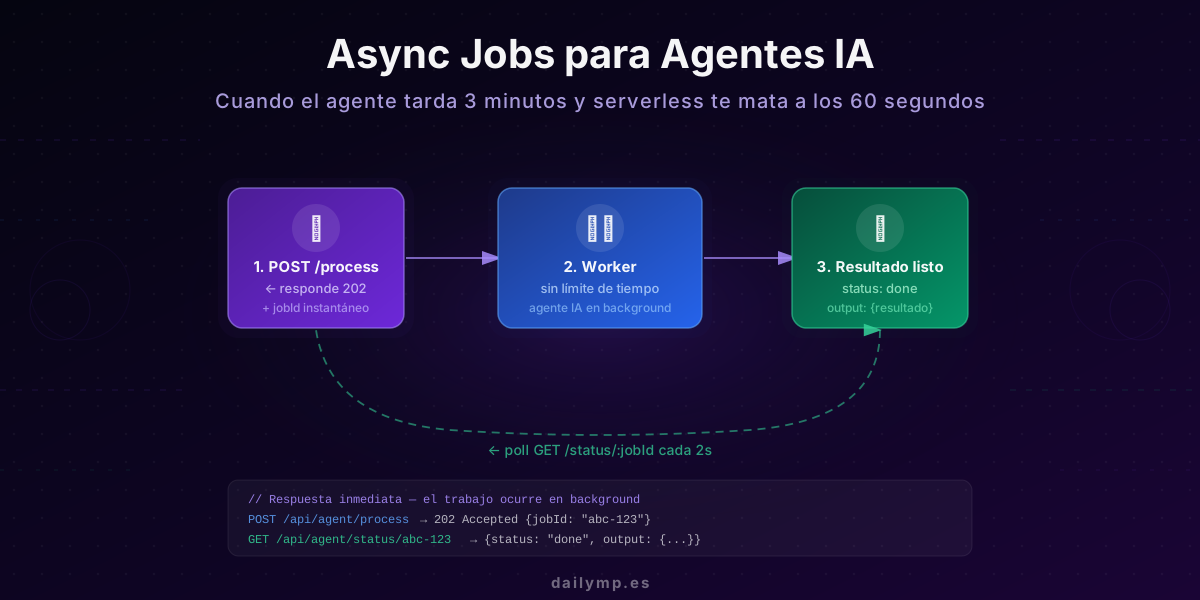
The flow has four steps, each with a single responsibility:
- POST /api/agent/process — the client submits the task. The API creates a record in the database, returns 202 + a
jobIdin under 200ms, and exits. Nothing is processed yet. - Background worker with no time limit — a separate process, outside the HTTP request lifecycle, picks up the job and runs it. It takes as long as it needs.
- GET /api/agent/status/:jobId — the client polls every 2-3 seconds to check the job status.
- Result ready — when the status changes to
done, the client reads the output. If something failed, it reads the error.
This pattern is inherently idempotent: if the client retries the POST for the same input, it gets the same jobId back and reads the result from the first run without triggering a second execution.
Implementation in TypeScript + Next.js + Supabase
The jobs table in Supabase
create table agent_jobs (
  id          uuid        default gen_random_uuid() primary key,
  status      text        default 'pending',   -- pending | processing | done | error
  input       jsonb       not null,
  output      jsonb,
  error       text,
  tenant_id   uuid        references auth.users(id),
  created_at  timestamptz default now(),
  updated_at  timestamptz default now()
);

alter table agent_jobs enable row level security;

create policy "own_jobs"
on agent_jobs for all
using (tenant_id = auth.uid());
The endpoint that creates the job
// app/api/agent/process/route.ts
import { createRouteHandlerClient } from '@supabase/auth-helpers-nextjs';
import { cookies } from 'next/headers';

export async function POST(req: Request) {
  const supabase = createRouteHandlerClient({ cookies });
  const { data: { session } } = await supabase.auth.getSession();
  if (!session) return new Response('Unauthorized', { status: 401 });

  const input = await req.json();

  // Create the job record — don't process anything here
  const { data: job, error } = await supabase
    .from('agent_jobs')
    .insert({ input, tenant_id: session.user.id, status: 'pending' })
    .select('id')
    .single();

  if (error) return Response.json({ error: error.message }, { status: 500 });

  // Fire the worker — don't await this
  await fetch(`${process.env.WORKER_URL}/run`, {
    method: 'POST',
    headers: {
      'Content-Type': 'application/json',
      'Authorization': `Bearer ${process.env.WORKER_SECRET}`
    },
    body: JSON.stringify({ jobId: job.id })
  });

  // 202 Accepted — work is in progress, check back later
  return Response.json({ jobId: job.id }, { status: 202 });
}
This endpoint responds in under 200ms because it doesn't execute any agent logic. The fetch call to trigger the worker is fire-and-forget.
The polling endpoint
// app/api/agent/status/[jobId]/route.ts
import { createRouteHandlerClient } from '@supabase/auth-helpers-nextjs';
import { cookies } from 'next/headers';

export async function GET(
  _req: Request,
  { params }: { params: { jobId: string } }
) {
  const supabase = createRouteHandlerClient({ cookies });
  const { data: { session } } = await supabase.auth.getSession();
  if (!session) return new Response('Unauthorized', { status: 401 });

  const { data: job } = await supabase
    .from('agent_jobs')
    .select('status, output, error, updated_at')
    .eq('id', params.jobId)
    .single();

  if (!job) return new Response('Not found', { status: 404 });
  return Response.json(job);
}
The React hook that drives polling
// hooks/useJobStatus.ts
import { useEffect, useState, useCallback } from 'react';

type JobStatus = 'pending' | 'processing' | 'done' | 'error';

interface JobState {
  status: JobStatus;
  output: unknown;
  error: string | null;
}

export function useJobStatus(jobId: string | null): JobState {
  const [state, setState] = useState<JobState>({
    status: 'pending',
    output: null,
    error: null
  });

  const poll = useCallback(async () => {
    if (!jobId) return false;
    try {
      const res = await fetch(`/api/agent/status/${jobId}`);
      if (!res.ok) return false;
      const job = await res.json();
      setState({ status: job.status, output: job.output, error: job.error });
      return job.status === 'done' || job.status === 'error';
    } catch {
      return false; // unstable network — next tick will retry
    }
  }, [jobId]);

  useEffect(() => {
    if (!jobId) return;

    let cancelled = false;

    const run = async () => {
      while (!cancelled) {
        const finished = await poll();
        if (finished || cancelled) break;
        await new Promise(r => setTimeout(r, 2500));
      }
    };

    run();
    return () => { cancelled = true; };
  }, [jobId, poll]);

  return state;
}
Using a while loop instead of setInterval prevents overlapping requests if the server responds slower than the poll interval.
The worker that runs the agent without time limits
The worker can be a Supabase Edge Function (with extended runtime on their Pro plan), a standalone Node server, a Lambda function, or any process that isn't subject to serverless time limits.
// worker/process-job.ts
import Anthropic from '@anthropic-ai/sdk';
import { createClient } from '@supabase/supabase-js';

const anthropic = new Anthropic();
const supabase = createClient(
  process.env.SUPABASE_URL!,
  process.env.SUPABASE_SERVICE_KEY!  // service key — server-side only
);

export async function processJob(jobId: string): Promise<void> {
  await supabase
    .from('agent_jobs')
    .update({ status: 'processing', updated_at: new Date() })
    .eq('id', jobId);

  try {
    const { data: job } = await supabase
      .from('agent_jobs')
      .select('input')
      .eq('id', jobId)
      .single();

    if (!job) throw new Error('Job not found');

    // Your agent logic here — no time limit enforced
    const result = await runLongRunningAgent(job.input, anthropic);

    await supabase
      .from('agent_jobs')
      .update({ status: 'done', output: result, updated_at: new Date() })
      .eq('id', jobId);

  } catch (err) {
    await supabase
      .from('agent_jobs')
      .update({
        status: 'error',
        error: err instanceof Error ? err.message : 'Unknown error',
        updated_at: new Date()
      })
      .eq('id', jobId);
  }
}
When to Use Async Jobs (and When Not To)
Not every agent needs this pattern. The decision criterion is simple:
Use async jobs when:
- The agent chains more than 2-3 LLM calls sequentially
- Steps depend on slow external APIs (OCR, large-scale embeddings, semantic search over a large corpus)
- The estimated runtime exceeds 30 seconds under real production conditions
- Work can fail mid-execution and you need state to retry from where it left off
Use streaming instead when:
- It's a chat interface where the user expects a real-time response
- The agent makes a single LLM call and the output can be shown progressively
- Watching text appear in real time improves the experience (editing, writing assistance)
The two patterns aren't mutually exclusive. An async job can emit progress updates via SSE while processing, combining durable state with real-time feedback. The job maintains state; the stream delivers progress.
The Cost of Not Building This From the Start
The synchronous pattern doesn't just cause timeouts — it causes duplicate work and inconsistent data. When the client retries because it didn't receive a response in time, the agent runs again from scratch, burns double the tokens, and may write partial or duplicate records to the database.
Retrofitting a job queue onto an already-deployed system has real costs: refactoring endpoints, adding the status table, updating the client to poll, deploying the worker. In a system with eight different agents, that refactor can take days.
Building it into the first agent takes hours. The difference in robustness is the difference between a system a CTO would sign off on in code review and one that would be flagged immediately.
For more complex agents, this pattern pairs well with circuit breakers and retry strategies for the internal worker calls. And if the agent handles data across multiple clients, JWT + RLS isolation ensures each job only accesses its tenant's data.
If you're building an agent with long-running workflows — or if you're already seeing timeouts in production — let's talk before it reaches more users.