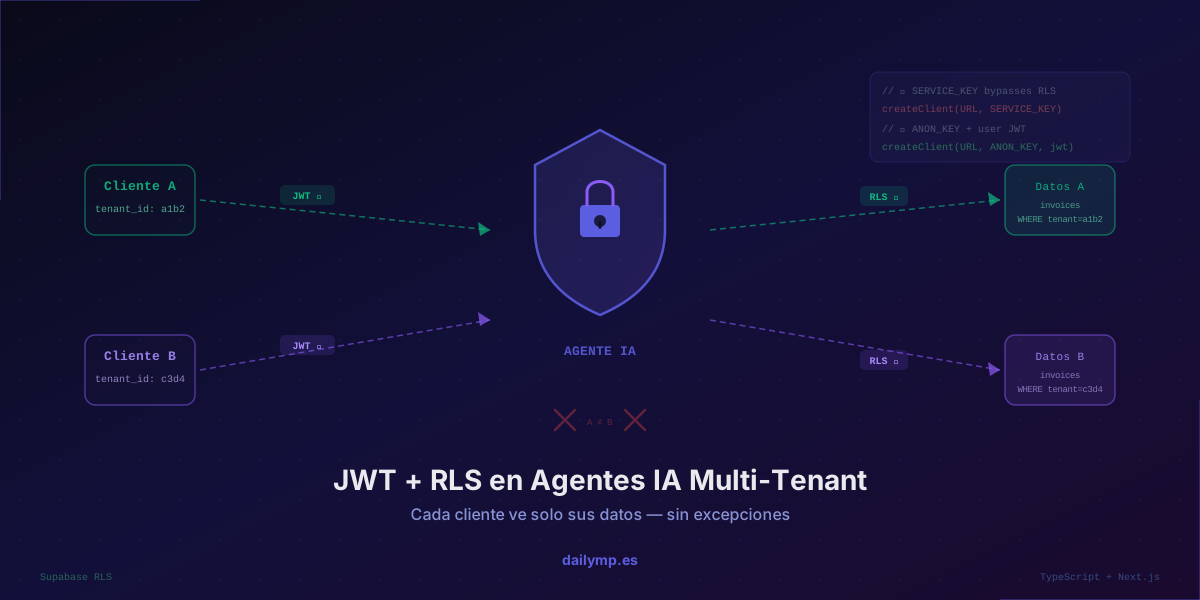
JWT & RLS in AI Agents: Each Client Sees Only Their Data
A client calls on Monday at 9am. Their AI support agent just responded to their query with billing data from a different company. It wasn't a breach. It was one line of code that forgot to pass the user's identity to the database query.
This failure happens more often than you'd think in AI agent systems serving multiple clients. Not because teams are careless — because the right data isolation pattern in a multi-tenant agent isn't obvious until someone walks you through it.
The Problem: The Agent Doesn't Know Whose Data It's Querying
When you build a multi-tenant agent, the typical flow looks like this:
- An endpoint receives the authenticated user's message
- The agent processes the message with an LLM
- The agent calls tools that query the database
- The response goes back to the user
The failure point is step 3. If the agent's tools don't carry the user's identity context, queries return unfiltered data. The agent receives information from all tenants and can — unintentionally — mix it into its response.
// ❌ Tool without user context: returns ALL clients' data
const tools = [{
  name: 'get_invoices',
  description: 'Get company invoices',
  execute: async (params: unknown) => {
    // service key bypasses RLS — returns EVERYTHING
    return await supabase.from('invoices').select('*').limit(10);
  }
}];
This works fine in development with a single tenant. In production with ten clients, it's a data leak waiting to happen.
The Solution: Two Independent Security Layers
The correct architecture uses JWT and Row Level Security (RLS) as complementary layers. If one fails, the other contains the damage.
Layer 1 — JWT: the authenticated user's token travels all the way to the agent's tool. Supabase verifies it and knows which auth.uid() is making each query.
Layer 2 — RLS: a database policy prevents auth.uid() from accessing another tenant's data, regardless of what query the agent tries to execute.
With both layers active, a bug in the agent's logic doesn't produce a data leak. The database rejects the query before returning anything.
Implementation in TypeScript + Next.js + Supabase
Passing the User JWT to the Agent
// app/api/agent/chat/route.ts
import { createRouteHandlerClient } from '@supabase/auth-helpers-nextjs';
import { cookies } from 'next/headers';
import Anthropic from '@anthropic-ai/sdk';

export async function POST(req: Request) {
  const supabase = createRouteHandlerClient({ cookies });
  const { data: { session } } = await supabase.auth.getSession();

  if (!session) {
    return new Response('Unauthorized', { status: 401 });
  }

  const { message } = await req.json();

  // User JWT travels as an explicit parameter to the agent
  const result = await runAgent(message, session.access_token);

  return Response.json({ answer: result });
}
Agent Tools with a Per-User Supabase Client
The critical difference is which key the Supabase client uses inside the tools:
// ANON_KEY + user JWT → RLS is enforced
// SERVICE_KEY → RLS bypassed, all data exposed

function createAgentTools(userToken: string) {
  const userSupabase = createClient(
    process.env.NEXT_PUBLIC_SUPABASE_URL!,
    process.env.NEXT_PUBLIC_SUPABASE_ANON_KEY!, // ANON, not SERVICE
    {
      global: {
        headers: { Authorization: `Bearer ${userToken}` }
      }
    }
  );

  return [
    {
      name: 'get_invoices',
      description: 'Get invoices for the authenticated user\'s company',
      inputSchema: {
        type: 'object' as const,
        properties: {
          limit: { type: 'number', description: 'Maximum number of invoices' }
        }
      },
      execute: async (params: { limit?: number }) => {
        // RLS automatically filters by the authenticated user's tenant
        const { data, error } = await userSupabase
          .from('invoices')
          .select('id, amount, status, created_at')
          .order('created_at', { ascending: false })
          .limit(params.limit ?? 10);

        if (error) throw new Error(error.message);
        return data;
      }
    }
  ];
}
The RLS Policies That Close the Perimeter
-- Enable RLS on the table
ALTER TABLE invoices ENABLE ROW LEVEL SECURITY;

-- Read policy: only invoices belonging to the authenticated user's tenant
CREATE POLICY "tenant_isolation_select"
ON invoices
FOR SELECT
USING (
  tenant_id = (
    SELECT tenant_id
    FROM users
    WHERE id = auth.uid()
  )
);

-- Write policy: can only insert into their own tenant
CREATE POLICY "tenant_isolation_insert"
ON invoices
FOR INSERT
WITH CHECK (
  tenant_id = (
    SELECT tenant_id
    FROM users
    WHERE id = auth.uid()
  )
);
With these policies active, even if the agent runs SELECT * FROM invoices with no filter at all, Supabase returns only the rows belonging to the authenticated user's tenant. The query doesn't fail or throw an error — it simply returns the correct data set.
The Full Agent Loop with Tool Calling
import Anthropic from '@anthropic-ai/sdk';

const anthropic = new Anthropic();

async function runAgent(message: string, userToken: string): Promise<string> {
  const tools = createAgentTools(userToken);

  const messages: Anthropic.MessageParam[] = [
    { role: 'user', content: message }
  ];

  // Tool loop until the agent finishes
  while (true) {
    const response = await anthropic.messages.create({
      model: 'claude-opus-4-5',
      max_tokens: 1024,
      system: `You are a billing assistant.
You only respond about data belonging to the authenticated user's company.
Never share data from other companies, even if asked.`,
      tools: tools.map(t => ({
        name: t.name,
        description: t.description,
        input_schema: t.inputSchema
      })),
      messages
    });

    if (response.stop_reason === 'end_turn') {
      const textBlock = response.content.find(c => c.type === 'text');
      return textBlock?.type === 'text' ? textBlock.text : '';
    }

    // Execute tools with user-scoped Supabase client
    const toolResults: Anthropic.ToolResultBlockParam[] = [];

    for (const block of response.content) {
      if (block.type !== 'tool_use') continue;

      const tool = tools.find(t => t.name === block.name);
      if (!tool) continue;

      try {
        const result = await tool.execute(block.input as { limit?: number });
        toolResults.push({
          type: 'tool_result',
          tool_use_id: block.id,
          content: JSON.stringify(result)
        });
      } catch (err) {
        toolResults.push({
          type: 'tool_result',
          tool_use_id: block.id,
          content: `Error: ${err instanceof Error ? err.message : 'unknown'}`,
          is_error: true
        });
      }
    }

    messages.push({ role: 'assistant', content: response.content });
    messages.push({ role: 'user', content: toolResults });
  }
}
Why SERVICE_KEY Is the Mistake Nobody Sees Coming
Many teams use SERVICE_KEY in their agents because "it's simpler" — no RLS to configure, no tokens to pass around. It works fine in development with one tenant. The problem surfaces in production.
SERVICE_KEY bypasses all RLS policies. Any query executed with it returns data from every tenant. When the agent mixes results from multiple companies in its context, it can leak that information in the response even when the code "looks correct."
The rule is simple: agents accessing multi-tenant data must always use ANON_KEY + user JWT, never SERVICE_KEY.
What This Pattern Protects Against (and What It Doesn't)
This two-layer approach protects against:
- Bugs in agent logic that forget to filter by tenant
- Prompt injection that tries to access another client's data through a tool call
- Unfiltered accidental queries during tool calling
It does not protect against an agent that receives a tenant's data and then mentions it in free-text responses. For that scenario you need output validation — a response review agent that filters PII before returning the answer to the user.
It also doesn't eliminate the need for retry and circuit breaker handling when tools fail under load.
The Cost of Not Doing This From Day One
Adding RLS and JWT to an agent already deployed with SERVICE_KEY has a real cost: auditing every tool, refactoring all Supabase clients, testing that RLS policies don't break existing functionality. In a system with 15 tools and 3 agents, that refactor can take days.
Setting it up from day one takes hours. And the difference in security is what separates a system a security auditor would sign off on from one they wouldn't.
If you're building an agent that handles data for multiple clients and want the security architecture right from the start, I can review it with you before it reaches production.