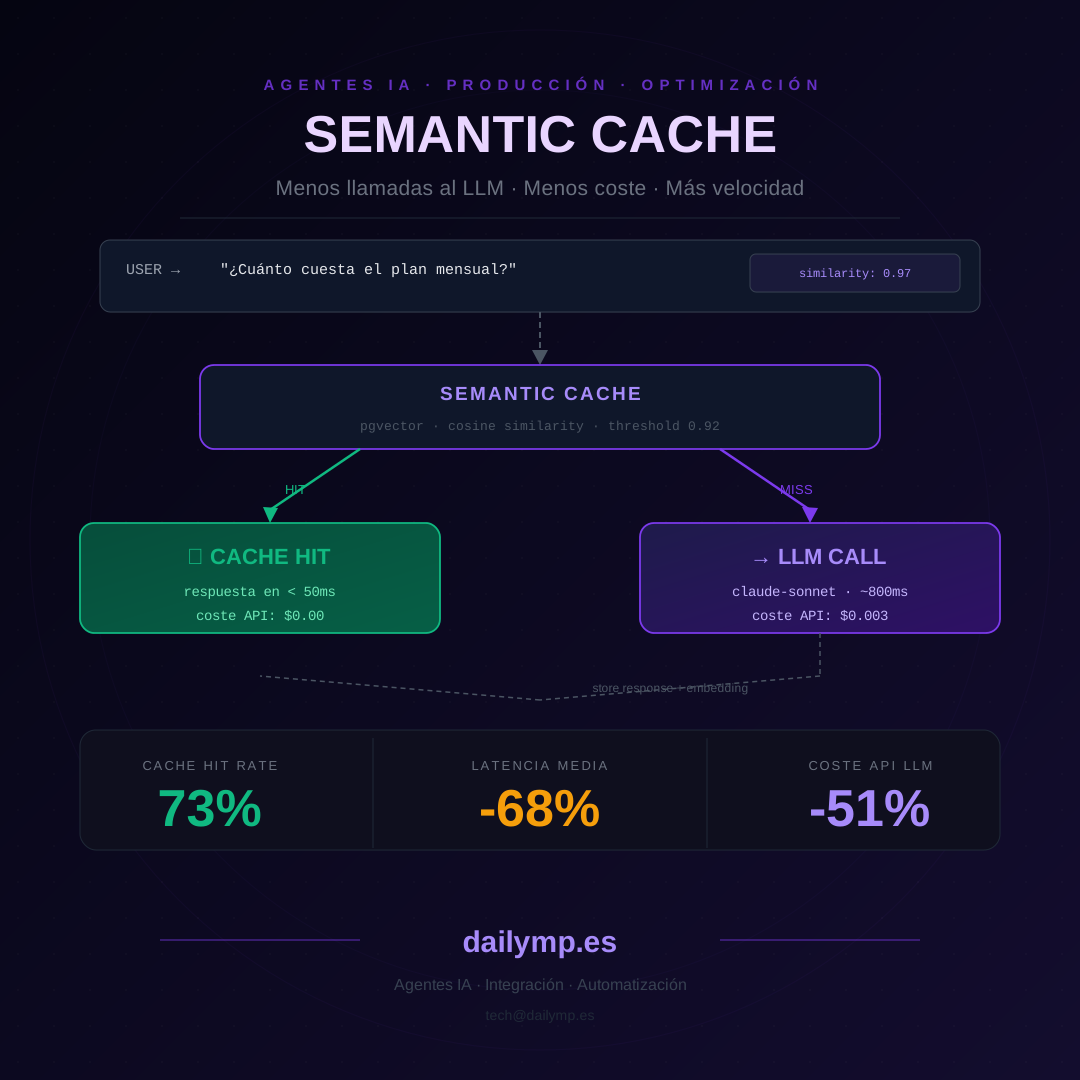
Semantic Cache for AI Agents: Cut LLM Costs by 50%
You have a customer-facing agent. Every month, 35% of incoming questions are variations of the same thing:
"How much does it cost?", "What's the price?", "Do you have monthly plans?", "What are your pricing tiers?", "Does the price include tax?"
They're the same question. Phrased five different ways. And your agent makes five separate LLM calls, paying for each one.
Exact-match caching doesn't help here. Traditional caches look for exact string matches. "How much does it cost?" and "What's the price?" are completely different strings — no hit possible.
The solution is a semantic cache: instead of comparing text, you compare meaning.
Why Recurring Questions Eat Half Your LLM Budget
A production AI agent with 500 daily users can have 40–70% of its questions in high-recurrence zones — questions about pricing, hours, policies, product functionality. Different in form, identical in intent.
Each call to a high-end model costs between $0.003 and $0.015 depending on token volume. Seems small. But with 350 recurring questions per day, you're paying between $1 and $5 daily for answers you already have.
Per month: up to $150 you could eliminate almost entirely.
And that's not counting latency. An LLM call takes 600ms to 2 seconds. A cached response takes less than 50ms. Users notice the difference on every interaction.
How Semantic Cache Works
Instead of storing the question as text and searching for exact matches, you store its embedding — a vector representation of meaning — and compare by cosine similarity.
Full flow:
- User question arrives
- Calculate the question's embedding (one cheap call to an embeddings model)
- Search the vector cache for any entry with similarity > 0.92 (configurable threshold)
- Cache hit: return the cached response in < 50ms, zero LLM cost
- Cache miss: call the LLM, store the response in cache with its embedding
The threshold is the key. At 0.92, you capture variations of the same concept without confusing semantically distinct questions.
Implementation with TypeScript, Supabase and pgvector
First, the schema in Supabase with the vector extension:
create extension if not exists vector;

create table semantic_cache (
  id uuid primary key default gen_random_uuid(),
  agent_id text not null,
  question text not null,
  response text not null,
  embedding vector(1536),
  created_at timestamptz default now()
);

-- Index for cosine similarity search
create index on semantic_cache
  using ivfflat (embedding vector_cosine_ops)
  with (lists = 100);

-- Similarity search function
create function match_cache_entries(
  query_embedding vector(1536),
  match_threshold float,
  match_count int,
  p_agent_id text
) returns table (id uuid, question text, response text, similarity float)
language sql stable as $$
  select id, question, response,
    1 - (embedding <=> query_embedding) as similarity
  from semantic_cache
  where 1 - (embedding <=> query_embedding) > match_threshold
    and agent_id = p_agent_id
  order by embedding <=> query_embedding
  limit match_count;
$$;
And the TypeScript implementation using the Vercel AI SDK:
import { embed } from 'ai'
import { openai } from '@ai-sdk/openai'
import { createClient } from '@supabase/supabase-js'
import Anthropic from '@anthropic-ai/sdk'

const supabase = createClient(
  process.env.SUPABASE_URL!,
  process.env.SUPABASE_SERVICE_KEY!
)
const anthropic = new Anthropic()
const SIMILARITY_THRESHOLD = 0.92

async function getEmbedding(text: string): Promise<number[]> {
  const { embedding } = await embed({
    model: openai.embedding('text-embedding-3-small'),
    value: text,
  })
  return embedding
}

export async function agentWithSemanticCache(
  question: string,
  agentId: string,
  systemPrompt: string
): Promise<{ response: string; cacheHit: boolean }> {

  // 1. Embed the incoming question
  const embedding = await getEmbedding(question)

  // 2. Search semantic cache
  const { data: cacheResult } = await supabase.rpc('match_cache_entries', {
    query_embedding: embedding,
    match_threshold: SIMILARITY_THRESHOLD,
    match_count: 1,
    p_agent_id: agentId,
  })

  if (cacheResult && cacheResult.length > 0) {
    return { response: cacheResult[0].response, cacheHit: true }
  }

  // 3. Cache miss: call the LLM
  const result = await anthropic.messages.create({
    model: 'claude-sonnet-5-20260101',
    max_tokens: 1024,
    system: systemPrompt,
    messages: [{ role: 'user', content: question }],
  })

  const response =
    result.content[0].type === 'text' ? result.content[0].text : ''

  // 4. Store in cache for future queries
  await supabase.from('semantic_cache').insert({
    agent_id: agentId,
    question,
    response,
    embedding,
  })

  return { response, cacheHit: false }
}
Embedding cost with text-embedding-3-small is approximately 50× lower than a Claude call. Worth calculating even on every question.
What to Cache and What Not To
Not all questions benefit equally from semantic cache. The practical rule:
Cache:
- Questions about product, pricing, or company policy
- General system functionality questions
- FAQs with fixed answers or answers that rarely change
Skip the cache:
- Questions depending on the user's context (balance, order history, status)
- Questions containing personal data or unique identifiers
- Questions where the answer changes in real time
For questions that shouldn't be cached, add a detection layer before the cache lookup:
function shouldSkipCache(question: string): boolean {
  const skipPatterns = [
    /my\s+(account|order|invoice|balance)/i,
    /\b\d{5,}\b/, // reference or order numbers
    /when\s+does\s+my/i,
  ]
  return skipPatterns.some(p => p.test(question))
}
A poorly-applied cache — serving generic answers to questions that need user-specific data — generates incorrect responses that frustrate users more than latency does.
When It's Worth Implementing
Semantic cache starts paying off when you have more than 200 daily questions to your agent with a recurrence rate above 30%.
Below that, the maintenance overhead (embedding costs, infrastructure complexity) doesn't justify the savings.
In the AI integration projects we build at DAILYMP, we implement semantic cache in the optimization phase — after the agent is live and we have real usage patterns. Adding it on day one without knowing your question distribution is premature optimization.
If you already have a production agent and API costs are starting to matter, this pattern typically reduces them by 40–70% without changing the agent's behavior for users.
Metrics to Monitor
Once in production, track:
- Cache hit rate: percentage of questions answered from cache. Target: > 40% in high-FAQ-volume agents
- Average similarity score: the mean similarity of cache hits. If it's close to your threshold (< 0.94), consider raising it to avoid incorrect responses
- Cache entry age distribution: how "fresh" your cache is. Entries older than 30 days should be reviewed if product details or pricing have changed
Log hits and misses in Supabase — with agentId and timestamp — and you'll have the data to tune the threshold week by week.
If you want to see how this would apply to your agent and estimate the real savings before building it, I can run the calculation in 30 minutes with your actual usage data.