What an AI Agent Does in Your Business (No Code)
Imagine you hire someone tomorrow.
They need no training. They never get sick. They never ask for vacation. They never make the same mistake twice. They work while you sleep, while you're in a meeting, while you're finally taking a few days off.
That's an AI agent. Nothing more, nothing less.
Before you close this tab thinking "that's for big corporations" or "that requires a lot of code" — let me tell you exactly what one of these agents does in a business like yours.
What Is an AI Agent, Explained Plainly?
An AI agent is software that receives information, makes decisions, and executes actions. On its own. Without anyone pressing a button.
It's not the chatbot from three years ago that answered "what are your opening hours?" with a dropdown menu. That's ancient history.
A modern AI agent can:
- Read an incoming email
- Understand what it's about and how urgent it is
- File it in the right category
- Reply if the answer is standard
- Create a follow-up task if needed
- Alert the right person if it's genuinely urgent
All of that without anyone clicking anything. In under 30 seconds from when the message arrives.
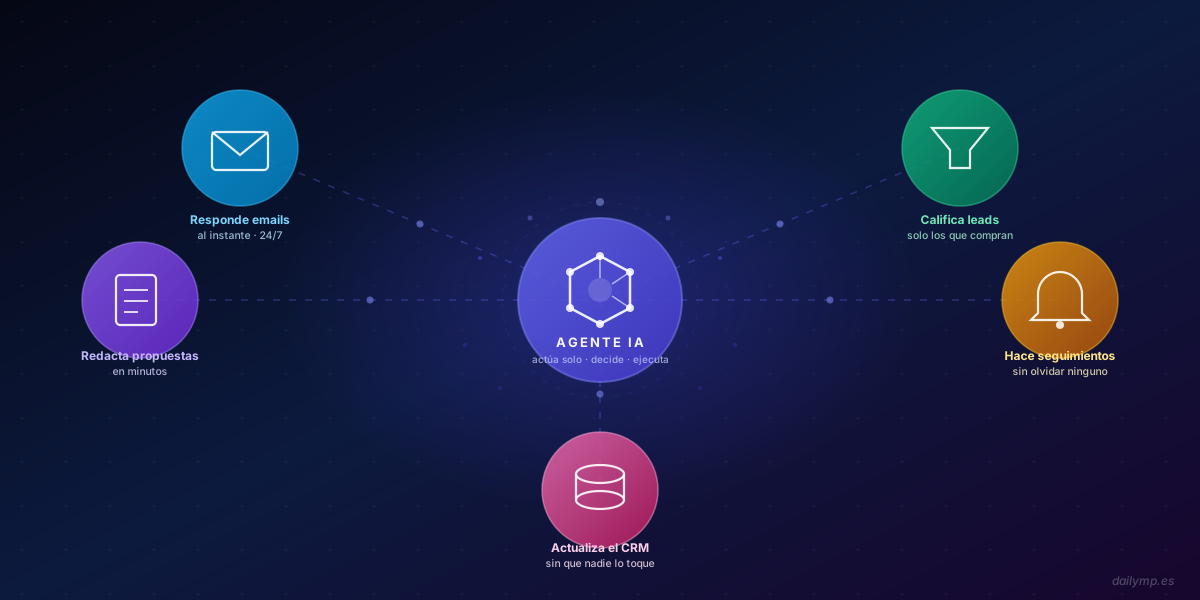
And that's just one of five common use cases.
What the Agent Does in Your Business, Day to Day
This isn't theory. These are the five processes I implement most often with companies between 10 and 50 employees.
1. Replies to First Messages from Potential Clients
When someone fills out your contact form or reaches out for the first time, the agent replies instantly. Not tomorrow. Not "when someone sees it." Right then.
The reply isn't generic: it's personalised based on what the person wrote, includes the basic information they need, and keeps the conversation open for the next step.
Why it matters: 78% of customers end up buying from the provider that replies first. If your competitor responds in five minutes and you take three hours, you already know how that ends.
2. Qualifies Leads Before They Reach Your Team
Not every contact is worth the same. An agent can ask the right questions, analyse the answers, and tell you whether that contact fits your ideal customer profile — before your team spends a single minute on them.
Qualified leads go straight to sales. Those that don't fit get an honest reply from the agent itself. Your team only talks to people who can actually buy.
3. Drafts Proposals and Quotes
For services or products with known parameters, the agent gathers the necessary information, processes it, and generates a first draft ready to review and send.
What used to take 40 minutes now takes 5. And it happens even at 11 pm when no one's in the office.
4. Does the Follow-Ups Nobody Does
"I was going to write to them but forgot."
That sentence costs sales. The agent forgets nothing.
Three days after a meeting: automatic follow-up. Seven days without a reply: second contact. Fourteen days: a polite close. The agent manages the schedule. Your team only hears about it when someone replies.
5. Updates the CRM Without Anyone Touching It
Every interaction gets recorded. Every client status updated. Without anyone opening the CRM manually, copying and pasting, or remembering to do it.
If you use HubSpot, Notion, Airtable, or almost any other tool, the agent connects and writes directly there. As if you had someone whose only job was to keep everything organised.
Why Now and Not in Six Months
Two arguments come up every time someone doesn't take the step:
"It's not the right moment" and "I want to stabilise other things first".
Both are understandable. But both ignore something important: the cost of not automating isn't zero. It's your team's time spent on repetitive tasks, leads that go cold, proposals that arrive too late, mistakes that repeat week after week.
Every month you wait is a month the business down the street — the one that already implemented this — is pulling ahead.
If you want to see the hard numbers on what waiting costs, the math isn't pretty, but it's honest.
What Changes Once You Have an Agent Running
The companies I work with typically recover between 8 and 15 hours per week in the first few weeks.
Not because the agent performs magic, but because the time previously spent on the following simply disappears:
- Responding to "urgent" messages that could have waited
- Manually sorting emails
- Remembering to send follow-ups
- Copying data from one system to another
- Looking for information that should already be organised
That time goes back to the team. To do what only humans can do: think, decide, build relationships, create.
Real Results
We work with companies in very different sectors — logistics, consulting, local services, marketing agencies — and the pattern is always the same: the first month feels small, but by month three no one wants to go back.
Start With One Process, Not Everything at Once
You don't need to automate the whole company at once.
What I do with every client is find the process that hurts most today: the one consuming the most time, generating the most errors, or costing the most money. We start there.
Within three to four weeks, that process runs on its own. Then we move to the next one.
If you want to see what kind of agents I can implement in your business, you can start with the AI Agents & Automation page or explore how this fits your current stack at AI Integration.
Or if you'd rather skip straight to the point and tell me how your business works: