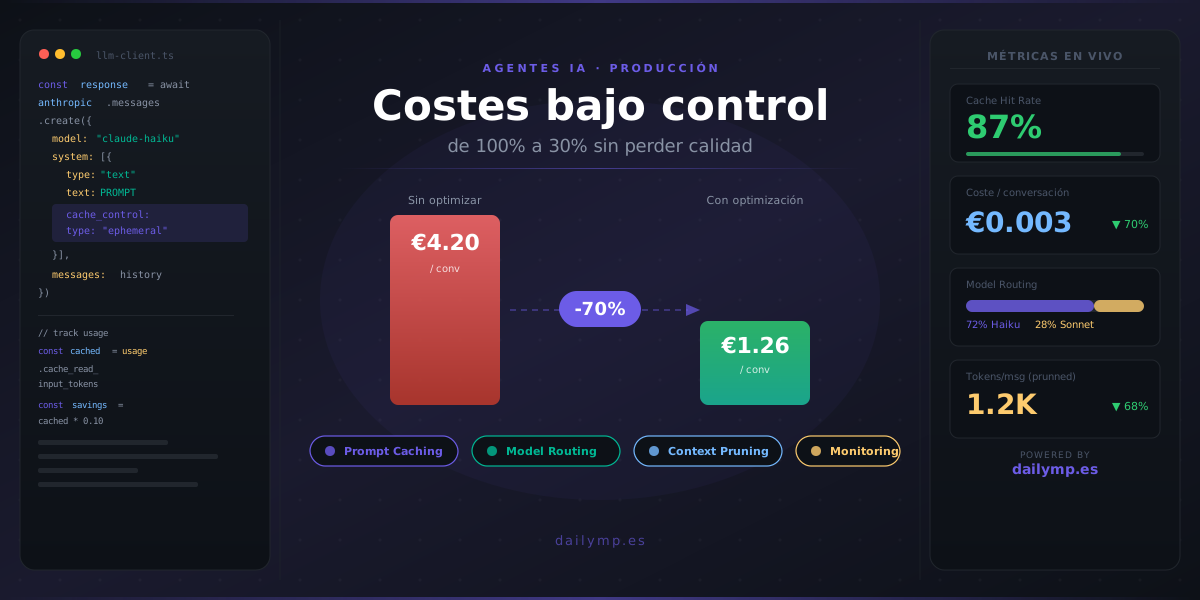
AI Agents in Production: How Not to Go Broke on API Costs
You built the agent. It works in staging. You deploy it to 200 users. A month later you look at the API bill and there's a number you weren't expecting.
That's when every CTO asks the question they should have asked earlier: how much does this agent actually cost in production?
It's not a stack problem. It's not an architecture problem. It's a scale-times-cost-per-call problem with no control mechanism in place. In this article I'll walk you through the four patterns we use in production to cut AI agent costs by 40–70% without degrading response quality.
Why AI Agent Costs Scale Differently From Classic Software
An AI agent isn't like a REST API. A classic API has a fixed cost per operation. An agent has a cost that depends on how many tokens it processes — and that depends on the system prompt, accumulated conversation history, tool definitions, tool call results, and response length.
If you have an agent with a 2,000-token system prompt, a 5-turn conversation history and 4 tool definitions, each call starts with over 5,000 input tokens before the user types anything. With 200 active users and 10 messages per session, that's 10 million input tokens per day. Just overhead.
The problem isn't that AI is expensive. The problem is that scaling without context control multiplies costs exponentially.
Technique 1: Prompt Caching
Anthropic added prompt caching to the Claude API in 2024. It's the highest-impact technique available: it can reduce input costs by up to 90% for cached tokens.
The idea: you mark static parts of your prompt with cache_control: { type: "ephemeral" }. If the next call has the same cached prefix, Claude doesn't reprocess those tokens — it serves them from cache. You only pay for processing the tokens that change: the user message and the most recent exchanges.
const response = await anthropic.messages.create({
  model: "claude-sonnet-5",
  max_tokens: 1024,
  system: [
    {
      type: "text",
      text: STATIC_SYSTEM_PROMPT, // 2,000 tokens that never change
      cache_control: { type: "ephemeral" }
    }
  ],
  messages: [
    ...conversationHistory,
    { role: "user", content: userMessage }
  ]
});
When to use it: when you have a long, static system prompt — instructions, personality, company context — that repeats on every call. Tool definitions are also strong candidates.
Real savings: with a 3,000-token system prompt and 10,000 daily calls, switching from processing to caching those tokens can save €200–€400/month depending on the model.
Technique 2: Model Routing
Not all tasks inside an agent require the same level of reasoning. Using the most expensive model for everything is the most common mistake when scaling.
The model routing pattern works like this: you classify task complexity before selecting the model.
async function routeToModel(task: string): Promise<string> {
  // Classify with the cheapest, fastest model first
  const classification = await anthropic.messages.create({
    model: "claude-haiku-4-5-20251001",
    max_tokens: 20,
    messages: [{
      role: "user",
      content: `Classify this task as SIMPLE or COMPLEX. Reply with one word only.\nTask: ${task}`
    }]
  });

  const complexity = classification.content[0].text.trim();

  return complexity === "SIMPLE"
    ? "claude-haiku-4-5-20251001"  // cheap, fast
    : "claude-sonnet-5";            // more capable, more expensive
}
SIMPLE tasks: short answers, structured data extraction, classification, brief summaries, validations.
COMPLEX tasks: multi-step reasoning, long document analysis, complex code generation, decisions with multiple variables.
With proper model routing, 60–80% of calls in a sales or support agent can be handled by the cheapest model.
Technique 3: Context Pruning
Conversation history is the biggest token drain in agents with memory. Without control, each turn adds tokens to the next context. In long conversations, 70% of the tokens you send are history the model probably doesn't need to answer the current question.
Three strategies, ordered from simplest to most sophisticated:
Sliding window: keep only the last N messages in context. Simple but effective for support chats where each question is relatively independent.
function pruneHistory(messages: Message[], maxTurns = 10): Message[] {
  if (messages.length <= maxTurns * 2) return messages;
  return messages.slice(-maxTurns * 2);
}
Compressed summary: instead of truncating, compress older messages into a summary paragraph. The agent maintains long-term coherence at much lower cost.
Entity extraction: instead of full history, extract and update a JSON object with the relevant data — user name, reported issue, steps already taken. This is the approach we use in the AI integration systems we build for clients in production.
Technique 4: Monitor Cost Per Conversation From Day One
Without visibility into cost per conversation, you won't know you have a problem until the bill arrives. Three metrics to track from the first deployment:
- Input tokens per message: if it grows week over week without real usage growth, the context is expanding without your knowing
- Cache hit rate: if you have prompt caching and hit rate drops below 70%, something in your "static" prompt is changing between calls without your noticing
- Cost per completed conversation: divide total cost by conversations that reached resolution — this is the only number that tells you if the agent is economically viable
interface LLMCallMetrics {
  inputTokens: number;
  outputTokens: number;
  cachedTokens: number;
  model: string;
  conversationId: string;
}

function trackUsage(response: Anthropic.Message, meta: Partial<LLMCallMetrics>) {
  const metrics: LLMCallMetrics = {
    inputTokens: response.usage.input_tokens,
    outputTokens: response.usage.output_tokens,
    cachedTokens: response.usage.cache_read_input_tokens ?? 0,
    model: response.model,
    conversationId: meta.conversationId!,
  };
  // → send to Datadog, Grafana, PostHog, whatever you already have
}
The Silent Mistake Nobody Sees Until It's Already Expensive
The most common pattern we find when auditing client agents: a system prompt that grows week after week because the team keeps adding instructions to fix edge-case behaviors, without removing the ones that no longer apply.
Six months in, the system prompt goes from 500 tokens to 6,000. The agent doesn't improve proportionally. The cost does.
Before implementing caching or routing, audit the system prompt. Remove redundant instructions, consolidate similar rules, and test that behavior holds with half the tokens. This is the highest-ROI optimization available and requires zero production code changes.
If you're scaling an AI agent and costs are starting to worry you — or if you want to put these patterns in place before the problem shows up — let's talk.