Your Quotes Have the Wrong Price. Check Your Spreadsheet.
Last week, one of your salespeople closed a deal. Good client, signed quickly, everything looked great. Three weeks later, while generating the invoice, someone on the team asks the question that ruins your afternoon: "Wait — which price list did you use for that quote?"
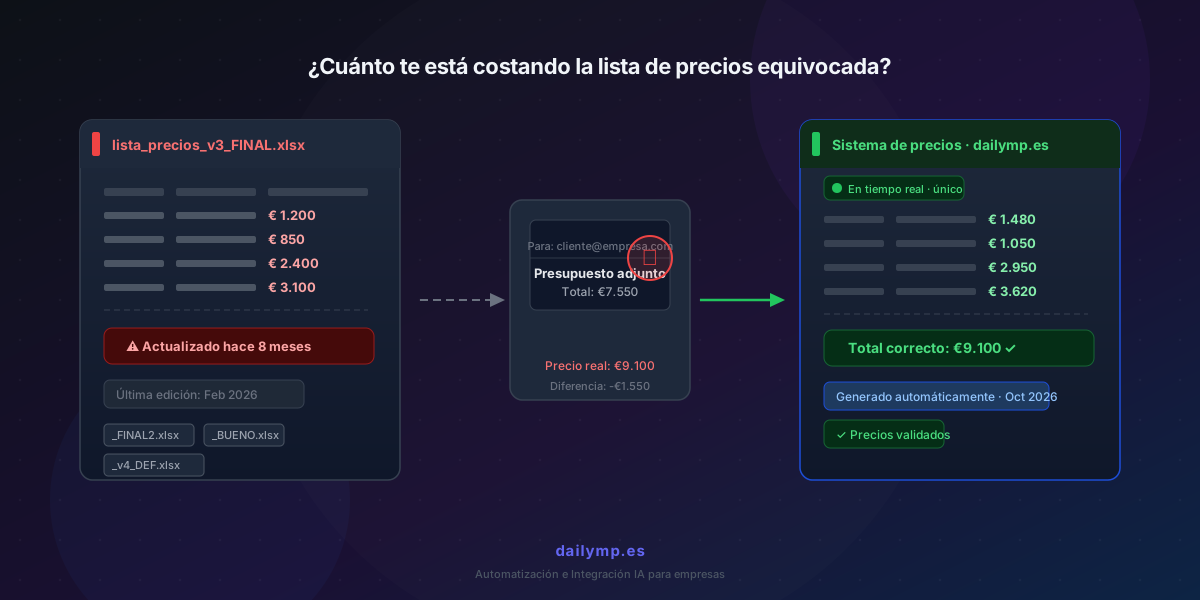
The file has a date stamp from February. Prices went up in April.
It's not the first time. And if you have more than two people sending quotes, it's probably happening more often than you realize.
The real problem isn't the price. It's the version.
In most small businesses with a sales team, the price list lives in a spreadsheet. It sits on the server, in a shared drive, or directly on each salesperson's desktop — downloaded at some point and never updated since.
When prices change, someone updates the master file. Sends the new version to the team. Half receive it. The other half keep using the old one. One renames it prices_FINAL_ok_2026.xlsx. Another works from prices_good_this_one.xlsx that a colleague forwarded in a December meeting.
The result: five people sending quotes, five different price versions in circulation at the same time.
You don't see it because nobody flags when a quote goes out with incorrect prices. The client accepts it — of course they do, it's cheaper — and the problem surfaces weeks later, once it's too late to fix.
What that gap actually costs you
Do the cold math. If your business sends 20 quotes per month and 15% carry prices from more than three months ago:
- 3 incorrect quotes per month
- With an average gap of 8% from current rates (cost increases, inflation, rate adjustments)
- At an average deal size of €4,000, that's €960 in lost margin every month
And that's the best case — when the client accepts and doesn't notice. There are two worse scenarios:
The client negotiates down from an already-wrong price. If your baseline is already outdated, any discount you give in negotiation compounds on top of that. You're losing twice.
The client compares with a competitor. If your quote is 10% below market, some clients get suspicious. They ask questions. They hesitate. Or they go with a more expensive competitor who seems more credible.
Why "remind the team" doesn't fix it
Every few months, many businesses hold the same meeting: "Guys, remember to use the updated price list." Everyone nods. By the following week, 40% are still using the old one — because "I'm not sure where the new one is" or "mine already has the custom discounts I usually apply."
The problem isn't that your team is careless. The problem is that the system requires each person to take an active decision to update themselves — and people prioritize the urgent over the important.
A price list that lives in a shared, editable file has a built-in expiration date. The person who updates it knows they updated it. Everyone else receives no signal that their copy is no longer valid.
How automation solves it
The answer isn't a €500/month CRM that nobody ends up using. It's connecting what you already have.
An AI agent integrated into your quoting process can do three concrete things:
A single source of truth for prices. Prices live in one centralized system — it could be a shared spreadsheet, a lightweight database, or directly inside your existing ERP or CRM. Nobody keeps a local copy. When someone generates a quote, the system pulls prices in real time.
Automatic validation before sending. If someone tries to send a quote with a price that doesn't match the current rate — or that was imported from an older document — the system alerts them before it goes out. Not a hard block. A prompt: "This price is 12% below the current rate. Are you sure?"
An audit trail of what was quoted and at what rate. Every quote sent is recorded with the rate used at that moment. If a client questions the invoice six months later, you have the record.
This kind of integration is exactly what we do at DAILYMP for sales and operations automation: connecting the tools you already use — your CRM, price spreadsheet, email, document manager — so information flows automatically without anyone having to remember to update it.
If you don't have a CRM yet, lightweight custom solutions work too. AI agents for operations automation don't require a huge infrastructure — in many cases, three weeks of work is enough to have the first flow running.
What typically happens after implementation
It's not a dramatic change. At first, the team still tries to use their old spreadsheets — out of habit. Within two weeks, when the system flags a price discrepancy once or twice and saves them the awkward call to the client, they stop wanting to go back to the spreadsheet.
The real shift isn't technological. It's that the cost of using the correct system drops below the cost of using the wrong one.
Start with a quick audit this week
Before automating anything, run this exercise: pull three quotes sent in the last two months and compare them line by line against your current rates.
If they all match, great — you don't have this problem.
If any don't match, multiply the difference by your monthly quote volume. That number is what the problem is costing you.
If you'd like to look at this together and map out how to connect your quoting flow so it never happens again, send me a message.