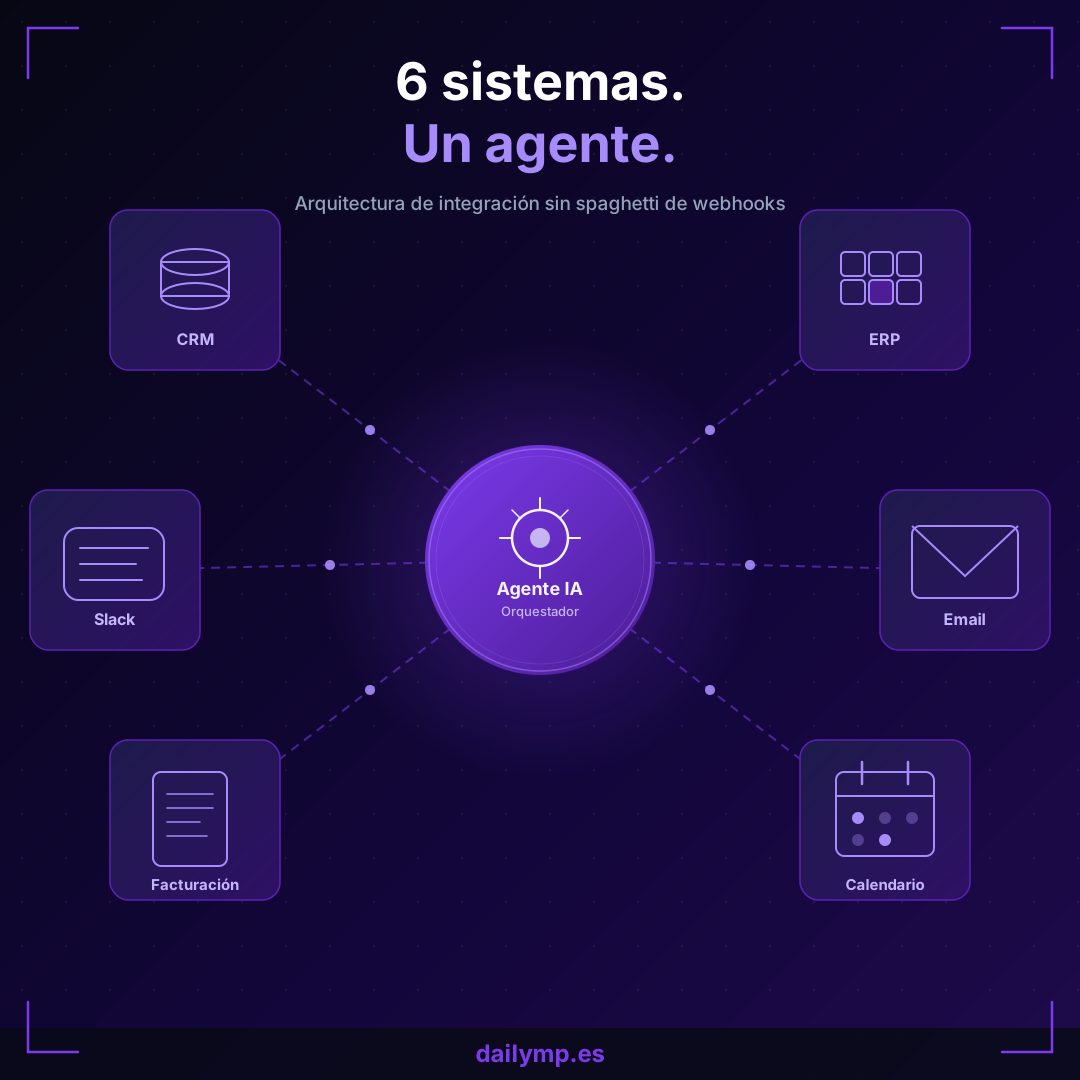
Six Systems. One Agent. Zero Point-to-Point.
The average company runs six to eight software tools in parallel. CRM, ERP, Slack or Teams, email, calendar, billing. Each does its job well. The problem is that none of them talk to each other reliably.
The result is the worst possible scenario for any engineering team: N tools generate N×(N-1)/2 point-to-point integrations. With six systems that is fifteen separate webhooks, fifteen sets of credentials to rotate, and fifteen places where something can fail silently while everyone assumes everything is working.
There is a pattern that solves this — not with more webhooks, but with an orchestrator agent.
The Real Problem With Point-to-Point Integrations
The typical integration pattern starts fine. A payment notification arrives from Stripe and updates the CRM. The CRM fires a webhook to the ERP. The ERP sends an email. Three webhooks, everything works.
Six months later there are twelve webhooks. The CRM changed versions and the customer_id field is now called contact_id. The Stripe webhook has been failing silently for weeks because nobody monitors the receiving endpoint. When someone finally digs into it, the original failure is impossible to trace: which step in the chain actually broke?
Why This Pattern Does Not Scale
Point-to-point coupling has two properties that make it unsustainable over time:
- Compound fragility: a change in any single system can break any integration depending on it
- Visibility debt: there is no central place to see which events were processed, which failed, and why
This is not a technology problem. It is an architecture problem.
The Orchestrator Pattern: One Entry Point, All the Logic
An AI agent can act as the intelligent middleware that connects all systems. Instead of fifteen bidirectional integrations, the design has three components:
- Typed event bus: each system publishes events with a known schema
- Orchestrator agent: receives the event, reasons about what actions to take, calls the right tools
- Execution log: what ran, with what data, when, and with what result
The key difference from a classic middleware layer (n8n, Zapier, Make) is that the agent can reason about intent. If a new contract arrives but the client already exists in the CRM with conflicting data, the agent can decide which source wins instead of blindly overwriting or failing silently.
Minimum Viable Architecture in TypeScript
// 1. Base type for all system events
interface BusinessEvent {
  id: string;         // UUID — key for idempotency
  type: string;       // 'contract.signed' | 'invoice.paid' | 'lead.created'
  timestamp: string;  // ISO 8601
  source: string;     // 'crm' | 'erp' | 'stripe' | 'email'
  payload: Record<string, unknown>;
}

// 2. Agent receives event and decides which tools to call
async function orchestrate(event: BusinessEvent): Promise<void> {
  const alreadyProcessed = await checkIdempotency(event.id);
  if (alreadyProcessed) return;

  const response = await callOrchestrator(event);

  for (const action of response.actions) {
    await executeWithRetry(action, { maxAttempts: 3 });
  }

  await markEventProcessed(event.id);
}

// 3. Typed tools — the LLM never calls APIs directly
const tools = {
  crm:     { createContact, updateDeal, addNote },
  erp:     { createOrder, syncInventory },
  slack:   { notifyChannel, createTask },
  billing: { createInvoice, markPaid },
};
Three principles keep this from breaking in production:
Idempotency by design. Every event has a unique id. Before processing, the agent checks whether it has already handled this event. Automatic retries are safe.
Typed tools, never raw APIs. The LLM does not call endpoints directly. It calls TypeScript functions with Zod-validated schemas. The model cannot invent a field that does not exist.
Observable state. Every action is logged with its input, output, and timestamp. When something fails, you know exactly where, with what data, and why.
The Orchestration Loop With Claude
import Anthropic from "@anthropic-ai/sdk";
import { z } from "zod";

const client = new Anthropic();

const CreateContactSchema = z.object({
  email:  z.string().email(),
  name:   z.string().min(1),
  source: z.string(),
});

async function runOrchestrator(event: BusinessEvent) {
  const response = await client.messages.create({
    model: "claude-opus-5",
    max_tokens: 1024,
    system: `You are the integration orchestrator for the company.
You receive business events and decide what actions to execute.
Priorities: 1) no data duplication, 2) maintain consistency, 3) alert on ambiguity.`,
    messages: [{
      role: "user",
      content: `Event:\n${JSON.stringify(event, null, 2)}\n\nWhat actions should I run?`,
    }],
    tools: [{
      name: "create_contact",
      description: "Creates a contact in the CRM if it does not already exist",
      input_schema: {
        type: "object" as const,
        properties: {
          email:  { type: "string" },
          name:   { type: "string" },
          source: { type: "string" },
        },
        required: ["email", "name", "source"],
      },
    }],
  });

  for (const block of response.content) {
    if (block.type !== "tool_use") continue;

    const validated = CreateContactSchema.safeParse(block.input);
    if (!validated.success) {
      await logError(event.id, block.name, validated.error);
      continue;
    }
    await executeWithRetry(() => tools.crm.createContact(validated.data));
  }
}
This approach fits directly with the patterns we covered in tool calling in production: input validation before touching any external API, explicit per-tool error handling, and logging every call.
The Most Common Mistake When Building This Alone
The typical failure mode is treating the agent like a slightly smarter webhook. Teams wire it to an HTTP endpoint, process the event, and if it fails — nothing happens. No log, no structured retry, no alert.
Production has a cruel tendency to find exactly the cases you did not test: a provider changes their event format, a client has special characters in their name, the CRM has an undocumented rate limit.
In the AI integration projects we build at DAILYMP, we add three layers that most teams skip in the first version:
- Durable event queue: if the agent fails, the event is not lost
- Full execution log: input, output, duration, status per action
- Anomaly alerts: if a particular event type exceeds a failure threshold, immediate alert
Without these layers, the system works 95% of the time and nobody knows what happens in the other 5% — which is precisely where the critical data lives that you cannot afford to lose.
When to Use an Agent vs. a Simple Webhook
Not everything needs an agent. A webhook that always executes the same action with no variation is cheaper and more predictable. Do not add complexity for its own sake.
Use an orchestrator agent when:
- The action to take depends on context, not just on event fields
- There are conflicting data sources that require judgment to resolve
- The same event can produce different actions depending on the current system state
- You need to coordinate more than two systems in a single operation
For everything else, a simple worker with Zod validation is sufficient and more maintainable.
Conclusion
Six systems without orchestrated integration are six systems working against each other. The orchestrator agent pattern is not over-engineering: it is the architecture that eliminates point-to-point coupling and adds reasoning where there used to be rigid rules that someone has to maintain by hand.
The difference between getting it right from the start and getting it done fast shows up three months later, when the system is in real production and the edge cases nobody anticipated start appearing.
If you are designing the integration now and want an architecture that holds, tell us what systems you have and where you are in the process.