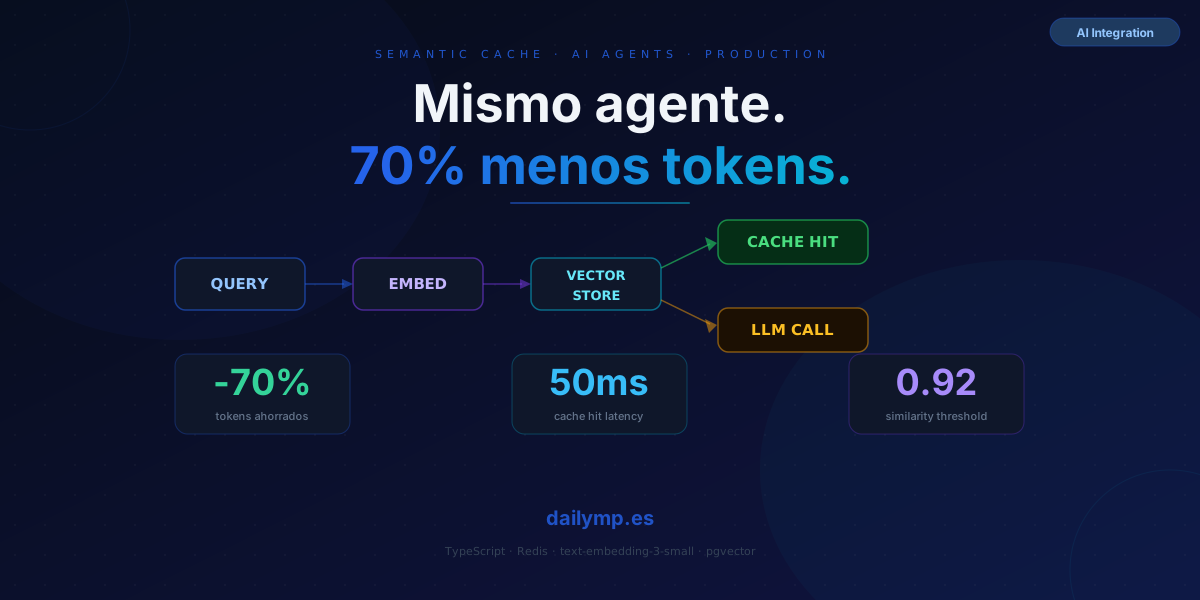
Semantic Cache: Same LLM Agent, 70% Fewer Token Calls
Your support agent has been answering "How do I reset my password?" forty times a day for months. Every response costs tokens. Every token costs money. You're paying for a conversation you already had — literally yesterday.
Semantic caching cuts that cost without users noticing a difference.
Why regular caching breaks down for LLM agents
A traditional cache stores results by exact key: getWeather("Madrid") → stores "18°C". Works for deterministic data. For an LLM, it doesn't: "How do I reset my password?" and "I want to update my password" are different strings but identical in intent. Exact-key caching misses that and calls the LLM twice.
A semantic cache uses embeddings to measure meaning similarity:
- Convert the user's query into a vector (embedding)
- Search the store for previous queries with high cosine similarity
- If similarity exceeds the threshold, return the cached response
- If not, call the LLM, store the response, and serve it
The user gets a response in 50ms instead of 800ms. You spend zero tokens. Everyone wins.
TypeScript implementation
The minimal structure with OpenAI embeddings and Redis. The same pattern works with pgvector if you're already on Postgres:
import OpenAI from 'openai'
import { Redis } from 'ioredis'
import { cosineSimilarity } from './utils'

const openai = new OpenAI()
const redis = new Redis(process.env.REDIS_URL!)

interface CacheEntry {
  queryEmbedding: number[]
  response: string
  createdAt: number
}

async function getEmbedding(text: string): Promise<number[]> {
  const { data } = await openai.embeddings.create({
    model: 'text-embedding-3-small',
    input: text,
  })
  return data[0].embedding
}

async function semanticCacheLookup(
  query: string,
  threshold = 0.92,
  ttlSeconds = 3600
): Promise<string | null> {
  const queryEmbedding = await getEmbedding(query)
  const keys = await redis.keys('sc:*')

  for (const key of keys) {
    const raw = await redis.get(key)
    if (!raw) continue

    const entry: CacheEntry = JSON.parse(raw)
    if (Date.now() - entry.createdAt > ttlSeconds * 1000) {
      await redis.del(key)
      continue
    }

    const sim = cosineSimilarity(queryEmbedding, entry.queryEmbedding)
    if (sim >= threshold) return entry.response
  }

  return null
}

async function cacheStore(query: string, response: string): Promise<void> {
  const queryEmbedding = await getEmbedding(query)
  const entry: CacheEntry = { queryEmbedding, response, createdAt: Date.now() }
  await redis.set(`sc:${Date.now()}`, JSON.stringify(entry), 'EX', 3600)
}
Drop it into your agent loop:
async function agentWithCache(userMessage: string): Promise<string> {
  const cached = await semanticCacheLookup(userMessage)
  if (cached) return cached // 50ms, zero tokens

  const response = await callLLM(userMessage) // 800ms, full token cost
  await cacheStore(userMessage, response)
  return response
}
Two paths. One costs. The other doesn't.
The parameter everyone gets wrong: the similarity threshold
The threshold (0.92 in the example) is the critical dial. Most teams set it to 0.95 "to be safe" — and the cache almost never hits. Or they drop to 0.85 and the agent starts returning wrong answers for similar-but-different questions.
How to calibrate it without guessing:
- Collect 500–1,000 real queries from your system
- Generate embeddings and measure pairwise similarity
- Manually classify which pairs share the same intent
- The optimal threshold is where F1-score (precision × recall) peaks
For generic support, 0.92–0.94 usually works. For technical queries or anything requiring real-time data, semantic cache is the wrong tool — see the next section.
Invalidation: responses that go stale
Time-based TTL is the minimum, not the solution. If your return policy changes, the cache will serve the old answer for up to an hour.
Recommended strategy: cache keys by semantic category. When a policy changes, invalidate only the affected category instead of waiting for TTL:
// Surgical invalidation by category
await redis.del(...await redis.keys('sc:returns:*'))

// vs. waiting for TTL = up to 1h serving stale data
Adding a category prefix to the key (sc:${category}:${Date.now()}) requires a lightweight classifier before the lookup, but gives you full control over invalidation.
When not to use semantic cache
Semantic cache works well for responses that are user-independent, relatively static, and free of real-time data.
Skip it for:
- Personalized queries that depend on user history
- Responses that include live external API data (prices, order status, inventory)
- Multi-step reasoning agents where per-session context matters
If your agent mixes cacheable and non-cacheable queries, add a classifier before the lookup:
const NON_CACHEABLE = ['my order', 'my account', 'current price', 'status of']

function isCacheable(query: string): boolean {
  return !NON_CACHEABLE.some(t => query.toLowerCase().includes(t))
}

async function agentWithSmartCache(userMessage: string): Promise<string> {
  if (isCacheable(userMessage)) {
    const cached = await semanticCacheLookup(userMessage)
    if (cached) return cached
  }

  const response = await callLLM(userMessage)
  if (isCacheable(userMessage)) await cacheStore(userMessage, response)
  return response
}
Real-world results
In mid-volume support agents (2,000–5,000 queries/day), well-configured semantic cache typically reduces LLM calls by 40–70%. The distribution follows a power law: a small set of heavily repeated questions drives most of your token spend.
The cost of an embedding (text-embedding-3-small) is ~20x lower than a full LLM response. The math works as long as your hit rate stays above 10–15%.
In the AI agent integration projects we ship at DAILYMP, semantic caching was one of the first production optimizations: monthly costs dropped before we needed to touch anything else. If you have a running agent and costs are scaling fast with usage, this is the most direct lever.
You can stack this with model routing in your agent pipeline: simple queries hit the cache, medium-complexity queries go to a small model, complex ones go to the flagship. Three cost optimization layers on top of each other.
Next step
Adding semantic cache to an existing agent takes 2–4 hours with Redis already available. ROI is immediate and measurable: compare token costs before and after in next month's bill.
If you want to review your agent's production design — cost, latency, architecture — reach out directly.