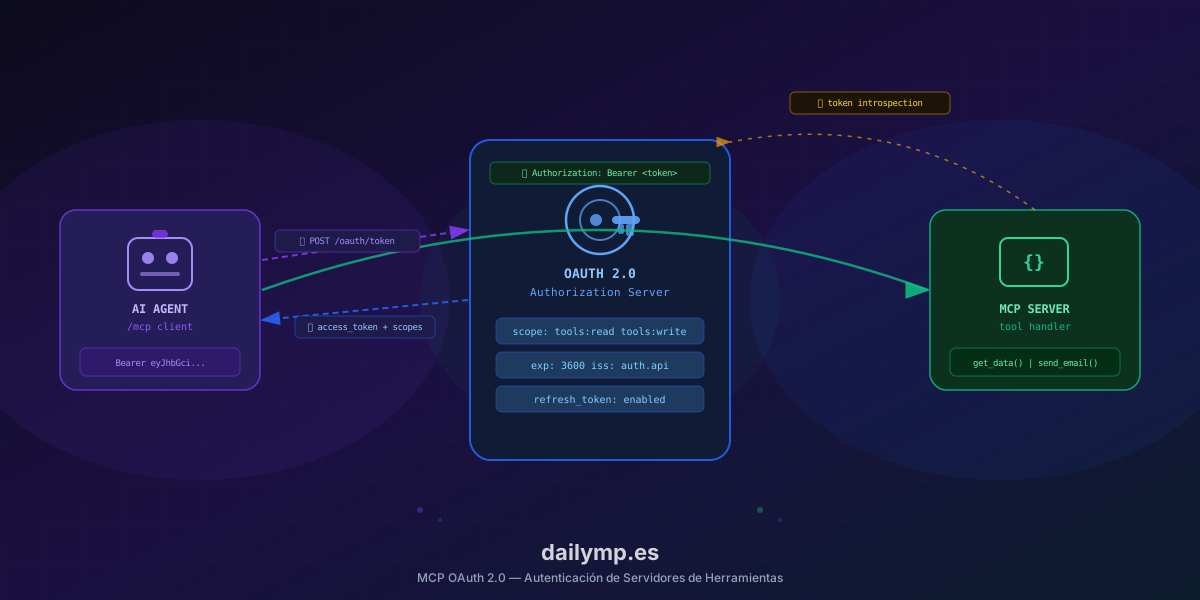
MCP OAuth 2.0: Authenticate Your Tool Server in Production
You build the MCP server. You register the tools. The agent calls them and everything works. Locally, without friction.
Then you deploy to production and you've just shipped an unauthenticated API. Any client that knows the endpoint has full access to every tool you registered.
This is the most common mistake when moving an MCP server from demo to production: the spec has supported OAuth 2.0 since version 2025-11-05, but most tutorials never get there.
Why an MCP Server Without Auth Is an Architecture Problem
This isn't a minor security concern. An exposed MCP server without authentication has concrete production consequences:
Without knowing who's calling, you can't filter tools per client. If tenant A and tenant B share the same server, both have access to the same tools with the same permissions. The dynamic RBAC for AI agents pattern handles per-role filtering, but that filtering needs to know who the caller is before it can apply.
Without tokens, you can't audit. When something fails — and it will — you need to know which client called which tool with which parameters. Without identity in the request, your log only tells you that send_invoice() ran 400 times. Not who called it.
Without token expiration, access is permanent. A leaked credential that never expires is an open door with no closing time.
The MCP OAuth 2.0 Specification
The protocol defines two flows depending on client type:
Public clients (Claude Desktop, apps without their own backend): Authorization Code with PKCE. The client redirects the user to the Authorization Server, gets a code, exchanges it for an access token.
Confidential clients (backend servers calling your MCP from server-side): Client Credentials. The server authenticates directly with client_id and client_secret, gets an access token with no user interaction.
In both cases, every request to the MCP server carries the token in the header:
Authorization: Bearer eyJhbGciOiJSUzI1NiJ9...
And the MCP server validates that token before executing any tool.
Implementation: Validation Middleware in TypeScript
The cleanest pattern is to validate the token in middleware before the MCP router ever touches the request. Here's the middleware for a Next.js server with JWT validation:
import { jwtVerify, createRemoteJWKSet } from 'jose'
import type { NextRequest } from 'next/server'

const JWKS = createRemoteJWKSet(
  new URL('https://your-auth-server.com/.well-known/jwks.json')
)

export async function validateMcpToken(req: NextRequest) {
  const authHeader = req.headers.get('authorization')
  if (!authHeader?.startsWith('Bearer ')) {
    return { error: 'missing_token', status: 401 }
  }

  const token = authHeader.slice(7)

  try {
    const { payload } = await jwtVerify(token, JWKS, {
      issuer: 'https://your-auth-server.com',
      audience: 'mcp-server',
    })

    return {
      clientId: payload.sub as string,
      scopes: (payload.scope as string)?.split(' ') ?? [],
    }
  } catch {
    return { error: 'invalid_token', status: 401 }
  }
}
The MCP server endpoint calls the middleware before handing context to the handler:
export async function POST(req: NextRequest) {
  const auth = await validateMcpToken(req)
  if ('error' in auth) {
    return Response.json(
      { error: auth.error },
      { status: auth.status }
    )
  }

  // auth.clientId and auth.scopes available to the handler
  const tools = getToolsForScopes(auth.scopes)
  return handleMcpRequest(req, { tools, clientId: auth.clientId })
}
Scopes Mapped to Tools
The scopes in the token determine which tools each client sees. The mapping is explicit:
const SCOPE_TOOL_MAP: Record<string, string[]> = {
  'tools:read': ['get_order', 'get_customer', 'list_products'],
  'tools:write': ['create_order', 'update_customer'],
  'tools:admin': ['delete_record', 'issue_refund', 'export_data'],
}

function getToolsForScopes(scopes: string[]): string[] {
  return [...new Set(scopes.flatMap(s => SCOPE_TOOL_MAP[s] ?? []))]
}
A client with scope: "tools:read" gets exactly three tools. If the agent tries to call issue_refund(), the server returns an error before executing anything. No prompt dependency, no model dependency — it's a constraint in the handler.
Token Refresh: What Breaks Without It
Access tokens expire. By default, the OAuth 2.0 flow returns a refresh_token alongside the access token. The MCP client must implement automatic renewal before the token expires, or calls will start failing with 401 mid-agent-session.
The problem is that most implementations don't handle refresh. The token expires, the agent gets an error it can't interpret, and the flow breaks silently — exactly the kind of hard-to-diagnose production failure we address in AI agent integration work.
The correct pattern is to intercept the 401 in the MCP client and renew before retrying:
async function callMcpTool(tool: string, params: unknown) {
  let token = await getStoredToken()

  const res = await fetch('/mcp', {
    method: 'POST',
    headers: { Authorization: `Bearer ${token.access_token}` },
    body: JSON.stringify({ tool, params }),
  })

  if (res.status === 401 && token.refresh_token) {
    token = await refreshAccessToken(token.refresh_token)
    await storeToken(token)
    return callMcpTool(tool, params) // single retry
  }

  return res.json()
}
What Breaks When You Implement This Alone
The OAuth 2.0 spec is 70 pages. The edge cases you discover in production are predictable but non-trivial:
- Clock skew between auth server and MCP server: the token looks expired even though it has 2 minutes of lifetime left. Fixed with
clockTolerancein JWT validation. - PKCE on mobile clients: the code verifier has to survive redirects that can kill app state.
- Real-time token revocation: if a user signs out, the access token stays valid until it expires. You need an introspection endpoint or a cached revocation list.
- Refresh token rotation: every use of a refresh token should produce a new one. Without this, a compromised refresh token can be used indefinitely.
These problems don't appear locally. They appear under real load, with multiple clients, in environments where server time varies.
Real Results
Teams that implement OAuth 2.0 correctly in their MCP servers get three concrete outcomes:
Visibility into who uses what. Every tool call carries the client_id of the agent that executed it. The log has context, debugging has a starting point.
Access control without touching the prompt. Scopes are Authorization Server configuration, not model instructions. Changing a client's permissions doesn't require modifying or redeploying the agent.
Reduced attack surface. A compromised token expires. A compromised credential has bounded scope. Potential damage has defined limits.
The Cost of Deferring It
Authentication is the kind of technical debt that feels manageable until it isn't. An unauthenticated MCP server in production is fine as long as only your own agents use it in a controlled environment. It stops being fine the day you connect an external client, when audit asks for access logs, or when a token leaks.
Adding OAuth 2.0 to an existing MCP server isn't complex, but parts of it take time: refresh management, token rotation, clock skew handling, scope-to-tool mapping.
If you already have the server working and want to add authentication without breaking what's already running, at DAILYMP we have this pattern implemented and in production. One working session to scope it, one week to have auth in production.