AI Agent Tool Errors: What the LLM Needs to Recover
Your agent works perfectly in staging. All tests pass. You ship to production, and the first time an external service takes a few hundred milliseconds longer than expected, the agent stops cold. No useful error message. No recovery. The user sees an infinite spinner or a generic "something went wrong."
This is the most common failure pattern I see in production AI agents, and the root cause is almost always the same: tools throw exceptions instead of returning structured results.
Why Exceptions Never Reach the LLM
To understand the problem, you need to know exactly how the tool calling protocol works. The LLM sends a tool_use message with a function name and parameters. Your code runs the function. The result comes back to the LLM as a tool_result message. The LLM reads it as context and decides what to do next.
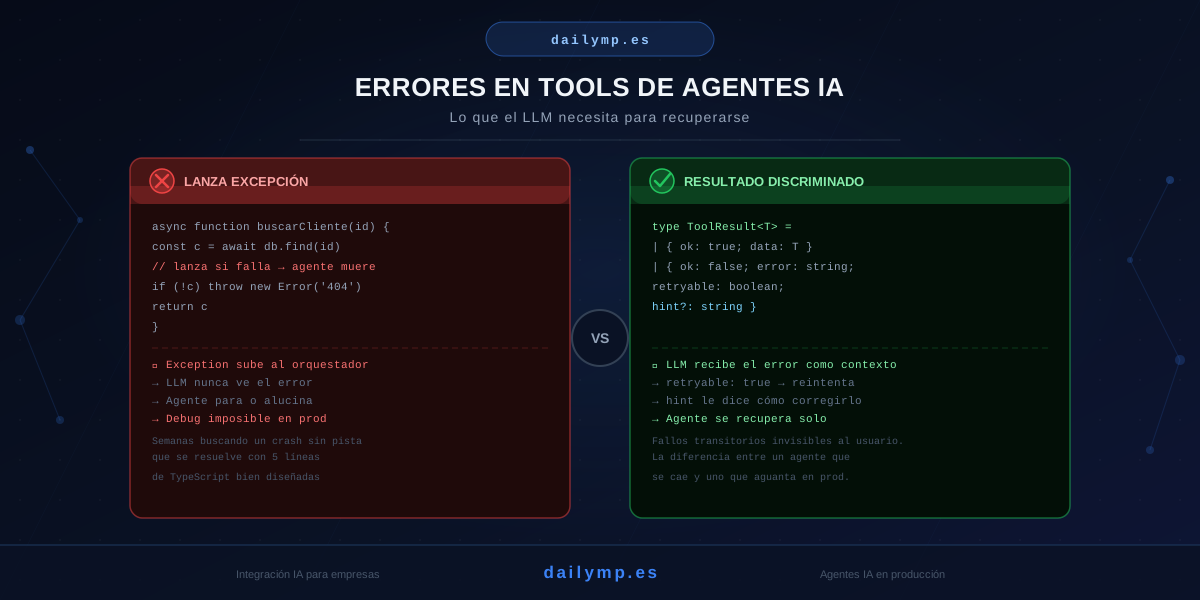
The issue: if your function throws an exception, that exception does not become a tool_result. It propagates up the call stack to the orchestration layer, which catches it and halts the agent run. The LLM never finds out what happened. It has no information to decide whether to retry, ask the user for different input, or take a fallback path.
The exception doesn't travel back to the model. It dies in your infrastructure layer, completely useless as context.
The Anti-pattern Everyone Writes First
// Tool that kills the agent when the DB fails or the ID doesn't exist
async function findCustomerTool({ id }: { id: string }) {
  const customer = await db.customers.findById(id) // throws if DB fails
  if (!customer) throw new Error(`Customer ${id} not found`)
  return customer
}
This code looks fine. It has error handling. The problem is that those errors go nowhere useful: the LLM never sees them. The agent dies silently or returns a vague response that helps nobody.
The Right Pattern: Discriminated Result with Recovery Hint
The fix is to return errors as part of the tool result, with enough information for the LLM to act on:
type ToolOk<T> = { ok: true; data: T }
type ToolErr = {
  ok: false
  error: string
  retryable: boolean
  hint?: string
}
export type ToolResult<T> = ToolOk<T> | ToolErr

async function findCustomerTool(
  { id }: { id: string }
): Promise<ToolResult<Customer>> {
  try {
    const customer = await db.customers.findById(id)
    if (!customer) {
      return {
        ok: false,
        error: `Customer ${id} does not exist in the database`,
        retryable: false,
        hint: 'Confirm the ID with the user before calling this tool again'
      }
    }
    return { ok: true, data: customer }
  } catch (err) {
    return {
      ok: false,
      error: 'Database temporarily unavailable',
      retryable: true,
      hint: 'Retry in 5 seconds with exactly the same parameters'
    }
  }
}
What the LLM Does With Each Response Type
retryable: false + hint about the ID: the LLM asks the user for the correct identifier. It doesn't retry a call it knows will fail again.
retryable: true + timeout hint: the LLM retries the tool (if you have retry logic configured) or tells the user there's a temporary issue and it will try again shortly.
{ error: "Database error 500" } with nothing else: the LLM guesses. It might retry when there's no point, or stop when it could recover. Results are unpredictable.
The hint field is not decorative. It's the message the LLM uses to decide its next action. The more specific it is, the better the production behavior.
Exposing This Type in the System Prompt
One line in the system prompt is enough for the model to handle these results correctly:
When a tool returns { ok: false, retryable: true }, retry once after a brief pause.
When retryable is false, do not retry—instead, ask the user for clarification based on the hint field.
No complex orchestration logic needed. The LLM handles it as context.
The Step Nobody Takes: Testing Error Paths
Most teams test the happy path. The LLM calls the tool, the tool returns data, the agent responds. But it's the error paths that break production.
Here's the test you should have for every critical tool:
it('retries when tool returns retryable: true', async () => {
  findCustomerMock
    .mockResolvedValueOnce({
      ok: false,
      retryable: true,
      error: 'DB unavailable',
      hint: 'Retry in 5 seconds'
    })
    .mockResolvedValueOnce({ ok: true, data: sampleCustomer })

  const result = await runAgent('Find customer with ID abc123')

  expect(findCustomerMock).toHaveBeenCalledTimes(2)
  expect(result).toContain(sampleCustomer.name)
})

it('does not retry when retryable is false', async () => {
  findCustomerMock.mockResolvedValueOnce({
    ok: false,
    retryable: false,
    error: 'Customer abc999 does not exist',
    hint: 'Verify the ID with the user'
  })

  const result = await runAgent('Find customer with ID abc999')

  expect(findCustomerMock).toHaveBeenCalledTimes(1)
  expect(result).toContain('verify') // LLM asks for confirmation
})
These tests take ten minutes to write and prevent weeks of production debugging.
Real Results
Teams that implement this pattern end up with agents that self-heal from transient failures—database timeouts, external API rate limits, malformed responses—without manual intervention and without the user ever noticing.
Teams that don't implement it spend hours debugging production crashes that leave no trace in logs, because the exception never reached where it needed to go.
The difference between the two is exactly this type: ToolResult<T>. Five lines of TypeScript that separate a brittle agent from one that holds up in production.
Next Step
If you're building an agent and your tools throw exceptions, this is the first place we look when something breaks in production. It's the cheapest change you can make with the highest impact on stability.
At DAILYMP we build agents with architectures that don't break in production: from tool design to error recovery tests, observability patterns, and the retry semantics the LLM actually understands.
If your agent is failing in production and you don't know why, this is probably it. If you want to review it together, in 30 minutes I'll tell you exactly where the problem is and how to fix it.
Review my agent architecture →
Already have the pattern implemented but your agent still fails? Read how AI agent fallback chains handle cases where the tool itself can't recover.