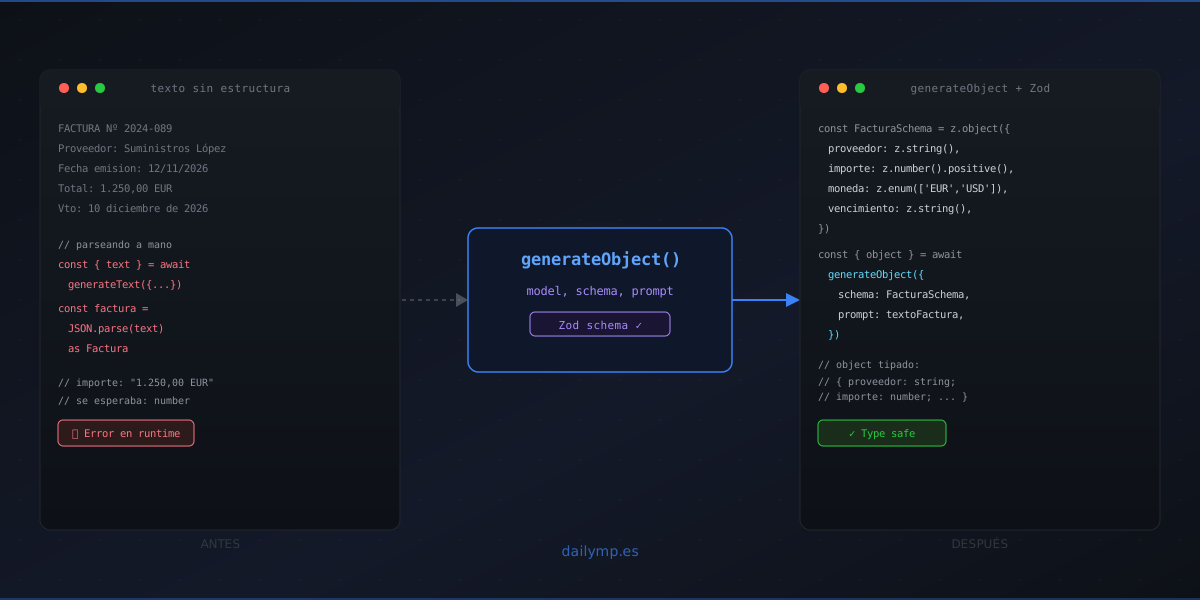
generateObject: Type-Safe Data Extraction From Any Text
Your agent extracts invoice data. You call generateText, take the model's output, run JSON.parse() and cast the result with as Invoice. TypeScript doesn't complain. But when the model returns "amount": "1,250.00 EUR" instead of "amount": 1250, the error surfaces in your accounting system — not in your agent logs.
generateObject from Vercel AI SDK closes that gap. No manual JSON parsing: you give it a Zod schema, the SDK converts it to a tool call internally, validates the model's response against that schema, and returns the inferred type automatically.
The problem with generateText + JSON.parse
The most common pattern when an LLM needs to return structured data looks like this:
const { text } = await generateText({
  model: anthropic('claude-3-5-haiku-20241022'),
  prompt: `Extract this invoice data as JSON: ${invoiceText}`,
})

const invoice = JSON.parse(text) as Invoice // ← this is where it breaks
Three things go wrong here:
1. TypeScript is lying to you. The as Invoice is an empty assertion. TypeScript compiles without error even when the runtime object has extra fields, missing fields, or wrong types.
2. The LLM doesn't always return clean JSON. Sometimes it prepends text ("Here's the JSON:") or escapes characters incorrectly. The JSON.parse throws an unhandled exception.
3. No value validation. The amount field might arrive as a number, a string, or a string with a currency symbol. Your downstream code will find out at the worst possible moment.
generateObject: schema first, free types
import { generateObject } from 'ai'
import { anthropic } from '@ai-sdk/anthropic'
import { z } from 'zod'

const InvoiceSchema = z.object({
  vendor: z.string(),
  invoiceNumber: z.string(),
  amount: z.number().positive(),
  currency: z.enum(['EUR', 'USD', 'GBP']),
  dueDate: z.string().regex(/^\d{4}-\d{2}-\d{2}$/),
  lineItems: z.array(z.object({
    description: z.string(),
    quantity: z.number(),
    unitPrice: z.number(),
  })),
})

const { object } = await generateObject({
  model: anthropic('claude-3-5-haiku-20241022'),
  schema: InvoiceSchema,
  prompt: `Extract the invoice data from this document: ${invoiceText}`,
})

// object: { vendor: string; invoiceNumber: string; amount: number; ... }
// TypeScript knows the exact type — no assertions needed
What the SDK does internally:
- Converts the Zod schema to a tool call with the equivalent JSON schema
- Sends the prompt asking the model to call that tool
- Validates the response against the Zod schema
- Returns
result.objectwith the type inferred fromz.infer<typeof InvoiceSchema>
If the model generates "amount": "1,250.00 EUR", the Zod validation fails before the data reaches your code. Not in accounting: in the agent.
Three real use cases
1. Automatic support ticket classification
Each customer email gets read and classified before routing:
const TicketSchema = z.object({
  category: z.enum(['billing', 'technical', 'cancellation', 'other']),
  priority: z.enum(['high', 'medium', 'low']),
  immediateAction: z.boolean(),
  summary: z.string().max(150),
})

const { object: ticket } = await generateObject({
  model: anthropic('claude-3-5-haiku-20241022'),
  schema: TicketSchema,
  prompt: `Classify this support email: "${emailContent}"`,
})

if (ticket.immediateAction) await notifyOncall(ticket)
await crm.createTicket(ticket) // ticket is fully typed
The support team stops reading every email to decide who handles it. The agent classifies, humans review only high-priority cases.
2. Lead scoring from contact forms
Every new contact gets scored before hitting the CRM:
const LeadSchema = z.object({
  isICP: z.boolean(),
  sector: z.string(),
  companySize: z.enum(['micro', 'small', 'medium', 'large']),
  urgency: z.number().min(1).max(5),
  primaryPainPoint: z.string().max(100),
})
This pattern is part of the AI integration service we implement for clients receiving more than 50 inbound contacts per month.
3. Meeting notes extraction
const MeetingSchema = z.object({
  participants: z.array(z.string()),
  agreedActions: z.array(z.object({
    owner: z.string(),
    task: z.string(),
    deadline: z.string().optional(),
  })),
  decisions: z.array(z.string()),
})
Free-form meeting text becomes a structured object in 2–3 seconds. Task managers receive the data directly — no manual copy-pasting involved.
streamObject for large documents
For long documents or when you want to show progress in the UI, streamObject gives you the partial object in real time:
import { streamObject } from 'ai'

const stream = streamObject({
  model: anthropic('claude-3-5-sonnet-20241022'),
  schema: InvoiceSchema,
  prompt: `Extract the data: ${largeDocument}`,
})

for await (const partial of stream.partialObjectStream) {
  // partial is Partial<Invoice> during generation
  if (partial.vendor) showProgress(partial.vendor)
}

const invoice = await stream.object // final, complete object
Fields arrive as the model generates them. You can show users which fields have been extracted without waiting for the complete object. Useful when the document is longer than 10 pages and the user is waiting.
Handling the case where the model can't satisfy the schema
generateObject throws NoObjectGeneratedError if the model doesn't produce something that satisfies the schema. This is explicit and controllable:
import { NoObjectGeneratedError } from 'ai'

try {
  const { object } = await generateObject({
    model: anthropic('claude-3-5-haiku-20241022'),
    schema: InvoiceSchema,
    prompt: `Extract the data: ${invoiceText}`,
  })
  return object
} catch (e) {
  if (e instanceof NoObjectGeneratedError) {
    logger.warn('generateObject failed', { rawText: e.text })
    // Retry with a more capable model or escalate to a human
    return null
  }
  throw e
}
e.text contains the raw text the model returned before schema validation failed. Use it to diagnose whether the problem is the prompt, the model, or the schema definition.
mode: tool vs mode: json — when to use each
The SDK defaults to mode: 'auto', which picks based on the provider. You can override it:
mode: 'tool'(recommended for complex schemas): Wraps the schema as a tool the model "calls". More reliable for nested schemas, arrays, and enums.mode: 'json': Asks the model to return JSON directly. Some models prepend text before the JSON, which can cause parse errors.mode: 'auto': The SDK chooses based on the provider. Good for code that runs across multiple model providers.
For production with complex schemas, use mode: 'tool' explicitly rather than relying on auto.
Next steps
If your team already uses Vercel AI SDK and has agents extracting data with generateText + manual parsing, migrating to generateObject is usually under an hour's work per agent. The benefit in type safety and early error detection pays off on the first production deploy.
You can also combine this with tool call validation in production to cover both document extraction and external tool execution in a single pipeline.
If you want to add structured document extraction to your workflow — invoices, contracts, customer emails — I can help you design the schema and the full pipeline.