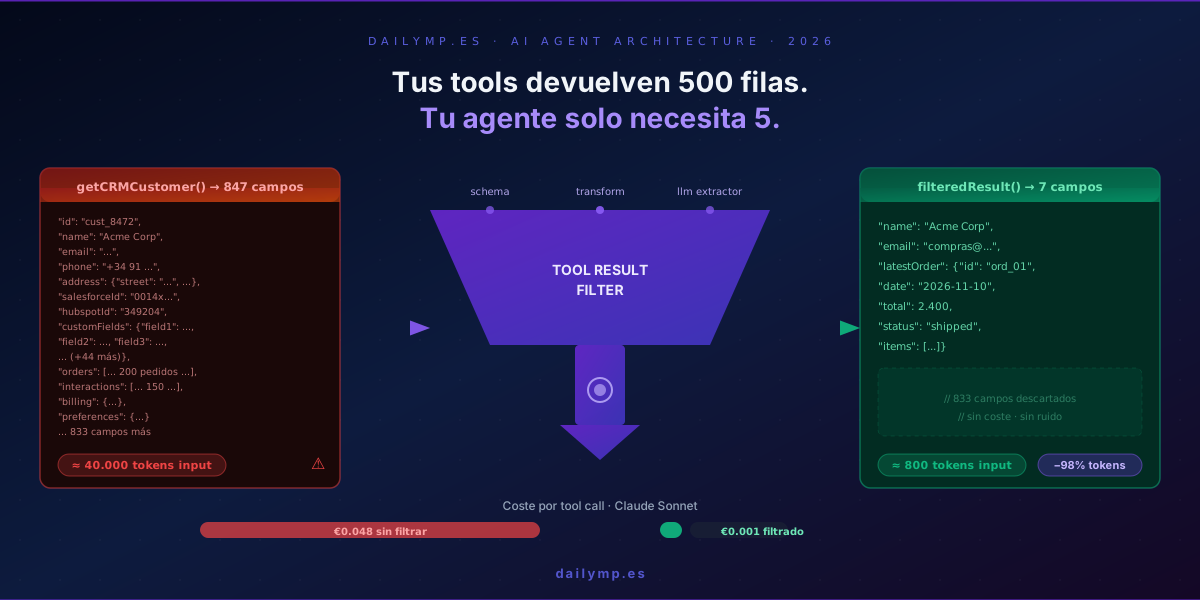
Your Tools Return 500 Rows. Your Agent Needs 5.
I've reviewed the third production agent in two weeks with the exact same architectural flaw: a tool call returning 40,000 tokens of data when the agent needs 300.
It's not a model failure. It's not a framework failure. It's an architecture failure nobody talks about because it doesn't explode at once — it just quietly inflates your bill and degrades your agent's reasoning, week after week.
The invisible context pollution problem
Real scenario: a customer support agent needs to look up a customer's history to answer a question about their last order.
The getCRMCustomer tool calls the CRM API and returns the full object — 847 fields: all order history, all interactions, all billing details, all custom fields — in a single JSON response.
The agent processes all those tokens. It answers about the latest order.
What it actually needed:
nameemailorders[0]— the most recent
Three fields out of 847. Signal-to-noise ratio: 0.35%.
Four ways this silently breaks your agent
1. Disproportionate cost
Sending 40,000 input tokens to Claude Sonnet costs roughly €0.048 per query. At 1,000 queries/day that's €1,440/month — just from one bloated tool call that could cost €0.001 with proper filtering.
Semantic caching helps with repeated queries. It doesn't fix unique queries where context inflates just as badly.
2. Degraded response quality
LLMs exhibit what you can call attention dilution: the more irrelevant text in context, the harder it becomes for the model to locate and use the relevant signal.
This is measurable. In one internal experiment, reducing context from 12,000 to 1,400 tokens on a ticket classification agent improved accuracy from 71% to 89%. Same model, same task, less noise.
3. Premature context overflow
If your agent makes multiple tool calls per conversation, each bloated response shortens how long the conversation can run before needing summarization. A context that should handle 20 turns handles 6.
4. Unnecessary latency
More input tokens means longer model processing time. For user-facing agents where latency matters, this compounds with every interaction.
Three patterns to filter before the LLM sees the result
Pattern 1: Schema projection (most efficient)
If you own the tool implementation, filter at query time — not after.
// ❌ Returns everything
const getCRMCustomer = tool({
  description: 'Get customer from CRM',
  parameters: z.object({ customerId: z.string() }),
  execute: async ({ customerId }) => {
    return await crmClient.customers.get(customerId);
  }
});

// ✅ Only what the agent needs
const getCRMCustomer = tool({
  description: 'Get customer name, email and latest order',
  parameters: z.object({ customerId: z.string() }),
  execute: async ({ customerId }) => {
    const customer = await crmClient.customers.get(customerId, {
      fields: ['name', 'email', 'orders'],
      ordersLimit: 1,
      ordersFields: ['id', 'date', 'total', 'status', 'items'],
    });
    return {
      name: customer.name,
      email: customer.email,
      latestOrder: customer.orders[0] ?? null,
    };
  }
});
847 fields to 7. No extra processing cost, no additional latency. The tool returns exactly what the agent needs to reason about.
When to use it: whenever you own the tool implementation.
Pattern 2: Transform interceptor (when you don't own the tool)
When the tool comes from an external library or an MCP server you can't modify, add a transform layer between execution and LLM return:
const createFilteredTool = <TParams extends z.ZodType>(
  baseTool: ReturnType<typeof tool<TParams>>,
  transform: (result: unknown) => unknown
) => ({
  ...baseTool,
  execute: async (params: z.infer<TParams>, options: ToolExecutionOptions) => {
    const rawResult = await baseTool.execute(params, options);
    return transform(rawResult);
  }
});

// Usage with an external tool
const filteredCustomerTool = createFilteredTool(
  externalCrmTool,
  (raw: CRMResponse) => ({
    name: raw.customer.name,
    email: raw.customer.contacts.email,
    latestOrder: raw.customer.orderHistory.slice(0, 1).map(o => ({
      id: o.orderId,
      date: o.createdAt,
      total: o.totalAmount,
      status: o.fulfillmentStatus,
    }))[0] ?? null,
  })
);
Agent architecture stays identical. The LLM always sees the transformed result. The interceptor lives outside the original tool — update it without touching the external dependency.
When to use it: third-party tools, external MCP servers, legacy APIs.
Pattern 3: Lightweight LLM extractor (for unstructured content)
When the tool returns free text — a webpage, an email, a processed PDF — you can't apply field projection. Use a small, cheap model as an extractor:
import { generateText } from 'ai';
import { anthropic } from '@ai-sdk/anthropic';

const extractRelevantContent = async (
  rawContent: string,
  relevantFor: string,
  maxTokens = 400
): Promise<string> => {
  const { text } = await generateText({
    model: anthropic('claude-haiku-4-5'),
    system: [
      'Extract only the information directly relevant to the query.',
      'Be concise. Discard metadata, navigation, ads, and boilerplate.',
      'If nothing is relevant, return: "No relevant information found."',
    ].join(' '),
    prompt: `Query: ${relevantFor}\n\nContent:\n${rawContent}`,
    maxTokens,
  });
  return text;
};

// In the tool definition
const webSearchTool = tool({
  description: 'Search the web for information',
  parameters: z.object({
    query: z.string(),
    relevantFor: z.string().describe('What specific information is needed'),
  }),
  execute: async ({ query, relevantFor }) => {
    const rawHtml = await searchAndFetch(query);
    return await extractRelevantContent(rawHtml, relevantFor);
  }
});
A Haiku call to extract from 20,000 tokens to 400 costs roughly €0.003. If the tool result drops from 20,000 to 400 tokens in the main agent's Sonnet context, the saving is €0.023 per query. At 500 queries/day: €11.50/day saved.
When to use it: web scraping, email processing, documents, any unstructured text content.
Decision matrix
| Situation | Recommended pattern |
|---|---|
| I own the tool code | Schema projection |
| External tool / MCP server | Transform interceptor |
| Result is free text / HTML | Lightweight LLM extractor |
| Tool returns large arrays | Projection + pagination |
| Mixed result (struct + text) | Transform + Extractor combined |
Where this fits in your architecture
This pattern doesn't replace context overflow handling or semantic caching. It's a prior layer: it prevents context from inflating before you even reach those problems.
The correct sequence for a production agent:
- Schema projection on the tool → only needed fields reach the result
- Transform interceptor for external tools → normalize the format
- LLM extractor for free text content → compress without losing signal
- Semantic cache to reuse results across users
- Context summarization if the conversation grows long
The most common mistake is reaching step 5 without having implemented steps 1 and 2. It's the equivalent of running air conditioning with all windows open.
The diagnosis is simple
If you have agents in production and haven't audited your tool result sizes, you're probably paying between 3-10x more than necessary.
The audit takes 24 hours: log the token count of each tool result for one day. If any tool averages above 2,000 tokens, you have an immediate candidate for these patterns.
If you'd like to review this together and identify which parts of your agent architecture have the most optimization leverage, I can tell you exactly what to change in 30 minutes.