Your AI Agents Pass Tests. Then Fail in Production.
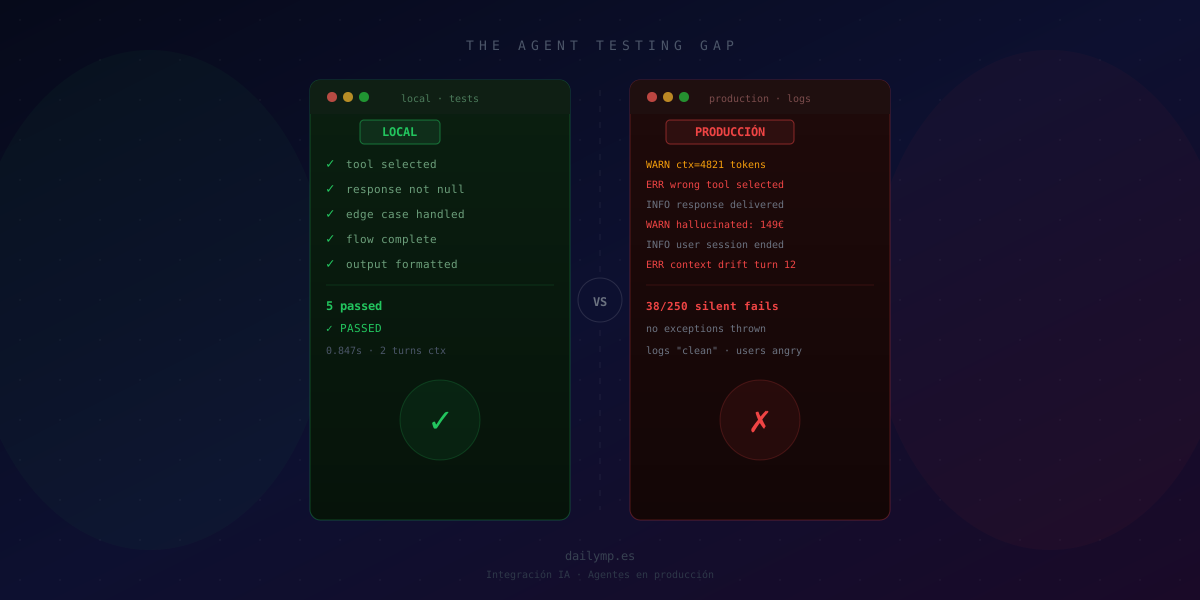
Your agents pass every local test. They hit production and start failing in ways you can't reproduce, that don't show up in your logs, and that take your team hours to understand.
This is the most overlooked testing problem in AI projects today: agents don't break like classic software. They degrade. They give answers that aren't technically exceptions but are wrong. They make bad decisions in contexts you never saw during development.
Why Unit Tests Don't Work for LLM Agents
When you test a TypeScript function, the result is deterministic. add(2, 3) always returns 5. You write expect(result).toBe(5) and sleep soundly.
LLM agents don't work that way. The same prompt with the same context can return slightly different responses each time. Default temperature alone guarantees variability. And that's the smaller problem.
The bigger problem is that most agent failures in production aren't exceptions. They are:
- The agent uses the wrong tool because the context has 3,000 more tokens than you had locally
- The agent "hallucinates" a plausible answer when it should have returned
null - The reasoning chain works fine with your test data and breaks with real production data
- The agent picks path A instead of B, and the user doesn't complain — they just don't come back
// What classic tests verify:
expect(agent.response).not.toBeNull()       // ✅ always passes
expect(agent.toolCalled).toBe('search')     // ✅ passes locally

// What you need to verify but can't with expect():
// Is the response CORRECT for the real use case?
// Does the reasoning hold up with real user data?
// Does the agent choose correctly with long production context?
The Three Most Common Failures That Only Appear in Production
1. Context drift: the agent gets lost in long conversations
During development you test with 2-3 conversation turns. In production, a user is 15 messages deep. The agent starts contradicting itself, "forgetting" system instructions, or behaving as if different tools were available.
The cause: the context window fills up and the LLM starts paying less attention to initial instructions. No unit test catches this because you never simulate long conversations with real user data.
// Pattern that breaks in production with long context:
const messages = [
  { role: 'system', content: systemPrompt }, // 800 tokens
  ...conversationHistory,                     // 3000+ tokens — instructions diluted
  { role: 'user', content: currentMessage }
]

// More robust pattern:
function buildMessages(history: Message[], systemPrompt: string) {
  const compressedHistory = compressToTokenBudget(history, 2000)
  return [
    { role: 'system', content: systemPrompt },
    ...compressedHistory,
    { role: 'user', content: history.at(-1)!.content }
  ]
}
2. Tool selection failure: picks the wrong tool
You give the agent 8 tools. Locally, with your perfectly-phrased test questions, it always picks correctly. In production, with real user questions, it picks tool A when it should pick tool B.
The root cause is almost always ambiguous or overlapping tool descriptions. When two tools have similar vocabulary in their descriptions, the LLM picks based on order of appearance or description length — not logic.
// Descriptions that confuse the LLM (same vocabulary):
{ name: 'get_customer_info', description: 'Gets information about a customer' }
{ name: 'search_customer',   description: 'Searches for customer data' }

// Descriptions that guide correctly (distinct, explicit use cases):
{
  name: 'get_customer_info',
  description: 'Retrieves full profile for a KNOWN customer. Only use when you already have the customer ID.'
}
{
  name: 'search_customer',
  description: 'Finds customers by name, email or phone. Use when you need to locate a customer but do NOT have their ID.'
}
3. Silent failures: plausible but incorrect responses
This is the most dangerous one. The agent responds. No exception. No 500 error. Logs are clean. But the answer is wrong.
A support agent giving outdated instructions. A sales agent quoting the wrong price. An analytics agent drawing incorrect conclusions because it misread a column in the dataset.
Classic monitoring systems don't catch these failures. Users do. Or worse — nobody catches them for weeks.
How to Build a Real Eval System
The solution is evaluating outputs with LLM-as-judge, paired with quantifiable metrics:
interface EvalCase {
  input: string
  expectedBehavior: string   // description of correct behavior
  criticalChecks: string[]   // binary pass/fail checks
}

async function runEval(agent: Agent, testCase: EvalCase) {
  const response = await agent.run(testCase.input)

  // 1. Deterministic checks — fast and cheap
  const passedCritical = testCase.criticalChecks.every(check =>
    evaluateCritical(response, check)
  )

  // 2. Qualitative evaluation with LLM as judge
  const qualityScore = await llmJudge({
    response: response.output,
    expectedBehavior: testCase.expectedBehavior,
    rubric: 'rate 1-5: accuracy, appropriate tool use, no hallucinations'
  })

  return { passed: passedCritical, quality: qualityScore }
}
This isn't perfect (the judge can hallucinate too), but it catches 80% of the silent failures that classic tests miss entirely.
What you need to get started:
- An eval dataset with 20-50 real cases from your domain — not invented locally, but drawn from real interactions or designed by someone who deeply understands the business
- Quantifiable metrics per case: which tool should be called, expected output format, when to escalate to a human
- An eval runner that runs automatically on every deploy
- A minimum quality threshold that blocks deploy if the agent falls below baseline
The Technical Debt of Skipping This
I've seen AI agent projects built in 3 weeks that then consume 3 months of corrective work. The pattern is always the same:
- Agent is built with basic smoke tests
- It goes to production with real users
- Silent failures accumulate for weeks undetected
- Someone complains, it gets investigated, and the agent has been wrong in 15% of interactions
- The team tries to patch without understanding root causes
- The patch introduces new unintended failures
Implementing evals from day one isn't perfectionism. It's what separates an agent that works in production from a prototype that works in demos.
Build Internally or Outsource?
Building a robust eval system from scratch takes time most teams don't have. You can use platforms like Langfuse or Braintrust for the observability pipeline, but someone has to design the eval cases, define the metrics, and keep the dataset updated as the agent evolves.
At DAILYMP we deliver agents with their eval suite included: initial dataset, runner, baseline metrics, and deploy threshold. Not because it's technically elegant, but because it's the only honest way to guarantee an agent actually works in production.
If you have an agent running in production without an eval system — or you're about to launch one — let's talk before your users discover the gap.
You can also explore how we approach other common architecture problems in our AI Driven Development service.