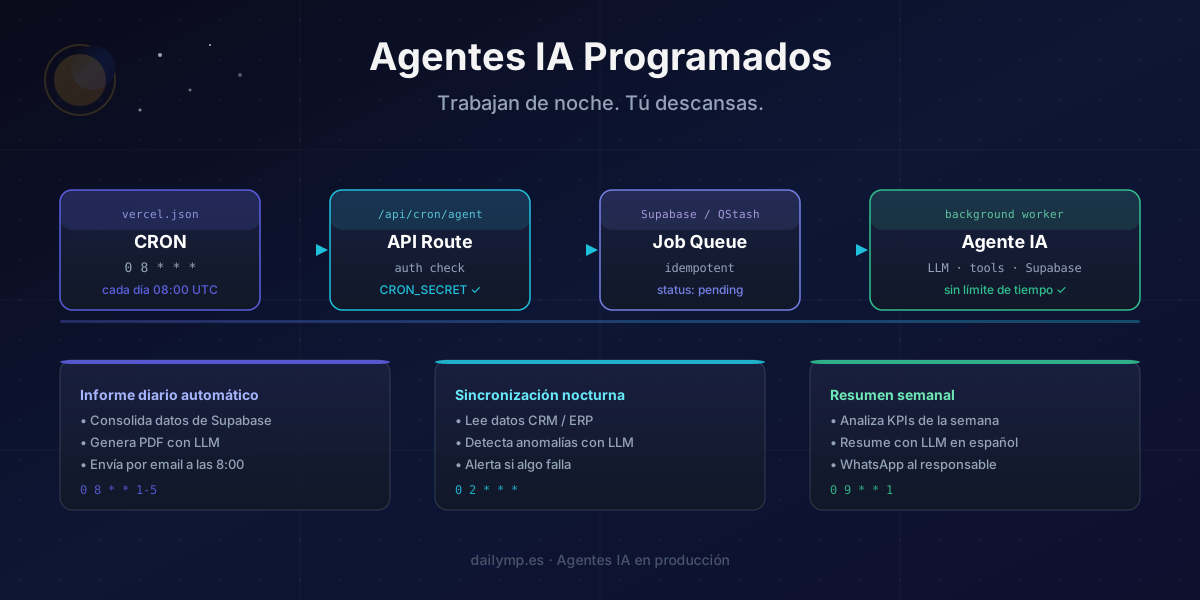
Scheduled AI Agents: Automate Without Hitting Send
You built the agent. It works. It extracts data, generates reports, sends emails. The problem: every time you want it to act, someone has to click a button or type a message.
That's not automation. That's a glorified keyboard shortcut.
The next level isn't building a smarter agent — it's building one that acts on its own, at the right time, even at 3 AM when nobody's watching.
The on-demand agent doesn't scale
Most AI agent implementations share the same pattern: the user sends a prompt, the agent responds. Useful, but it caps the real potential of automation.
The most valuable use cases in a business aren't conversational — they're recurring:
- The end-of-day report someone has to remember to ask for
- The nightly data sync done manually between systems
- The weekly KPI summary that gets postponed because there's always something urgent
- Billing anomaly detection nobody sees until the client calls
All of these share one trait: the value isn't in the response — it's in the fact that it happens without anyone requesting it.
That's what scheduled agents are for. And building them right has more edge cases than it looks.
The direct-cron trap
The most common mistake when implementing a cron agent: running the agent directly inside the cron handler.
// ❌ The pattern that looks right but breaks in production
export async function GET() {
  // This function dies if the agent takes more than 60s on Vercel Hobby
  // or 5min on Pro — no warning, no retry, no log
  const result = await runFullAgentWorkflow(); // 3-8 minutes in reality
  return Response.json({ result });
}
Vercel's cron fires an HTTP request. That request has the same timeout limits as any serverless function. If your agent takes four minutes to process a month of invoices, the cron dies silently at 60 seconds on Hobby — or at 300 seconds on Pro — with no visible error, no retry, no record that anything failed.
Monday comes and the CFO's report isn't there. Nobody knows why. You check Vercel and see the function invocation completion rate dropped to 0%. The morning someone notices is the morning something was already lost.
The right architecture: cron → enqueue → worker
The cron doesn't run the agent. The cron enqueues the work. The worker processes it with no time limit.
CRON (08:00 UTC)
  └─▶ API Route /api/cron/daily-report
        └─▶ INSERT job_queue (status: 'pending')
              └─▶ External worker / long-running Edge Function
                    └─▶ AI Agent (no time limit)
                          └─▶ Result in Supabase
This decoupling guarantees three things:
- The cron always finishes in under 200ms — never times out
- The agent can take as long as it needs
- If the agent fails, the job stays at
status: 'error'and you can retry
Vercel cron configuration
// vercel.json
{
  "crons": [
    {
      "path": "/api/cron/daily-report",
      "schedule": "0 8 * * 1-5"
    },
    {
      "path": "/api/cron/nightly-sync",
      "schedule": "0 2 * * *"
    }
  ]
}
The cron handler — enqueue only, never execute
// app/api/cron/daily-report/route.ts
import { headers } from 'next/headers';
import { createClient } from '@supabase/supabase-js';

const supabase = createClient(
  process.env.NEXT_PUBLIC_SUPABASE_URL!,
  process.env.SUPABASE_SERVICE_ROLE_KEY!
);

export const runtime = 'nodejs';

export async function GET() {
  // Verify the call comes from Vercel, not just anyone
  const authHeader = headers().get('authorization');
  if (authHeader !== `Bearer ${process.env.CRON_SECRET}`) {
    return Response.json({ error: 'Unauthorized' }, { status: 401 });
  }

  const today = new Date().toISOString().split('T')[0]; // YYYY-MM-DD

  // Prevent duplicates if the cron fires twice
  const { data: existing } = await supabase
    .from('agent_jobs')
    .select('id, status')
    .eq('type', 'daily_report')
    .eq('run_date', today)
    .maybeSingle();

  if (existing) {
    return Response.json({
      message: 'Job already scheduled or completed',
      status: existing.status,
    });
  }

  // Enqueue the work — handler ends here
  const { error } = await supabase.from('agent_jobs').insert({
    type: 'daily_report',
    run_date: today,
    status: 'pending',
    payload: { date: today, recipients: ['cfo@company.com'] },
  });

  if (error) {
    console.error('Failed to enqueue job:', error);
    return Response.json({ error: 'Enqueue failed' }, { status: 500 });
  }

  return Response.json({ message: 'Job enqueued', date: today });
}
Idempotency: the problem nobody thinks about until it happens
Crons are not deterministic. Vercel can fire the same cron twice if there's a network or clock issue. AWS does the same. Any distributed task system does the same.
If your agent isn't idempotent, a double fire produces double work: two emails to the CFO, two identical PDFs in the bucket, two rows in the database with the same report.
The solution is a combination of idempotency key (type + date) and database lock:
// lib/agent-jobs.ts
export async function claimJob(
  supabase: ReturnType<typeof createClient>,
  jobId: string
): Promise<boolean> {
  // Atomic UPDATE: only advances if status is 'pending'
  const { data, error } = await supabase
    .from('agent_jobs')
    .update({ status: 'running', started_at: new Date().toISOString() })
    .eq('id', jobId)
    .eq('status', 'pending') // Lock condition
    .select('id')
    .maybeSingle();

  if (error || !data) {
    // Another worker already claimed this job
    return false;
  }

  return true;
}
The worker only processes if the UPDATE returns a row. If two workers compete for the same job, one gets data and the other gets null. No race conditions, no duplicate work.
The agent worker — unhurried, unlimited
The worker is a separate function that runs outside the HTTP request lifecycle. It can be a long-running Edge Function, an Inngest function, a QStash task, or a Railway process. The key point: it doesn't share the cron handler's limits.
// lib/workers/daily-report.worker.ts
import { anthropic } from '@anthropic-ai/sdk';

export async function processDailyReport(job: AgentJob) {
  const { date, recipients } = job.payload;

  // 1. Fetch the day's data from Supabase
  const metrics = await fetchDailyMetrics(date);

  // 2. Generate the analysis with the LLM
  const analysis = await anthropic.messages.create({
    model: 'claude-sonnet-4-6',
    max_tokens: 2000,
    messages: [{
      role: 'user',
      content: `Analyze these metrics for ${date} and generate an executive summary for the management team. Highlight anomalies and trends.\n\nMetrics:\n${JSON.stringify(metrics, null, 2)}`,
    }],
  });

  const summary = analysis.content[0].type === 'text'
    ? analysis.content[0].text
    : '';

  // 3. Generate PDF and send emails
  await generateAndSendReport({ date, summary, metrics, recipients });

  return { summary, metricsCount: metrics.length };
}
Observability: knowing the 3 AM agent actually ran
If the agent fails at 3 AM and nobody sees it, did it fail? For your CFO, yes — the report isn't there.
You need three things:
1. A log of every execution in the database:
create table agent_jobs (
  id          uuid        default gen_random_uuid() primary key,
  type        text        not null,
  run_date    date        not null,
  status      text        default 'pending',
  payload     jsonb       not null default '{}',
  result      jsonb,
  error_msg   text,
  started_at  timestamptz,
  finished_at timestamptz,
  created_at  timestamptz default now(),
  unique (type, run_date)
);
2. Alerts on failure — a Slack webhook or email to the tech team when status = 'error':
async function notifyJobFailure(job: AgentJob, error: Error) {
  await fetch(process.env.SLACK_WEBHOOK_URL!, {
    method: 'POST',
    headers: { 'Content-Type': 'application/json' },
    body: JSON.stringify({
      text: `⚠️ Cron agent failed: *${job.type}* (${job.run_date})\n\`${error.message}\``,
    }),
  });
}
3. A minimal dashboard — a Supabase query showing the execution history. Ten seconds every morning confirms everything ran.
When to use Vercel Cron vs external services
Vercel Cron works well for agents that:
- Enqueue work in under 5 seconds
- Don't need more than one concurrent run
- Run on minute granularity (not sub-minute)
For more complex cases — multiple retries, priority queues, multi-step workflows — consider Inngest or QStash by Upstash. Both integrate well with the AI integration in Next.js stack we use at DAILYMP.
The key difference: Vercel Cron fires an HTTP request and doesn't track whether the work completed. Inngest and QStash manage state, retries, and failures natively — the right call when volume or business criticality justifies it.
The outcome: processes that don't rely on anyone's memory
A correctly scheduled agent doesn't require team discipline. The report arrives because the system generates it, not because someone requested it. The sync happens because it's on the server's calendar, not on a person's to-do list.
This is exactly the type of architecture we build in AI agent automation projects at DAILYMP: systems that run on their own, with real observability, not dependent on anyone pressing a button.
If your business has a recurring process that still depends on someone remembering to do it, there's an automated version waiting.