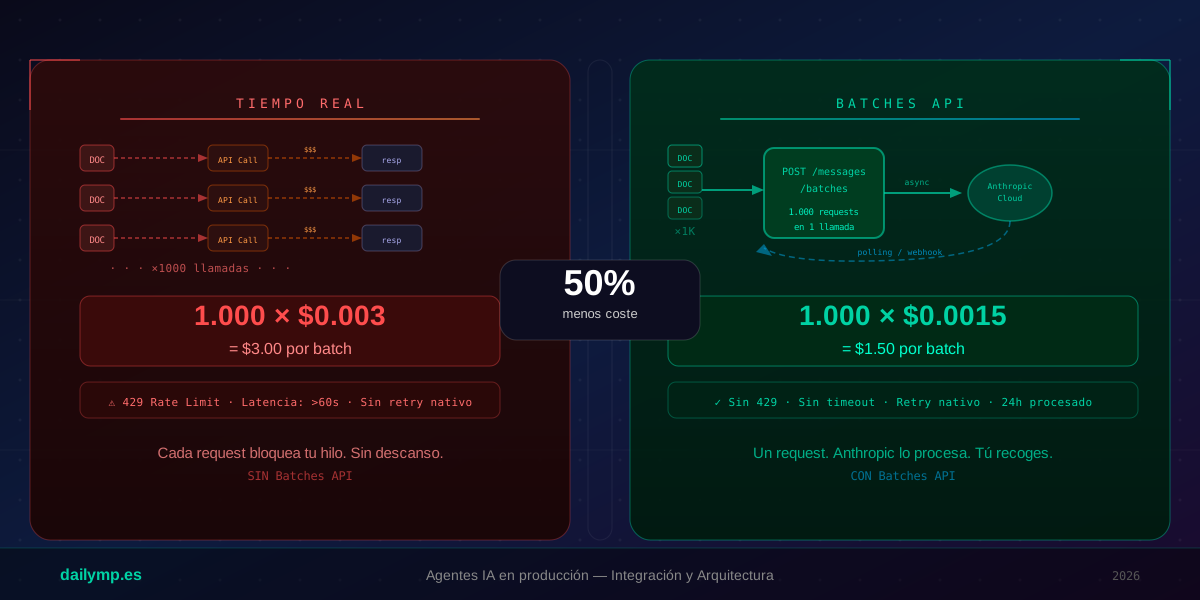
Anthropic Batches API: Cut Your AI Agent Costs 50%
You have a pipeline that processes 800 invoices at month-end. Each invoice is one LLM call. You launch 800 real-time requests, implement a semaphore to avoid rate-limit explosions, handle the 429s that still come through, and then look at your Anthropic bill at the end of the month.
The number is correct. But you're paying twice what you should.
The Anthropic Batches API has existed since 2024, and most teams don't use it. Not because it doesn't work — because they don't know it exists or don't understand when it makes sense.
What the Batches API Is and Why It Changes Your Cost Math
The standard Anthropic Messages API (POST /messages) processes one request and returns the response synchronously. You pay full price per input token and output token, in real time.
The Batches API (POST /messages/batches) accepts up to 10,000 requests in a single HTTP call, processes them asynchronously on Anthropic's infrastructure, and returns results when done. In exchange:
- 50% discount on price per token (both input and output)
- No rate limits on your side — Anthropic manages the queue
- Processing time guaranteed: up to 24 hours (in practice usually under 1 hour for small batches)
- Native retry: if a request fails, Anthropic retries it automatically
The trade-off is straightforward: you exchange real-time latency for price. For any task that doesn't need an immediate response — overnight processing, reports, document classification, data enrichment — this switch is a no-brainer.
When to Use Batch vs Real-Time
The rule is simple: if the user is waiting for the response, use real-time. If not, use Batch.
Use Batches API:
- Document processing at end of day (invoices, contracts, reports)
- Classification and labeling of historical data
- Generating summaries of past conversations
- Sentiment analysis of yesterday's support tickets
- Background database record enrichment
Use standard API:
- Real-time chat with users
- Agents responding to immediate events
- AI-powered form validation
- Content generation while the user waits
If your pipeline covers both cases, split them: real-time for urgent tasks, Batch for what can wait.
TypeScript Implementation
The Batches API has three operations: create the batch, check its status, and retrieve results.
Create the batch
import Anthropic from "@anthropic-ai/sdk";

const anthropic = new Anthropic({ apiKey: process.env.ANTHROPIC_API_KEY });

interface DocumentRequest {
  id: string;
  content: string;
}

async function createDocumentBatch(documents: DocumentRequest[]) {
  const requests = documents.map((doc) => ({
    custom_id: doc.id, // your identifier — you receive this in results
    params: {
      model: "claude-haiku-4-5-20251001", // use Haiku for classification: 4x cheaper
      max_tokens: 512,
      system:
        "Classify the document into one of these categories: INVOICE, CONTRACT, REPORT, OTHER. Reply with the category only.",
      messages: [
        {
          role: "user",
          content: doc.content,
        },
      ],
    },
  }));

  const batch = await anthropic.messages.batches.create({ requests });

  console.log(`Batch created: ${batch.id}`);
  console.log(`Status: ${batch.processing_status}`);
  console.log(`Requests: ${batch.request_counts.processing}`);

  return batch.id;
}
The custom_id is critical: it lets you join results back to your original data without relying on response order.
Poll for status
async function waitForBatch(batchId: string): Promise<void> {
  const POLL_INTERVAL_MS = 30_000; // 30 seconds between checks
  const MAX_WAIT_MS = 24 * 60 * 60 * 1000; // 24 hours max
  const startTime = Date.now();

  while (Date.now() - startTime < MAX_WAIT_MS) {
    const batch = await anthropic.messages.batches.retrieve(batchId);

    if (batch.processing_status === "ended") {
      console.log(`Batch done in ${(Date.now() - startTime) / 1000}s`);
      console.log(
        `Succeeded: ${batch.request_counts.succeeded}`
      );
      return;
    }

    if (batch.processing_status === "canceling") {
      throw new Error("Batch was cancelled");
    }

    console.log(
      `Processing: ${batch.request_counts.processing} remaining...`
    );
    await new Promise((resolve) => setTimeout(resolve, POLL_INTERVAL_MS));
  }

  throw new Error("Timeout waiting for batch");
}
In production, instead of an active polling loop, save the batchId to your database and trigger a check from a cron job every 10 minutes. Active loops work fine for one-off scripts or local development.
Retrieve and process results
interface ClassificationResult {
  documentId: string;
  category: string | null;
  error: string | null;
}

async function processBatchResults(
  batchId: string
): Promise<ClassificationResult[]> {
  const results: ClassificationResult[] = [];

  for await (const result of await anthropic.messages.batches.results(
    batchId
  )) {
    if (result.result.type === "succeeded") {
      const content = result.result.message.content[0];
      results.push({
        documentId: result.custom_id,
        category:
          content.type === "text" ? content.text.trim() : null,
        error: null,
      });
    } else {
      results.push({
        documentId: result.custom_id,
        category: null,
        error: result.result.error.error.message,
      });
    }
  }

  return results;
}
The async iterator handles pagination for you. If the batch has 10,000 results, you receive them as a stream without loading everything into memory.
Full Production Pattern: Overnight Batch Job
The most common use case is a job that runs at night and processes the day's documents. With Next.js and scheduled agents, the complete flow looks like:
- 00:00 — Cron triggers the job: queries your database for all unclassified documents from the day
- 00:01 — Creates the batch: sends 800 documents in a single HTTP call
- 00:01 to ~01:00 — Polling or webhook: checks batch status every 10 minutes
- ~01:00 — Retrieves results: updates the documents table with classifications
- 01:05 — Notifies: Slack/email summary of the processing run
// Save batchId to DB so the cron can pick it up
async function saveBatchJob(batchId: string, documentIds: string[]) {
  await supabase.from("batch_jobs").insert({
    batch_id: batchId,
    document_ids: documentIds,
    status: "processing",
    created_at: new Date().toISOString(),
  });
}

// The 01:00 cron checks if the batch finished
async function checkAndProcessBatch(jobId: string) {
  const { data: job } = await supabase
    .from("batch_jobs")
    .select("*")
    .eq("id", jobId)
    .single();

  const batch = await anthropic.messages.batches.retrieve(job.batch_id);

  if (batch.processing_status !== "ended") return; // still processing

  const results = await processBatchResults(job.batch_id);

  // Bulk upsert instead of 800 individual updates
  await supabase.from("documents").upsert(
    results.map((r) => ({
      id: r.documentId,
      category: r.category,
      classified_at: new Date().toISOString(),
    }))
  );

  await supabase
    .from("batch_jobs")
    .update({ status: "completed" })
    .eq("id", jobId);
}
The Real Cost Calculation
A concrete example. 800 documents, 500 input tokens per document, 50 output tokens per response:
Real-time (Claude Haiku 4.5):
- 800 × 500 input tokens = 400,000 tokens × $0.00080/1K = $0.32
- 800 × 50 output tokens = 40,000 tokens × $0.00400/1K = $0.16
- Total: $0.48
Batches API (Claude Haiku 4.5 in batch):
- 50% discount on both input and output
- Total: $0.24
That's $0.24 saved per run. Running daily for a year: $87.60 in annual savings on a modest pipeline. At 5,000 documents per day, that's $547 less per year — plus you eliminate all the rate limiting logic, retry handlers, and semaphore code.
The code you don't have to write has value too.
What Changes in Your Architecture
Adopting the Batches API doesn't require refactoring your agent. It requires separating two concepts you probably had mixed together:
- Tasks that need an immediate response — keep using the standard API
- Tasks that can wait — move to Batch, with polling or webhook, managed by a cron
That conceptual shift — from "I call the LLM and wait" to "I queue the task and process when ready" — is the same shift that separates a system that scales from one that breaks when volume doubles.
If you're building document processing pipelines, batch classification systems, or overnight reporting workflows and want to review the architecture before the API bill gives you the first signal, at DAILYMP we integrate these systems from design through deployment.