It's 10 AM. Your Team Has Been Reading Emails for an Hour.
It's 10 AM.
Your team has been in the office for an hour. In that time, each person has been going through their inbox.
There's a delivery confirmation from a supplier. An invoice from a software subscription no one asked to change. An email where a client is talking to their accountant and cc'd you out of courtesy. Someone asking if the price is still the same as last year. A newsletter notification no one ever unsubscribes from.
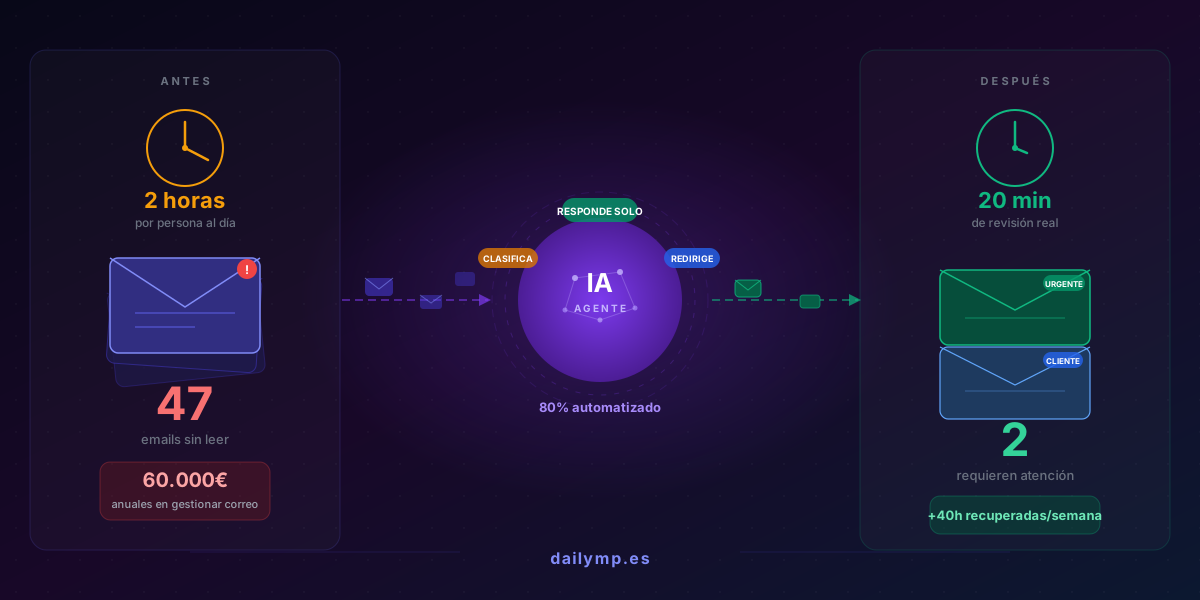
And somewhere buried underneath all of that — below forty-seven unread messages — is the email from a potential client who reached out about your services last night at 6 PM.
You'll find it eventually. But by then, that client has already written to three of your competitors.
What reading emails actually costs your business
You don't need a study. Just look at your own numbers.
If you have five people on your team and each one spends between ninety minutes and two hours a day managing emails — reading, sorting, responding, forwarding, searching for old threads, deciding what to archive — here's what you're paying:
5 people × 2 hours × €25/hour = €250 per day.
Per week: €1,250. Per month: €5,000. Per year: over €60,000 managing an inbox.
Not answering clients. Not closing deals. Not doing work that grows the business. Reading, sorting, and deciding what to do with every message that comes in.
And that doesn't count the opportunity cost: projects that move slower because someone is reviewing notifications instead of working on what actually matters.
90% of your email doesn't need a human to read it
This is uncomfortable, but it's true.
If you track every email your company receives for one week, the breakdown typically looks like this:
- Automatic notifications (order confirmations, receipts, system alerts): 25–30%
- Newsletters and marketing emails no one explicitly signed up for: 15–20%
- CC'd emails where someone looped you in but no action is required: 20–25%
- Routine requests (invoice copies, order status, cancellation policy, opening hours): 10–15%
- Emails that actually need a human response: 10–15%
Do the math. Out of every ten emails that arrive, one or two require a real decision from someone on your team. The other eight or nine are noise your team processes anyway — one by one, every single day.
What slips through while your team is processing noise
The problem isn't just the time lost. It's what doesn't happen while that time is consumed.
When your team is working through low-value emails, they take longer to see the high-value ones. The client who asked for a quote yesterday at 7 PM has been waiting fourteen hours for a response because their email is buried under fifty notifications.
The supplier who confirmed tomorrow's delivery and added a last-minute change in the final paragraph. The potential partner who asked if you were available this week and, getting no quick reply, assumed you were busy and moved on.
These aren't edge cases. They're what happens when email volume exceeds the capacity to process it with real attention. The person scanning their inbox to catch up isn't reading carefully. They're skimming. And in that skim, important things disappear.
How an AI agent manages your inbox without anyone reading every email
An AI agent connected to your email doesn't eliminate email. It changes who handles it first.
Instead of each team member opening their inbox and sorting through everything manually, the agent does that in seconds — before anyone touches it:
- Automatically classifies every email by type and priority
- Responds to routine requests on its own: invoice copies, opening hours, order status, return policy — with the right information, without anyone reviewing it
- Routes emails that need attention to the right person, with a context summary so they don't have to read the full thread
- Groups notifications into a daily digest instead of fifty interruptions spread throughout the day
- Immediately flags anything urgent: a client writing for the second time, a complaint, a quote request
Your team stops reading emails. They start reviewing what the agent flagged as important — which is 10% to 20% of the total.
What used to be two hours of inbox management becomes twenty minutes of genuine review.
What changes in the first month
The most visible change isn't the time saved. It's the sense of control.
When you know no important email is going to slip through — because there's a system that catches it and puts it in front of whoever needs to see it — you stop checking the inbox every fifteen minutes just in case.
Potential clients get a reply in minutes, not hours. Suppliers get confirmation the same day. Routine requests resolve themselves. And your team works with a clean inbox instead of the constant feeling that something is always piling up.
Companies that implement this typically recover 35 to 50 hours per week of real work time distributed across the team — hours previously spent sorting, responding to standard requests, and searching for emails that should have been easy to find.
How it works in practice
Integrating AI with the tools your business already uses — Gmail, Outlook, your CRM — doesn't require changing how your team works or learning anything new.
The typical process looks like this:
- We analyze your company's email patterns for one week: volume, categories, average response times
- We configure the agent with classification rules and standard responses for your most frequent routine requests
- We connect it to your existing tools — no migration, no changes to your current setup
- Your team only steps in when something genuinely requires human judgment: a negotiation, a complex complaint, a decision that can't be automated
Setup time in most businesses is less than a week. The results are visible from day one.
A concrete question
How many emails did your company receive this week?
How many of them actually required a person to read them and make a decision?
If the gap between those two numbers is large, you already have the diagnosis. The next step is deciding whether you want to keep paying for that gap — or let a system handle it instead.
Let's talk about automating your company's email management →