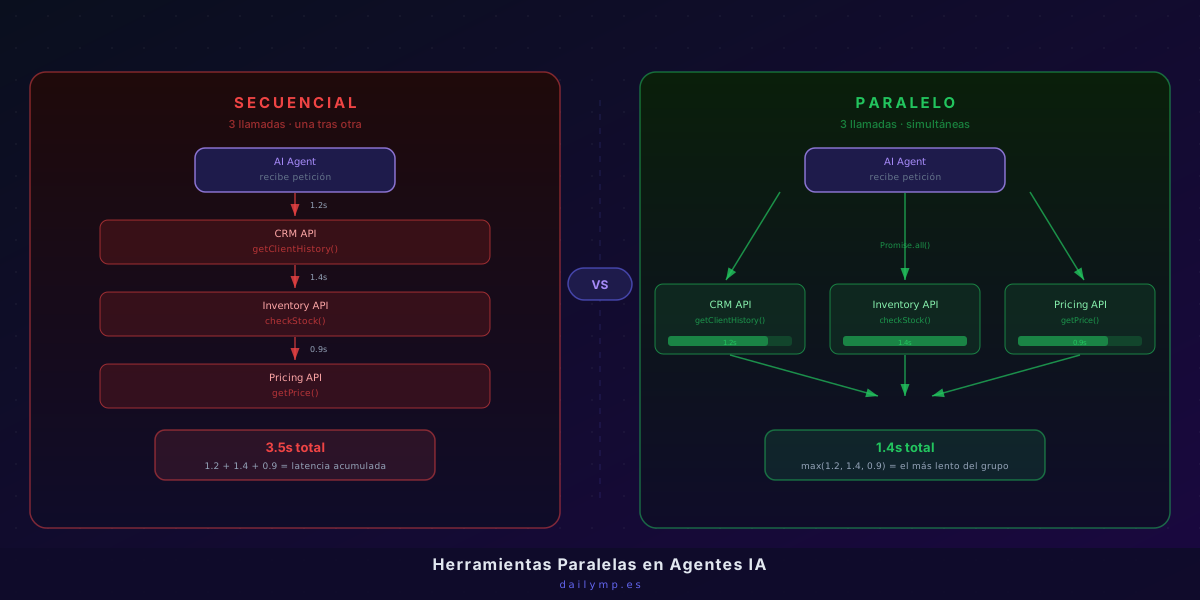
Parallel Tool Calling in AI Agents: 60% Less Latency
The quote agent works. You deployed it, the client tests it, and a few seconds later the answer appears. Four seconds, every single time.
What's happening inside: the agent calls the CRM to fetch client history, waits for the response, calls the inventory system to check stock, waits, calls the pricing API to calculate the rate, waits. Three calls in series. Three accumulated waits.
This is not a model problem. It's an architecture problem.
Why Sequential Tool Calling Is the Default — and Why It Kills Latency
When you first implement tool calling, the most natural pattern looks like this:
// The pattern that seems right but accumulates latency
const clientHistory = await getClientHistory(clientId); // 1.2s
const stockStatus = await checkStock(productIds);        // 1.4s
const pricing = await getPrice(productId, volume);       // 0.9s

// Total: 3.5s — and that's when everything goes well
Logically it makes sense: call a function, wait for the result, continue. The problem is that these three calls don't depend on each other. You don't need client history to check stock. You don't need stock to get a price. You're serializing by default, not by necessity.
In production, every 100ms of added latency has a real cost: users who drop off, conversations that feel sluggish, agents that seem less capable than they actually are.
How Claude's API Signals Parallel Tool Calls
Before looking at server-side code, understanding what happens at the model level matters. When you design your system prompt and tool descriptions well, Claude can return multiple tool_use blocks in a single response.
This is the model telling you: "I can handle these three things at the same time." The API response looks like this:
{
  "content": [
    {
      "type": "tool_use",
      "id": "toolu_01",
      "name": "getClientHistory",
      "input": { "clientId": "c-4821" }
    },
    {
      "type": "tool_use",
      "id": "toolu_02",
      "name": "checkStock",
      "input": { "productIds": ["p-100", "p-101"] }
    },
    {
      "type": "tool_use",
      "id": "toolu_03",
      "name": "getPrice",
      "input": { "productId": "p-100", "volume": 5 }
    }
  ],
  "stop_reason": "tool_use"
}
The model already did the work of identifying what can be parallelized. The mistake is not taking advantage of it.
Implementation with Promise.all() and Error Handling
The correct pattern for executing those three tool_use blocks in parallel:
import Anthropic from "@anthropic-ai/sdk";

type ToolUseBlock = {
  type: "tool_use";
  id: string;
  name: string;
  input: Record<string, unknown>;
};

type ToolResult = {
  type: "tool_result";
  tool_use_id: string;
  content: string;
};

async function executeToolsInParallel(
  toolUseBlocks: ToolUseBlock[]
): Promise<ToolResult[]> {
  const results = await Promise.allSettled(
    toolUseBlocks.map(async (block) => {
      const result = await callTool(block.name, block.input);
      return {
        type: "tool_result" as const,
        tool_use_id: block.id,
        content: JSON.stringify(result),
      };
    })
  );

  return results.map((r, i) => {
    if (r.status === "fulfilled") return r.value;
    // If a tool fails, return the error — the agent can recover
    return {
      type: "tool_result" as const,
      tool_use_id: toolUseBlocks[i].id,
      content: JSON.stringify({ error: r.reason?.message ?? "Tool failed" }),
    };
  });
}
Note the use of Promise.allSettled instead of Promise.all. The difference is critical: Promise.all cancels everything if a single tool fails. Promise.allSettled returns each tool's result independently — the agent receives the error as a tool_result with error content and can decide how to handle it on the next turn.
The Full Loop: Agent Turn with Parallel Tools
async function runAgentWithParallelTools(
  userMessage: string,
  tools: Anthropic.Tool[]
): Promise<string> {
  const client = new Anthropic();
  const messages: Anthropic.MessageParam[] = [
    { role: "user", content: userMessage },
  ];

  while (true) {
    const response = await client.messages.create({
      model: "claude-sonnet-4-6",
      max_tokens: 4096,
      tools,
      messages,
    });

    // Did the agent finish?
    if (response.stop_reason === "end_turn") {
      const text = response.content.find((b) => b.type === "text");
      return text?.type === "text" ? text.text : "";
    }

    // Extract all tool_use blocks
    const toolUseBlocks = response.content.filter(
      (b): b is ToolUseBlock => b.type === "tool_use"
    );

    if (toolUseBlocks.length === 0) break;

    // Execute in parallel — this is where the difference is made
    const toolResults = await executeToolsInParallel(toolUseBlocks);

    // Append the assistant turn and the results
    messages.push({ role: "assistant", content: response.content });
    messages.push({ role: "user", content: toolResults });
  }

  return "";
}
With this pattern, if the model returns three tool_use blocks, you execute them with Promise.allSettled and the total time becomes max(1.2, 1.4, 0.9) = 1.4s, not 1.2 + 1.4 + 0.9 = 3.5s.
When NOT to Parallelize: Tool Dependencies
Parallel execution isn't always the right answer. Some cases require results from one tool before calling the next:
// This flow CANNOT parallelize — step 2 depends on step 1
const reservationId = await createReservation(data);       // must come first
const confirmation = await sendConfirmation(reservationId); // needs the ID
When the model understands there's a dependency, it returns tool_use blocks in separate turns — one per turn — and the natural loop handles it correctly. If you find yourself forcing parallelism in dependent cases, the symptom is incorrect results or the agent entering a loop.
The practical rule: if tool B needs an output value from tool A, they go in separate turns. If they're independent, Claude will group them on its own — just make sure you process them in parallel when they arrive.
Designing the System Prompt to Encourage Batching
The model batches tools when it understands it can. You can encourage this in the system prompt:
When you need multiple independent pieces of data (client history, stock,
prices), call all relevant tools in the same turn instead of one at a time.
Group independent calls together.
This instruction doesn't change agent logic — it just tells the model it doesn't need to be conservative about the number of tool calls per turn. In internal benchmarks, this instruction alone reduces the number of turns required by 30-40% in agents with four or more available tools.
The Production Result
This pattern is at the core of the AI integration agents we build for clients. A quote agent that previously took 4-5 seconds to generate a response now takes 1.5-2 seconds — without changing the model, without increasing the API budget.
The difference isn't just performance. An agent that responds in 1.5 seconds feels capable and fast. One that takes 5 seconds feels slow even if the answer is exactly the same.
If you're building agents with access to multiple systems — CRM, ERP, inventory, pricing, history — and you're still serializing calls, you're leaving latency on the table with every interaction. Let's look at your specific case.
Message me on WhatsApp and we'll identify exactly where your agent is accumulating unnecessary latency.