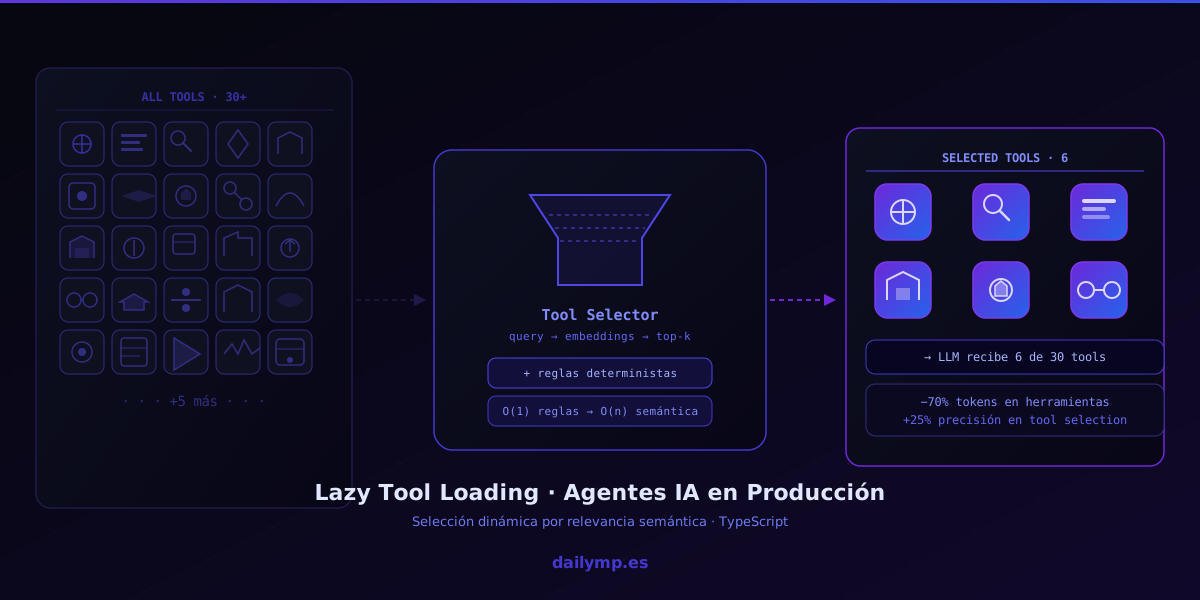
Lazy Tool Loading in AI Agents: Context and Accuracy
You have an agent with 30 tools. A CRM, a database, four ERP endpoints, a semantic search engine, functions for sending emails, creating tasks, updating records...
When a user writes "when is the next review for the Acme contract?", your agent loads all 30 tool definitions into the context and hands them to the LLM.
The model has to read each definition, pick the right one, and decide how to call it. With 30 tools, that's an extra 4,000–6,000 tokens per call. If the agent handles 500 queries a day, you're burning 2–3 million tokens per month just on tool payload. And that's when things go well.
The real problem is that too many options confuse the model.
Why too many tools hurt LLM accuracy
Current models do well with 5–8 clearly differentiated choices. With 30 tools, three things happen:
Semantic collisions. If you have search_contracts, get_contract_by_id, list_active_contracts and find_expired_contracts, the model picks the wrong one even when the outcome would be similar. Not because it doesn't understand the difference — user queries rarely specify which variant they need.
Attention dilution. The transformer distributes attention across the full context. With 30 tool definitions in the prompt, the attention budget available for actual reasoning about the query shrinks. System instructions and tool schemas compete with thinking.
Overconfidence in irrelevant tools. The model sees an email-sending function and, even though the user just asked about a contract, sometimes decides to add a notification step nobody requested.
The fix isn't having fewer tools. It's loading only the relevant ones per query.
The pattern: tool registry + semantic selection
The architecture has three layers:
- Tool registry: a full catalogue with definitions and metadata for every tool
- Tool selector: given the current query context, returns the relevant tool subset
- Tool loader: builds the final prompt with only the selected tools
Tool registry in TypeScript
interface ToolDefinition {
  name: string;
  description: string;
  inputSchema: object;
  tags: string[];        // for domain-based filtering
  embedding?: number[];  // pre-computed at server startup
}

class ToolRegistry {
  private tools = new Map<string, ToolDefinition>();

  register(tool: ToolDefinition) {
    this.tools.set(tool.name, tool);
  }

  getAll(): ToolDefinition[] {
    return [...this.tools.values()];
  }

  getByTags(tags: string[]): ToolDefinition[] {
    return this.getAll().filter((t) =>
      t.tags.some((tag) => tags.includes(tag))
    );
  }
}
Semantic selector
Embed the user's query and compare it against each tool's pre-computed embedding:
async function selectTools(
  query: string,
  registry: ToolRegistry,
  maxTools = 6
): Promise<ToolDefinition[]> {
  const queryEmbedding = await embed(query);

  const scored = registry.getAll().map((tool) => ({
    tool,
    score: cosineSimilarity(queryEmbedding, tool.embedding!),
  }));

  return scored
    .sort((a, b) => b.score - a.score)
    .slice(0, maxTools)
    .map((s) => s.tool);
}
Tool embeddings are pre-computed at startup and kept in memory. Recompute only when you add a new tool.
Layer with deterministic rules
For common, well-known intents, rules are faster and more predictable than semantic search:
const INTENT_RULES: Record<string, string[]> = {
  contract: ["search_contracts", "get_contract_detail", "list_active_contracts"],
  email:    ["send_email", "get_email_template", "list_email_drafts"],
  crm:      ["search_customer", "update_customer", "create_contact"],
};

function rulesBasedPreselect(query: string): string[] | null {
  const lower = query.toLowerCase();
  for (const [intent, tools] of Object.entries(INTENT_RULES)) {
    if (lower.includes(intent)) return tools;
  }
  return null;
}

async function getToolsForQuery(
  query: string,
  registry: ToolRegistry
): Promise<ToolDefinition[]> {
  // Rules first: O(1), no embedding API call needed
  const rulesResult = rulesBasedPreselect(query);
  if (rulesResult) {
    return rulesResult
      .map((name) => registry.get(name))
      .filter((t): t is ToolDefinition => t !== undefined);
  }
  // Fallback: semantic selection
  return selectTools(query, registry);
}
In production, 70–80% of queries match known rules. Semantic search handles the long tail without you having to enumerate every possible intent.
Results in real projects
On agents built at DAILYMP using this architecture:
- 60–70% fewer tokens in the tool payload per call
- 15–25% improvement in tool selection accuracy (fewer "wrong tool chosen" errors)
- Lower latency because the LLM processes a smaller context window
The most important gain isn't cost — it's quality. An agent with 30 tools that loads the 6 most relevant ones answers better than one that loads all 30 and occasionally gets lost choosing.
We apply this pattern early in any AI agent integration project where the agent needs to touch multiple business systems. When the agent connects to an ERP, a CRM, a contracts database, and a ticketing system, tool selection matters as much as the main prompt.
When to implement it — and when not to
Worth it when:
- You have more than 10–12 tools in the agent
- The tools span distinct semantic domains (finance, HR, logistics, communications)
- Cost or latency are already concerns in production
Skip it when:
- You have 5–6 very distinct tools — load them all and keep the code simple
- All tools are in the same domain — the model doesn't get confused as easily
- A wrong tool selection has serious consequences — better to over-load and use clear instructions
The implementation overhead is low: a tool registry, a selection function, and embeddings pre-computed at startup. An afternoon of work that pays dividends as the agent scales.
The most common mistake when scaling an agent
Most teams add tools without rethinking the loading architecture. They start with 5, reach 20, and keep loading all of them because "it works." When accuracy drops or costs climb, they blame the model instead of the context.
This is exactly the kind of architectural issue we fix in AI Driven Development projects: not swapping the model, but fixing how the model receives information.
How many tools does your agent have right now? If you're past 10 and the model is picking wrong or the cost per call is starting to sting, let's talk.