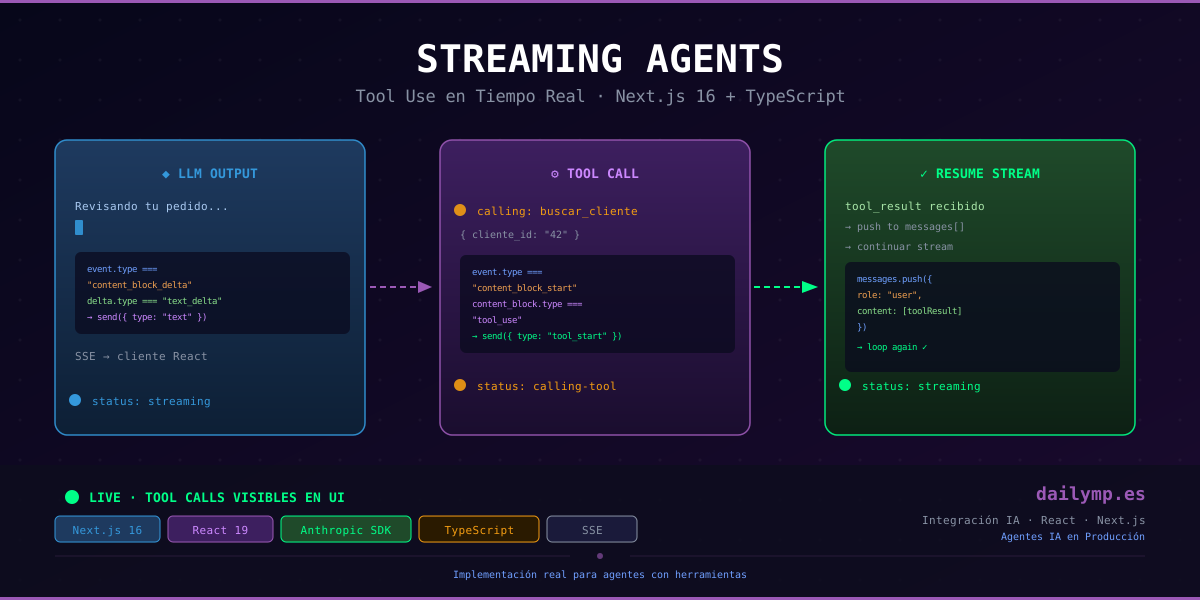
Streaming Tool Use in Next.js: AI Agent UX That Doesn't Freeze
Your customer support agent starts its response: "I'm checking your order...". Tokens flow one by one. Everything looks good. Then the agent needs to query the client database. The stream stops. The cursor blinks. The user stares at a frozen screen for three seconds. They close the tab.
This isn't a Vercel bug or a timeout issue. It's a streaming architecture problem. Most AI tutorials show how to stream text. None explain what happens when the agent calls a tool mid-stream — and how to show the user that something is actively happening while they wait.
Why Streaming Breaks With Tool Calls
Anthropic's SDK emits several event types when you use messages.stream(). Most implementations only listen to one:
| Event | Meaning |
|---|---|
content_block_delta + text_delta | Generated text token |
content_block_start + tool_use | Agent wants to call a tool |
content_block_delta + input_json_delta | Tool parameters (incremental) |
message_stop | Agent finished its turn |
The common mistake: the server only forwards text deltas, executes the tool silently, and resumes the stream. The client sees text, silence, more text. It has no idea the agent is working.
The fix is to emit a server-sent event for every phase — including when a tool call starts and which tool is being called — so the client can show concrete progress indicators.
The Server: Route Handler in Next.js 16
The correct pattern uses an explicit agentic loop: the server keeps iterating while the model returns stop_reason: "tool_use". Each iteration sends SSE events to the client.
// app/api/agent/stream/route.ts
import Anthropic from "@anthropic-ai/sdk";

const anthropic = new Anthropic();

const TOOLS: Anthropic.Messages.Tool[] = [
  {
    name: "lookup_client",
    description: "Retrieves client history and orders by ID",
    input_schema: {
      type: "object" as const,
      properties: { client_id: { type: "string", description: "Client ID" } },
      required: ["client_id"],
    },
  },
];

export async function POST(req: Request) {
  const { message } = await req.json();
  const encoder = new TextEncoder();

  const stream = new ReadableStream({
    async start(controller) {
      const send = (data: object) =>
        controller.enqueue(
          encoder.encode(`data: ${JSON.stringify(data)}\n\n`)
        );

      const messages: Anthropic.Messages.MessageParam[] = [
        { role: "user", content: message },
      ];

      // Agentic loop: model may call N tools before giving final answer
      while (true) {
        const agentStream = anthropic.messages.stream({
          model: "claude-sonnet-4-6",
          max_tokens: 1024,
          tools: TOOLS,
          messages,
        });

        let activeToolBlock: Anthropic.Messages.ToolUseBlock | null = null;

        for await (const event of agentStream) {
          if (
            event.type === "content_block_delta" &&
            event.delta.type === "text_delta"
          ) {
            send({ type: "text", text: event.delta.text });
          } else if (
            event.type === "content_block_start" &&
            event.content_block.type === "tool_use"
          ) {
            // Notify client: agent is calling this specific tool
            activeToolBlock = event.content_block;
            send({ type: "tool_start", name: event.content_block.name });
          }
        }

        const finalMsg = await agentStream.finalMessage();

        if (finalMsg.stop_reason !== "tool_use" || !activeToolBlock) {
          send({ type: "done" });
          controller.close();
          break;
        }

        // Execute tool and notify client
        const toolResult = await executeToolCall(activeToolBlock);
        send({ type: "tool_result", name: activeToolBlock.name });

        // Build history for next iteration — both blocks required
        messages.push({ role: "assistant", content: finalMsg.content });
        messages.push({
          role: "user",
          content: [
            {
              type: "tool_result",
              tool_use_id: activeToolBlock.id,
              content: JSON.stringify(toolResult),
            },
          ],
        });
      }
    },
  });

  return new Response(stream, {
    headers: {
      "Content-Type": "text/event-stream",
      "Cache-Control": "no-cache",
      Connection: "keep-alive",
    },
  });
}

async function executeToolCall(
  block: Anthropic.Messages.ToolUseBlock
): Promise<unknown> {
  const input = block.input as { client_id?: string };
  // Replace with real DB or CRM call
  return {
    name: "García López",
    orders: 3,
    last_order: "2026-09-08",
    status: "active",
  };
}
The detail most rushed implementations get wrong: the history must include both the assistant's tool_use block and the user's tool_result block. Without both, the model loses context for the next turn.
The Client: React Hook With Agent State
The hook manages four states: idle, streaming, calling-tool, and done. This allows rendering specific feedback at each phase.
// hooks/useAgentStream.ts
import { useState } from "react";

type AgentStatus = "idle" | "streaming" | "calling-tool" | "done";

export function useAgentStream() {
  const [text, setText] = useState("");
  const [status, setStatus] = useState<AgentStatus>("idle");
  const [activeTool, setActiveTool] = useState<string | null>(null);

  const send = async (message: string) => {
    setText("");
    setStatus("streaming");

    const response = await fetch("/api/agent/stream", {
      method: "POST",
      headers: { "Content-Type": "application/json" },
      body: JSON.stringify({ message }),
    });

    const reader = response.body!.getReader();
    const decoder = new TextDecoder();

    while (true) {
      const { done, value } = await reader.read();
      if (done) break;

      for (const line of decoder.decode(value).split("\n")) {
        if (!line.startsWith("data: ")) continue;
        try {
          const event = JSON.parse(line.slice(6));

          switch (event.type) {
            case "text":
              setText((prev) => prev + event.text);
              break;
            case "tool_start":
              setStatus("calling-tool");
              setActiveTool(event.name);
              break;
            case "tool_result":
              setStatus("streaming");
              setActiveTool(null);
              break;
            case "done":
              setStatus("done");
              break;
          }
        } catch {
          // Ignore malformed stream lines
        }
      }
    }
  };

  return { text, status, activeTool, send };
}
In the UI, the calling-tool state lets you show exactly what the agent is doing:
const { text, status, activeTool, send } = useAgentStream();

<div>
  {text && <p>{text}</p>}
  {status === "calling-tool" && (
    <span className="text-yellow-400 text-sm animate-pulse">
      Querying {activeTool?.replace(/_/g, " ")}...
    </span>
  )}
</div>
What Changes in Production
Without this pattern: generated text → 2–3 seconds of silence → more text. User has no idea whether the app is working.
With this pattern: generated text → "Querying client history..." → text with real data. The user sees a coherent, transparent process.
The impact is more than perceptual. Agents with real tool latencies get mistaken for crashes when users receive no feedback. A correct indicator turns a 3-second wait into something tolerable.
This is the standard pattern in all the AI integration projects we deliver at DAILYMP — the agent communicates what it's doing in real time, before giving the final answer.
Three Gotchas That Break the Implementation
1. Not Including the tool_use Block in Assistant History
If you send only the tool_result without the preceding assistant tool_use block, the model receives a tool response with no context. This manifests as strange behavior or an SDK exception.
2. Assuming Only One Tool Call Per Turn
A real-world agent can chain multiple tool calls. The while (true) loop is intentional: it only exits when stop_reason is not "tool_use". If you implement this as a single iteration, the agent truncates its response whenever it needs more than one tool.
3. Not Handling Tool Execution Errors
If your database call fails, you must still send a tool_result with the error — the model needs to know the tool responded, even if it failed. If you send nothing, the loop hangs indefinitely.
try {
  const result = await executeToolCall(activeToolBlock);
  messages.push({ role: "user", content: [{ type: "tool_result", tool_use_id: activeToolBlock.id, content: JSON.stringify(result) }] });
} catch (err) {
  messages.push({ role: "user", content: [{ type: "tool_result", tool_use_id: activeToolBlock.id, content: `Error: ${(err as Error).message}`, is_error: true }] });
}
The Real Cost of Getting It Wrong
Getting this architecture right from scratch takes 3–8 days depending on agent complexity: the agentic loop, correct history management, tool error handling, cancellation with AbortController, reconnection on dropped connections. Each piece has its own edge cases.
In AI Driven Development projects, this is infrastructure we deliver in the first sprint — not something to discover after users start complaining about frozen screens in production.
If you're building a production agent with tool use and don't want to spend days on plumbing, message me on WhatsApp. What you just read is exactly how we start with every client.