AI Agent Tool Cache: Stop Redundant API Calls in Prod
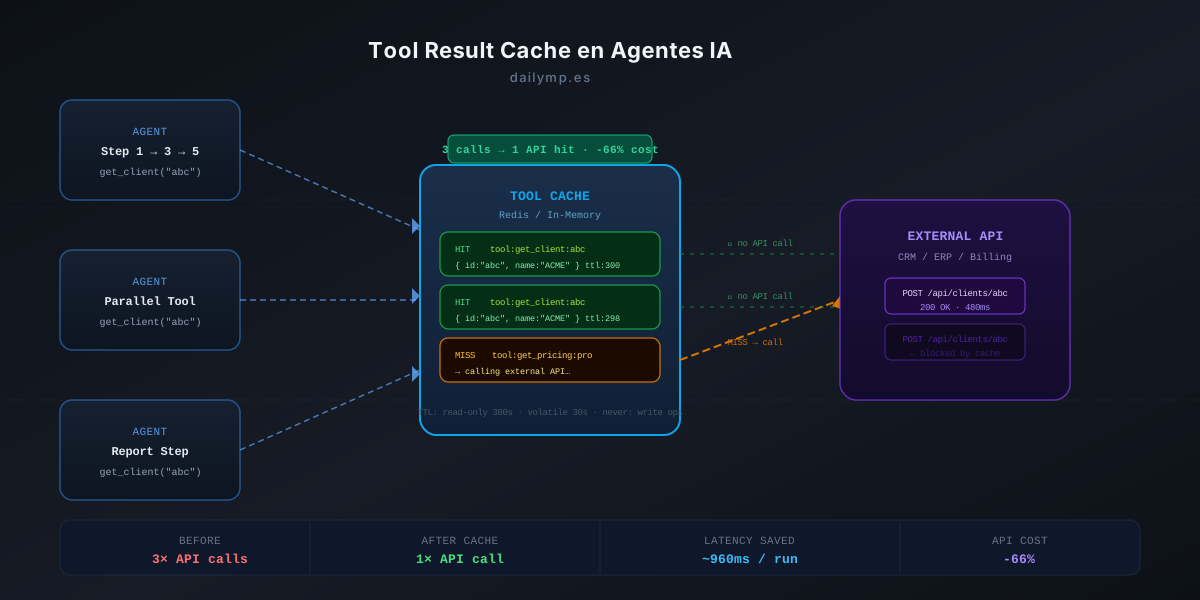
Your billing automation agent has five steps. Step 2 calls get_client_data("abc-123") to build the invoice body. Step 3 calls it again to fill the email subject. Step 5 calls it once more to populate the final report.
Three identical calls. Three times 480ms of latency. Three times the cost of the external API.
The LLM isn't at fault here — it doesn't "remember" having already executed that tool with those arguments. Each step in the workflow is a fresh context.
Why semantic cache doesn't solve this
Two patterns get confused here, and it's worth separating them clearly:
Semantic cache stores LLM responses when users ask similar questions. "How much does it cost?" and "What's the price?" return the same cached answer. The saving is in model calls.
Tool result cache operates at a completely different layer: it stores the result of an external tool call when it's invoked with the same arguments, within the same agent run. The saving is in external API calls — CRM, ERP, third-party services, databases.
They're complementary. If you have both, you reduce costs on two fronts. If you only have one, you're still overpaying on the other.
The pattern: transparent wrapper over any tool
The cleanest implementation is a wrapper that intercepts tool execution before it reaches the external API:
import { createHash } from 'crypto';
import { Redis } from '@upstash/redis';

class CachedTool {
  constructor(
    private tool: { name: string; execute: (args: unknown) => Promise<unknown> },
    private redis: Redis,
    private ttl: number
  ) {}

  async execute(args: unknown): Promise<unknown> {
    const key = this.buildKey(args);
    const cached = await this.redis.get<string>(key);
    if (cached) return JSON.parse(cached);

    const result = await this.tool.execute(args);
    await this.redis.setex(key, this.ttl, JSON.stringify(result));
    return result;
  }

  private buildKey(args: unknown): string {
    const hash = createHash('sha256')
      .update(`${this.tool.name}:${JSON.stringify(args)}`)
      .digest('hex');
    return `toolcache:${hash}`;
  }
}
The agent calls cachedTool.execute(args) exactly as before. On a hit, it returns the stored data in under 10ms instead of waiting 400–600ms for the external API. On a miss, it executes the tool, stores the result, and returns it.
What to cache — and what never to cache
This is the most important design decision. The rule is simple: only cache idempotent tools.
Cache these (read operations):
get_client,get_invoice,get_product_catalogquery_database,read_document,fetch_config- Any call whose result doesn't change if executed N times
Never cache these (write operations):
send_email,send_whatsapp,create_recordupdate_status,delete_item,charge_payment- Any operation with side effects
If you cache send_email, the first run works. Subsequent runs return the cached result from the first execution — and the email never gets sent again. That's exactly what you don't want.
A way to enforce this distinction in TypeScript is to type tools by their nature:
type ReadTool = { readonly idempotent: true; ttl: number };
type WriteTool = { readonly idempotent: false };

function wrapIfCacheable(
  tool: { name: string; execute: Function } & (ReadTool | WriteTool),
  redis: Redis
) {
  if (!tool.idempotent) return tool;
  return new CachedTool(tool, redis, tool.ttl);
}
Three TTL levels based on data volatility
Using the same TTL for everything is the second most common mistake after caching writes:
| Data type | Recommended TTL | Example |
|---|---|---|
| Configuration data | 3,600s (1h) | pricing, product catalog |
| Client data | 300s (5 min) | name, email, address |
| Order status | 30s | updated stock, payment state |
| Real-time data | 0 (don't cache) | live quotes, critical inventory |
If a client updates their email and the agent uses cached data for 5 minutes, that's an acceptable tradeoff. If a payment status is 30 seconds stale, also fine. If you cache a financial account balance for an hour, that could be a real problem.
TTL is an explicit commitment between consistency and performance. Document that commitment in code.
Request-level cache: the simplest case
For many workflows, you don't need Redis at all. A simple Map in local memory that lives for the duration of the run is enough:
class RequestScopedCache {
  private store = new Map<string, unknown>();

  wrap<T>(
    tool: (args: T) => Promise<unknown>,
    name: string
  ) {
    return async (args: T) => {
      const key = `${name}:${JSON.stringify(args)}`;
      if (this.store.has(key)) return this.store.get(key);
      const result = await tool(args);
      this.store.set(key, result);
      return result;
    };
  }
}
This pattern is especially valuable in agents with parallel tool calling: when the model launches several tools simultaneously, two of them might call get_client at the same time. Without a cache, both round-trip to the API. With the Map, the first one stores the result and the second retrieves it locally.
Production impact
In a real billing automation agent, the typical pattern before implementing tool cache:
get_client_data: called 3 times per run → 3 × 480ms = 1,440ms extraget_invoice_settings: called 2 times → 2 × 220ms = 440ms extra- Total avoidable overhead: ~1,880ms per run
With cache active: 1 real call + 4 local hits. Total latency for those 5 operations: ~490ms.
In a system processing 200 invoices per day, that's 376,000ms of latency eliminated — over six minutes of waiting time that simply disappears. And if each external API call has a usage cost, the cost saving is directly proportional to the number of cache hits.
Applying this to your stack
Tool result cache is one of the infrastructure patterns we apply in every AI agent integration project: a layer that doesn't change the agent's logic but meaningfully improves its performance and real cost.
If you have an agent running in production and don't know whether it's duplicating calls, the first step is to add logging for every tool call with its arguments. Two identical lines in the log are the signal.
Want to audit how many duplicate calls your agent is making? →