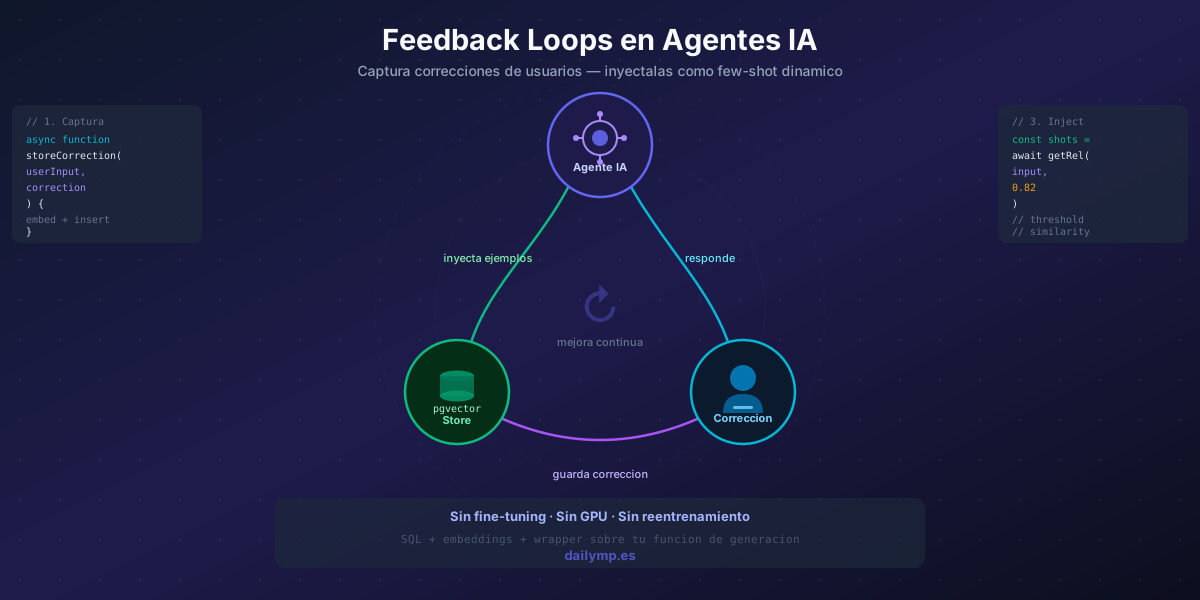
AI Agent Feedback Loops: Improve Without Retraining
Your agent has been running in production for three weeks. It worked well at first. Then users started flagging mistakes. You tweaked the system prompt, redeployed. A week later, the same errors reappeared in a slightly different form.
There's a pattern here that most teams don't solve well: the system prompt is static, but production errors are dynamic. You can refine the prompt every week, but you'll never have enough examples to cover every edge case users encounter. And fine-tuning is too slow, too expensive, and requires hundreds of curated examples.
There's a middle ground almost nobody implements: a feedback loop based on embeddings that turns every user correction into a dynamic few-shot example.
The Root Problem: Your Examples Don't Scale
Few-shot works. We covered this in the few-shot prompting article: three concrete examples beat 500 words of instructions.
The problem is those examples are static. You write them once, they sit in the system prompt. They don't update when a user says "that's wrong."
The feedback loop closes that gap: instead of you manually updating the prompt, the system captures user corrections and automatically turns them into new examples, retrieved by semantic similarity when a similar query comes in.
No fine-tuning. No GPU. No retraining. It's SQL + embeddings + a thin wrapper around your generation function.
The Architecture in Three Pieces
1. Capture endpoint. The frontend submits the correction: original user input, agent response, and the correct response. A POST endpoint processes it, generates the embedding for the input, and stores everything.
2. Corrections table. A Supabase table holding the trio (user_input, agent_output, correction) plus a vector column input_embedding for similarity search.
3. Injection wrapper. Before every LLM call, retrieve the most similar corrections to the current input and add them to the system prompt as XML-tagged examples.
Step-by-Step Implementation
The Table and Search Function
CREATE TABLE agent_corrections (
  id           uuid DEFAULT gen_random_uuid() PRIMARY KEY,
  user_input   text NOT NULL,
  agent_output text NOT NULL,
  correction   text NOT NULL,
  input_embedding vector(1536),
  approved     boolean DEFAULT true,
  use_count    integer DEFAULT 0,
  created_at   timestamptz DEFAULT now()
);

CREATE INDEX ON agent_corrections
  USING ivfflat (input_embedding vector_cosine_ops)
  WITH (lists = 50);

CREATE OR REPLACE FUNCTION match_corrections(
  query_embedding vector(1536),
  match_threshold float,
  match_count int
)
RETURNS TABLE (
  user_input text, agent_output text, correction text, similarity float
)
LANGUAGE sql STABLE AS $$
  SELECT user_input, agent_output, correction,
         1 - (input_embedding <=> query_embedding) AS similarity
  FROM agent_corrections
  WHERE approved = true
    AND 1 - (input_embedding <=> query_embedding) > match_threshold
  ORDER BY similarity DESC
  LIMIT match_count;
$$;
The Capture Endpoint
// app/api/feedback/route.ts
import { embed } from '@/lib/embeddings';
import { createClient } from '@/lib/supabase-server';

export async function POST(req: Request) {
  const { userInput, agentOutput, correction } = await req.json();

  const embedding = await embed(userInput);
  const supabase = createClient();

  await supabase.from('agent_corrections').insert({
    user_input: userInput,
    agent_output: agentOutput,
    correction,
    input_embedding: embedding,
  });

  return Response.json({ ok: true });
}
The Injection Wrapper
// lib/agent-with-feedback.ts
import { embed } from './embeddings';
import { supabase } from './supabase';

async function getRelevantCorrections(userInput: string) {
  const embedding = await embed(userInput);
  const { data } = await supabase.rpc('match_corrections', {
    query_embedding: embedding,
    match_threshold: 0.82,
    match_count: 3,
  });
  return data ?? [];
}

export async function buildPromptWithFeedback(
  basePrompt: string,
  userInput: string
): Promise<string> {
  const corrections = await getRelevantCorrections(userInput);
  if (corrections.length === 0) return basePrompt;

  const block = corrections
    .map(
      (c) => `
<correction>
<user_input>${c.user_input}</user_input>
<wrong_response>${c.agent_output}</wrong_response>
<correct_response>${c.correction}</correct_response>
</correction>`
    )
    .join('');

  return `${basePrompt}\n\n<past_corrections>${block}</past_corrections>`;
}
The 0.82 threshold is conservative: only inject corrections that are very similar to the current input. If corrections aren't being used, lower it to 0.78. If irrelevant corrections are being injected, raise it to 0.86. Start high and tune with real data.
What to Watch Out For
Contradictions. If two users correct the same type of error in opposite directions, injecting both confuses the model. Add a conflicted column and a review process to catch contradictory corrections before marking them approved.
Prompt poisoning. For public-facing agents, a user could submit malicious corrections designed to alter the agent's behavior. The approved column exists precisely for this: default it to false and add a review step before activating corrections.
Token budget. Each correction adds ~150 tokens to context. With three corrections maximum and a high threshold, the impact is manageable. For long conversations, prioritize using use_count — the most-reused corrections first.
Metrics That Matter
Before this system, you can't measure how much your agent improves. With it, you have three actionable metrics:
- Correction reuse rate: how many times is each correction used before that error disappears from traffic? If a correction is never reused, the agent stopped making that mistake.
- Feedback acceptance rate: percentage of interactions users don't flag as incorrect.
- Mean time to improvement: how many interactions pass after storing a correction before that error type disappears.
Pair this with an agent observability setup and you can see improvement in real time on a dashboard.
When This System Isn't Enough
The feedback loop is tactical: it fixes errors one by one as they surface. It works well until you accumulate 200–300 corrections in the same error category, which signals a systemic issue in the base prompt or agent architecture.
At that point, it's time to review the AI integration strategy from the top or evaluate whether you have enough data for fine-tuning to be worthwhile. Below that threshold, the feedback loop is faster and cheaper than any alternative.
Let's Build It Together
If you have an agent in production that keeps repeating the same mistakes, this pattern takes less than a day to implement on an existing Next.js + Supabase stack.
If you want us to build it or adapt it to your current setup, reach out: