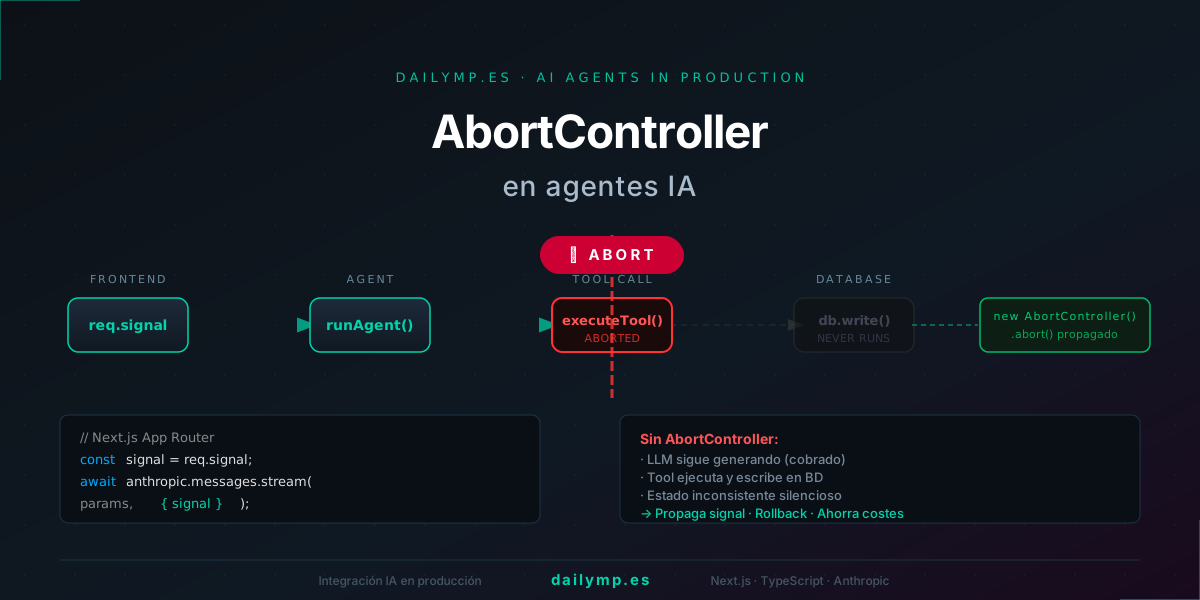
AbortController in AI Agents: Cancel Without Breaking State
It's 10:47 AM. Your agent is processing an 80-page PDF for a client. The analysis takes 25 seconds. Halfway through, the user clicks "Cancel."
You think it stopped. It didn't.
The token stream keeps running on the server. The database write tool already started. When you check your Anthropic invoice at the end of the month, that cancelled request shows up as fully processed.
The lifecycle nobody explains
When a user cancels in the frontend, the browser closes the HTTP connection. The Next.js server receives the abort signal. But if you don't propagate that signal — to the SDK, to your tools, to your database transaction — each component keeps running in its own world.
The typical outcome without a properly implemented AbortController:
- LLM keeps generating tokens (billed at 100%)
- In-flight tool call finishes its work (side effects executed)
- Database receives a partial write (inconsistent state)
- The user is gone, so nobody catches the error for weeks
It's the invisible bug: no exception, no error logs, just billing.
AbortController: the signal that connects the entire chain
AbortController is JavaScript's standard for coordinating cancellations. You create a controller, pass its signal to every operation you want to be interruptible, and when you call controller.abort(), everything holding that signal cancels in a coordinated way.
In a Next.js Route Handler, the signal is already available for free: req.signal fires the moment the client closes the connection.
// app/api/agent/route.ts
export async function POST(req: Request) {
  const { messages } = await req.json();
  const abortSignal = req.signal; // ← available automatically

  const encoder = new TextEncoder();
  const stream = new ReadableStream({
    async start(controller) {
      try {
        await runAgent(messages, abortSignal, (chunk) => {
          controller.enqueue(encoder.encode(`data: ${chunk}\n\n`));
        });
      } catch (err) {
        if ((err as Error).name === "AbortError") {
          return; // clean cancellation, not a real error
        }
        throw err;
      } finally {
        controller.close();
      }
    },
  });

  return new Response(stream, {
    headers: { "Content-Type": "text/event-stream" },
  });
}
The key is in runAgent: it receives the signal and propagates it to everything that can block.
Propagating the signal to the Anthropic SDK
The Anthropic SDK accepts signal as an option for both messages.create and streaming. When the signal fires, the SDK throws an AbortError immediately instead of waiting for the full response.
async function runAgent(
  messages: MessageParam[],
  signal: AbortSignal,
  onChunk: (text: string) => void
) {
  const anthropic = new Anthropic();

  const stream = await anthropic.messages.stream(
    {
      model: "claude-sonnet-4-6",
      max_tokens: 4096,
      system: "You are an assistant specialized in document analysis.",
      messages,
    },
    { signal } // ← propagate signal to the SDK
  );

  for await (const event of stream) {
    if (signal.aborted) break;

    if (
      event.type === "content_block_delta" &&
      event.delta.type === "text_delta"
    ) {
      onChunk(event.delta.text);
    }
  }
}
The tool call that already launched
The trickiest scenario: the LLM already emitted a tool_use block and your agent is executing the tool when cancellation arrives. The signal aborted the stream, but the tool is already running.
Two strategies depending on operation type:
Read-only operations (database lookups, external API reads): let them finish. No side effects, ignoring the AbortError is safe and simpler.
Write operations (create record, send email, call webhook): wrap them in a transaction and rollback if the signal fires before commit.
Rollback on writes: the correct pattern
async function writeToDbSafe(data: InvoiceData, signal: AbortSignal) {
  if (signal.aborted) {
    throw new DOMException("Signal aborted before write", "AbortError");
  }

  const client = await db.connect();
  try {
    await client.query("BEGIN");
    await client.query(
      "INSERT INTO invoices (data, created_at) VALUES ($1, NOW())",
      [JSON.stringify(data)]
    );

    // Check signal right before COMMIT
    if (signal.aborted) {
      await client.query("ROLLBACK");
      throw new DOMException("Signal aborted: rollback executed", "AbortError");
    }

    await client.query("COMMIT");
  } catch (err) {
    await client.query("ROLLBACK");
    throw err;
  } finally {
    client.release();
  }
}
The key: check signal.aborted after the last async operation and before COMMIT. If the user cancelled during the write, the rollback leaves the database exactly as it was before the request — no orphaned records, no partial data.
What most teams implement (and what's missing)
The most common approach is putting the AbortController in the Route Handler and not propagating it further. The stream cuts off for the user, who sees the cancellation, but the agent keeps running on the server until it finishes.
When you take AI integration services into production with real load — 50, 100 concurrent requests — that accumulated overhead matters. If your agent has a 20% cancellation rate during peak usage, that 20% of work completed for nobody shows up fully in the LLM bill.
Full propagation costs writing two or three helper functions. On an agent that processes documents or makes expensive tool calls, that investment pays back in the first week of real production.
For advanced architecture patterns in AI agents and automation, cancellation handling is one of the first items on the production checklist.
Conclusion
A properly implemented AbortController isn't a UX nicety — it's production infrastructure. The signal needs to travel from the HTTP connection close all the way down to the last database query, through the Anthropic SDK and every tool that can write state.
Without that complete chain, you're paying for work nobody saw, with partial data in your database that nobody cleans up.
Got an agent in production or building one now? Let's talk →