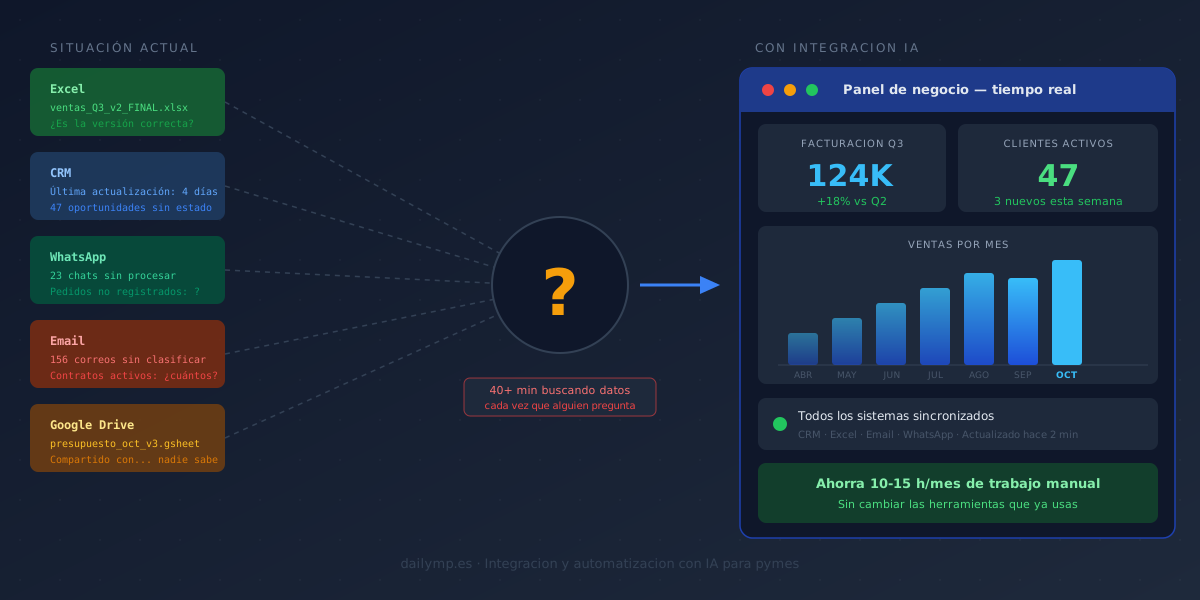
Your Business Data Is Everywhere. Finding It Takes Hours.
Someone messages you: "Can you send me the revenue figures for the last three months?"
You say yes, no problem. And then the process begins.
You open the Excel file from August, but September hasn't been updated yet. You check the CRM, but the numbers don't match the actual invoicing because someone forgot to close a couple of deals. You scroll through your email for anything from the accountant. You open Google Drive. You find three versions of the same spreadsheet with conflicting dates.
Forty minutes later you have an approximate number that you're not entirely confident is right.
This isn't an organization problem. It's a sign that your data isn't where it should be.
Where Your Business Data Actually Lives
In a typical company with 5 to 30 people, business data is scattered across at least six different places:
- Excel or Google Sheets: multiple files, multiple versions, no single source of truth
- CRM: out of date or filled in inconsistently by the team
- Email: dozens of threads with critical information nobody ever moved to a proper system
- WhatsApp: client conversations, orders, and confirmations not recorded anywhere
- Invoices and quotes: in a Dropbox folder, on one person's laptop, or with the accountant
- Inside the salesperson's head: they know exactly where every client stands — but only they do
The result: your company has a lot of information. The problem is nobody sees it together. When someone needs it to make a decision, they have to go find it manually.
What That Costs You Every Week
Running the calculation is uncomfortable, but worth it.
If one person on your team spends two to three hours a week gathering data to prepare reports, that's eight to twelve hours per month. At a cost of €25 per hour — being conservative — that's €200 to €300 per month just on data collection.
Not analysis. Not making decisions. Just going to find data that already exists, scattered across systems.
And that doesn't count the hidden costs: decisions made late because the data wasn't ready, errors from working with outdated information, or meetings that run long because nobody has the right numbers in front of them.
The Problem Gets Worse in Q4
In October, when the final quarter of the year begins, this problem gets more expensive. You need to know how Q3 went to plan Q4. You need to understand which clients are going to close before December. You need data at hand before budget meetings arrive.
And if each of those data points requires stopping half a day to track it down, the cost isn't just time — it's your ability to react fast enough.
What Changes When Data Is Unified
This isn't a six-month technology project or a reason to replace all your existing tools.
DAILYMP's AI Integration service connects your current systems — CRM, invoicing tools, spreadsheets, email — into a single flow. Once connected, data syncs automatically.
When someone needs to know last month's revenue, how many active clients there are this week, or which orders are pending confirmation, the answer is there without searching for it.
You don't throw away what you already have. You stop having it live in separate silos and start having it work as a single source of truth.
The Agent That Answers Questions in Seconds
There's one more step that changes how this works day to day.
With an AI automation agent, instead of opening four tabs and reviewing data manually, you can ask a direct question: "How many new clients did we close in September compared to August?"
The agent queries the connected systems, cross-references the information, and gives you the answer in seconds. No spreadsheet prep. No manual aggregation. No waiting for the weekly report.
The result isn't just saved time. It's that decisions stop being made on data from three weeks ago and start being made on what's actually happening right now.
What Your Business Can Do Starting This Week
You don't need to replace everything you have or overhaul all your processes at once.
The first step is identifying the two or three systems where 80% of your information lives: usually the CRM, the invoicing tool, and email. Connecting those already eliminates most of the manual collection work.
After that, adding an agent that answers questions is the natural next step. It doesn't all have to happen at once.
If you're not sure where to start or what makes the most sense for your business, that's exactly what I'm here for. Tell me how your business information is organized right now and we'll figure out together what to solve first.