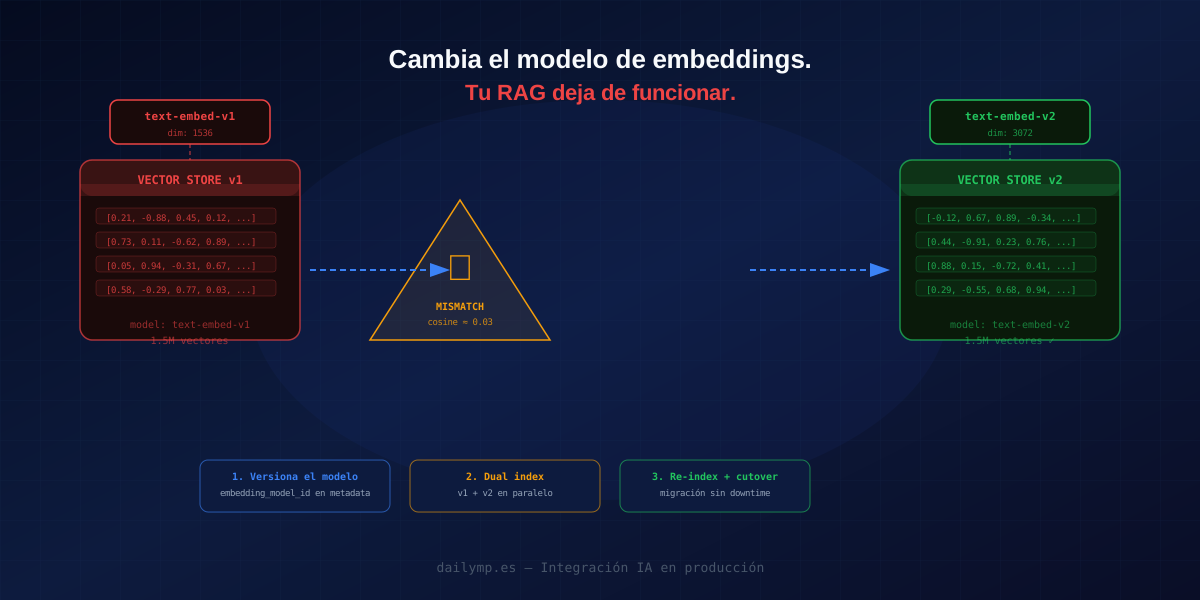
Update Your Embedding Model. Your RAG Breaks Silently.
Your RAG has been in production for three months. Results are solid. You decide to upgrade the embedding model because the new one is more accurate and cheaper.
You deploy. No errors. Tests pass. The system responds.
But something shifted: answers are worse. The agent stops finding the right documents. Users ask questions the system should answer and it returns "no relevant information found."
There's no exception in the logs. No 500. Just incorrect results that nobody connects to the change you made a week ago.
Welcome to the most silent failure mode in production RAG: vector space incompatibility.
Why your stored vectors are now garbage
When you change the embedding model, the problem isn't the new model. The problem is that your stored vectors were generated by the old one.
Every embedding model projects text into its own vector space. text-embedding-ada-002 from OpenAI uses 1536 dimensions. text-embedding-3-large uses 3072. Voyage AI and Cohere models have their own geometry entirely.
Even when the dimensionality matches, the geometry of the space is different. Cosine similarity between two vectors from the same model measures semantic similarity. Cosine similarity between a vector from the new model and one from the old model measures statistical noise.
Your system doesn't know a change happened. It encodes the user's query with the new model. It searches for the nearest neighbors. It finds them — but those "nearest neighbors" have no real semantic relationship to the query.
// The silent failure: query with v2 model, documents stored with v1
const queryEmbedding = await embedWithModel(query, "text-embedding-v2");

// This cosine measures nothing semantic. But it throws no error.
const results = await vectorDB.similaritySearch(queryEmbedding, topK: 5);
// results has records, all with low actual similarity → bad context to the LLM
The LLM receives wrong context and generates wrong answers. No errors, no alerts, nothing visible.
Catching the problem before it reaches production
The defense starts in the metadata of each stored vector. Every indexed document must record which model generated its embedding:
interface DocumentChunk {
  id: string;
  content: string;
  embedding: number[];
  metadata: {
    source: string;
    embeddingModel: string;  // "text-embedding-ada-002" | "voyage-3" | etc.
    embeddingDim: number;
    indexedAt: string;
  };
}

async function indexDocument(
  content: string,
  source: string,
  model: EmbeddingModel
): Promise<DocumentChunk> {
  const embedding = await model.embed(content);

  return {
    id: crypto.randomUUID(),
    content,
    embedding: embedding.values,
    metadata: {
      source,
      embeddingModel: model.id,
      embeddingDim: embedding.values.length,
      indexedAt: new Date().toISOString(),
    },
  };
}
With this metadata you can detect incompatibilities at query time:
async function safeSearch(
  query: string,
  currentModel: EmbeddingModel,
  vectorDB: VectorDB
): Promise<SearchResult[]> {
  const queryEmbedding = await currentModel.embed(query);

  // Filter only vectors generated with the current model
  const results = await vectorDB.similaritySearch(queryEmbedding.values, {
    topK: 10,
    filter: {
      embeddingModel: { $eq: currentModel.id },
    },
  });

  if (results.length < 3) {
    console.warn(`[RAG] Fewer than 3 results for model ${currentModel.id}.
    Have documents been re-indexed?`);
  }

  return results;
}
The migration strategy: dual index
The common mistake is a big-bang re-index: stop ingestion, regenerate all vectors, switch the model in production. During migration, RAG is down. For millions of chunks, that window is long.
The right strategy is the dual index: maintain two collections in parallel while migration runs.
class DualIndexRAG {
  constructor(
    private oldCollection: VectorCollection,  // existing v1 vectors
    private newCollection: VectorCollection,  // v2 vectors being built
    private oldModel: EmbeddingModel,
    private newModel: EmbeddingModel,
  ) {}

  async search(query: string): Promise<SearchResult[]> {
    const [oldEmbedding, newEmbedding] = await Promise.all([
      this.oldModel.embed(query),
      this.newModel.embed(query),
    ]);

    const [oldResults, newResults] = await Promise.all([
      this.oldCollection.search(oldEmbedding.values, 10),
      this.newCollection.search(newEmbedding.values, 10),
    ]);

    // Prioritize v2 when there's enough coverage
    if (newResults.length >= 5) {
      return newResults;
    }
    // Fall back to v1 while re-index is still running
    return oldResults;
  }
}
This pattern lets you:
- Start indexing documents with the new model while the old one stays in production
- Serve from the new model only when coverage is sufficient
- Complete re-indexing in the background without downtime
For ingestion during migration, write each new document to both collections:
async function ingestDuringMigration(
  document: Document,
  dual: DualIndexRAG
): Promise<void> {
  await Promise.all([
    dual.oldCollection.insert(await dual.oldModel.embed(document.content)),
    dual.newCollection.insert(await dual.newModel.embed(document.content)),
  ]);
}
The re-index job: without killing production
A mass re-index can't compete with production for API rate limits. It needs its own throttling and clean pause/resume:
async function reindexBatch(
  oldCollection: VectorCollection,
  newCollection: VectorCollection,
  newModel: EmbeddingModel,
  opts = { batchSize: 50, delayMs: 200 }
): Promise<{ processed: number; errors: number }> {
  let cursor: string | null = null;
  let processed = 0;
  let errors = 0;

  do {
    const page = await oldCollection.paginate(opts.batchSize, cursor);

    const embeddings = await Promise.allSettled(
      page.items.map(async (doc) => ({
        ...doc,
        embedding: (await newModel.embed(doc.content)).values,
        metadata: {
          ...doc.metadata,
          embeddingModel: newModel.id,
        },
      }))
    );

    for (const result of embeddings) {
      if (result.status === "fulfilled") {
        await newCollection.upsert(result.value);
        processed++;
      } else {
        errors++;
        console.error("[reindex] chunk error:", result.reason);
      }
    }

    cursor = page.nextCursor;
    if (cursor) await new Promise((r) => setTimeout(r, opts.delayMs));
  } while (cursor !== null);

  return { processed, errors };
}
With batchSize: 50 and delayMs: 200ms you process ~250 documents/second without saturating the embeddings API or slowing down live queries.
When to cut over
Before turning off the old index, verify new index coverage with a migration metric:
async function checkMigrationCoverage(
  oldCollection: VectorCollection,
  newCollection: VectorCollection
): Promise<{ coverage: number; ready: boolean }> {
  const [oldCount, newCount] = await Promise.all([
    oldCollection.count(),
    newCollection.count(),
  ]);

  const coverage = newCount / oldCount;
  return {
    coverage,
    ready: coverage >= 0.98,  // 98% coverage before cutover
  };
}
The final cutover is changing DualIndexRAG to always return results from the new index, and scheduling deletion of the old one in 24–48h (to allow rollback if needed).
If you have a production AI integration with RAG and the embedding model has never changed, you will eventually need to do this. Building the infrastructure now — metadata versioning, dual index, tested re-index jobs — is far cheaper than building it under pressure while the RAG is already degraded.
At DAILYMP, every RAG pipeline we ship includes planned migration infrastructure from day one: model versioning, versioned collections, and re-index jobs tested before the first model update ever arrives.
Do you have a RAG in production that has never been through this process?