Build an MCP Server in TypeScript: Your Database as Tools
You have three agents in production. The first queries orders. The second manages customers. The third generates reports. All three hit the same database.
And all three have their own implementation of get_customer. Three slightly different schemas. Three handlers doing the same thing with different parameter names. When the backend team renames customer_name to full_name, the bug shows up in two agents. You find the third one two weeks later in a production error report.
The Model Context Protocol (MCP) exists exactly for this.
Why duplicating tools creates compounding technical debt
The standard pattern when building an agent: define tools directly in the agent code, next to the Anthropic client.
// Orders agent
const tools = [{
  name: "get_customer",
  input_schema: {
    type: "object",
    properties: { id: { type: "string" } },
    required: ["id"]
  }
}]

// Customers agent — almost identical, but not quite
const tools = [{
  name: "get_customer",
  input_schema: {
    type: "object",
    properties: { customer_id: { type: "string" } }, // different param name
    required: ["customer_id"]
  }
}]
Two agents, two schemas, two parameter names for the exact same entity. When the backend team updates the model, you have two places to break instead of one.
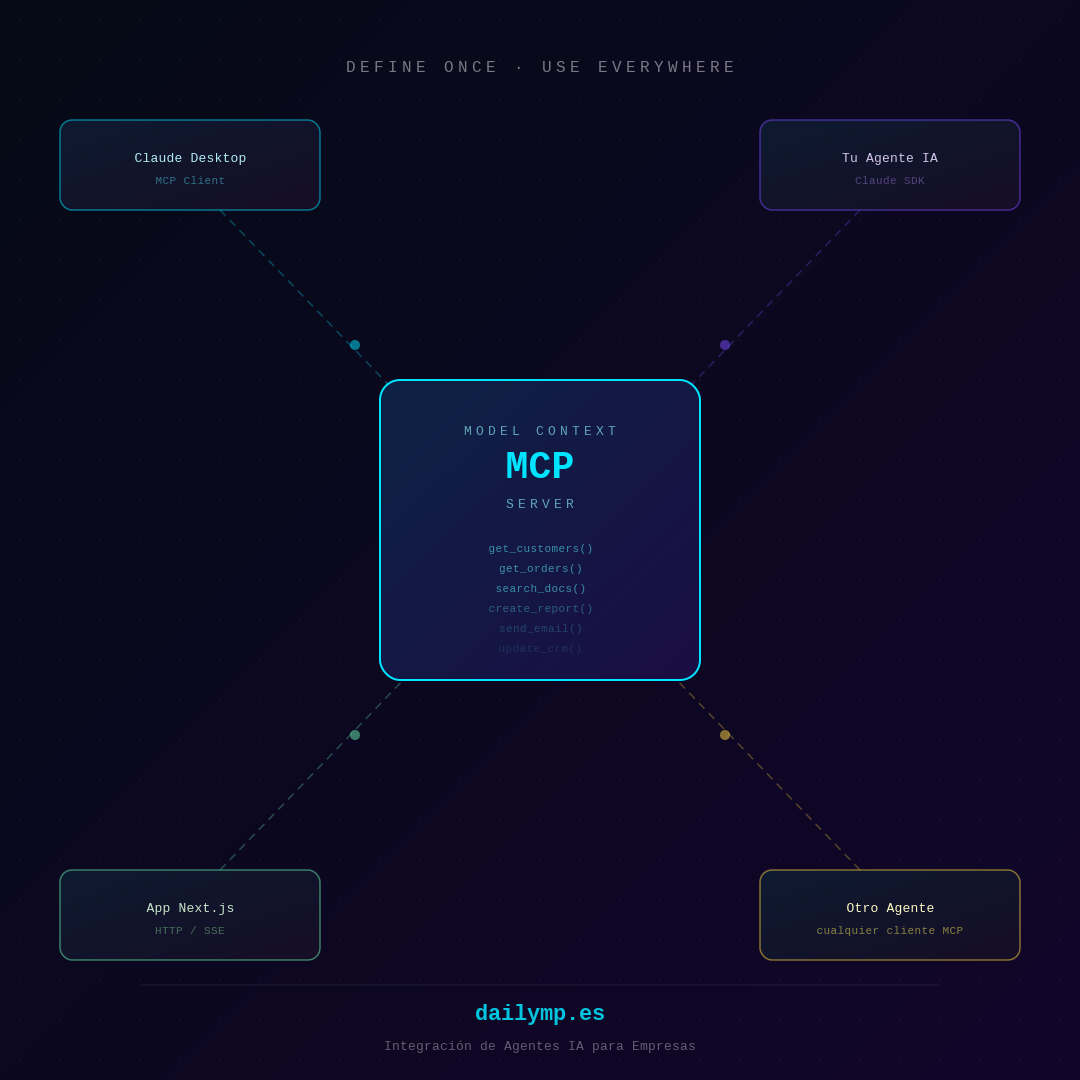
MCP inverts the relationship: a central server publishes the available tools. Any MCP client — Claude Desktop, your own agent, a Next.js app — connects and gets the tool list automatically. Change a tool in one place, every client uses the updated version on the next connection.
The structure of an MCP server in TypeScript
An MCP server has three pieces:
- Transport: how it communicates.
stdiofor local use (Claude Desktop), HTTP/SSE for network access - Tool definitions: name, description, and input schema with Zod
- Handlers: the function that runs when the LLM calls a tool
Install the official SDK:
npm install @modelcontextprotocol/sdk zod pg
Implementation: expose your PostgreSQL as tools
import { McpServer } from "@modelcontextprotocol/sdk/server/mcp.js";
import { StdioServerTransport } from "@modelcontextprotocol/sdk/server/stdio.js";
import { z } from "zod";
import { Pool } from "pg";

const pool = new Pool({ connectionString: process.env.DATABASE_URL });

const server = new McpServer({
  name: "business-tools",
  version: "1.0.0"
});

// Tool: search customers
server.tool(
  "get_customers",
  "Search customers by name or email. Returns up to 10 results.",
  {
    query: z.string().min(2).describe("Search term (name or email)"),
    limit: z.number().int().min(1).max(10).optional().default(5)
  },
  async ({ query, limit }) => {
    const { rows } = await pool.query(
      `SELECT id, full_name, email, company
       FROM customers
       WHERE full_name ILIKE $1 OR email ILIKE $1
       LIMIT $2`,
      [`%${query}%`, limit]
    );

    return {
      content: [{
        type: "text",
        text: JSON.stringify(rows, null, 2)
      }]
    };
  }
);

// Tool: get customer orders
server.tool(
  "get_orders",
  "Gets orders for a customer. Optionally filter by status.",
  {
    customer_id: z.string().uuid().describe("Customer UUID"),
    status: z.enum(["pending", "completed", "cancelled"]).optional()
  },
  async ({ customer_id, status }) => {
    const params: (string | undefined)[] = [customer_id];
    let query = `SELECT id, total, status, created_at
                 FROM orders WHERE customer_id = $1`;

    if (status) {
      params.push(status);
      query += ` AND status = $${params.length}`;
    }

    query += ` ORDER BY created_at DESC LIMIT 20`;

    const { rows } = await pool.query(query, params);

    return {
      content: [{
        type: "text",
        text: rows.length === 0
          ? "No orders found for this customer."
          : JSON.stringify(rows, null, 2)
      }]
    };
  }
);

const transport = new StdioServerTransport();
await server.connect(transport);
Zod handles input validation automatically. If the LLM sends a customer_id that isn't a valid UUID, the server rejects the call with a descriptive error before the query ever reaches the database.
The three failures that break this in production
1. Schema drift from the actual data model
When the database changes and you don't update the tool schema, the LLM calls with parameters that no longer exist or have been renamed. The failure is silent: the agent doesn't throw, it just produces wrong results.
The right pattern: generate tool definitions programmatically from your Drizzle or Prisma schema, not by hand. That way the tool schema always matches the database schema.
2. Missing error handling in the handler
If the query throws, the server returns a generic error the LLM can't reason about. The right pattern:
async ({ customer_id }) => {
  try {
    const { rows } = await pool.query(/* ... */);
    return { content: [{ type: "text", text: JSON.stringify(rows) }] };
  } catch (err) {
    return {
      content: [{
        type: "text",
        text: `Error: ${err instanceof Error ? err.message : "Unknown error"}`
      }],
      isError: true
    };
  }
}
With isError: true, the LLM knows the tool call failed and can decide whether to retry, escalate to the user, or take an alternative path.
3. No authentication on the HTTP server
An MCP server over HTTP without auth is a completely open API. For production, you need OAuth 2.0 with per-client scopes and token refresh. The MCP OAuth article covers the full implementation with JWT validation and per-tool scopes.
Connecting the server to your agents
For Claude Desktop, add the server to claude_desktop_config.json:
{
  "mcpServers": {
    "business-tools": {
      "command": "node",
      "args": ["/path/to/server/index.js"]
    }
  }
}
From your own agent with the Anthropic SDK, you can use an MCPClient that discovers available tools automatically and registers them for the agent — without duplicating any definitions.
The result every multi-agent team needs: one server, all the tools, all the agents. Update a tool once, everyone benefits. Add a new tool, it's available to all connected clients from the next session.
At DAILYMP's AI integration services, we build MCP servers connecting CRM, ERP, and internal databases, with per-client authentication and scopes that limit which tools each agent can access based on its role.