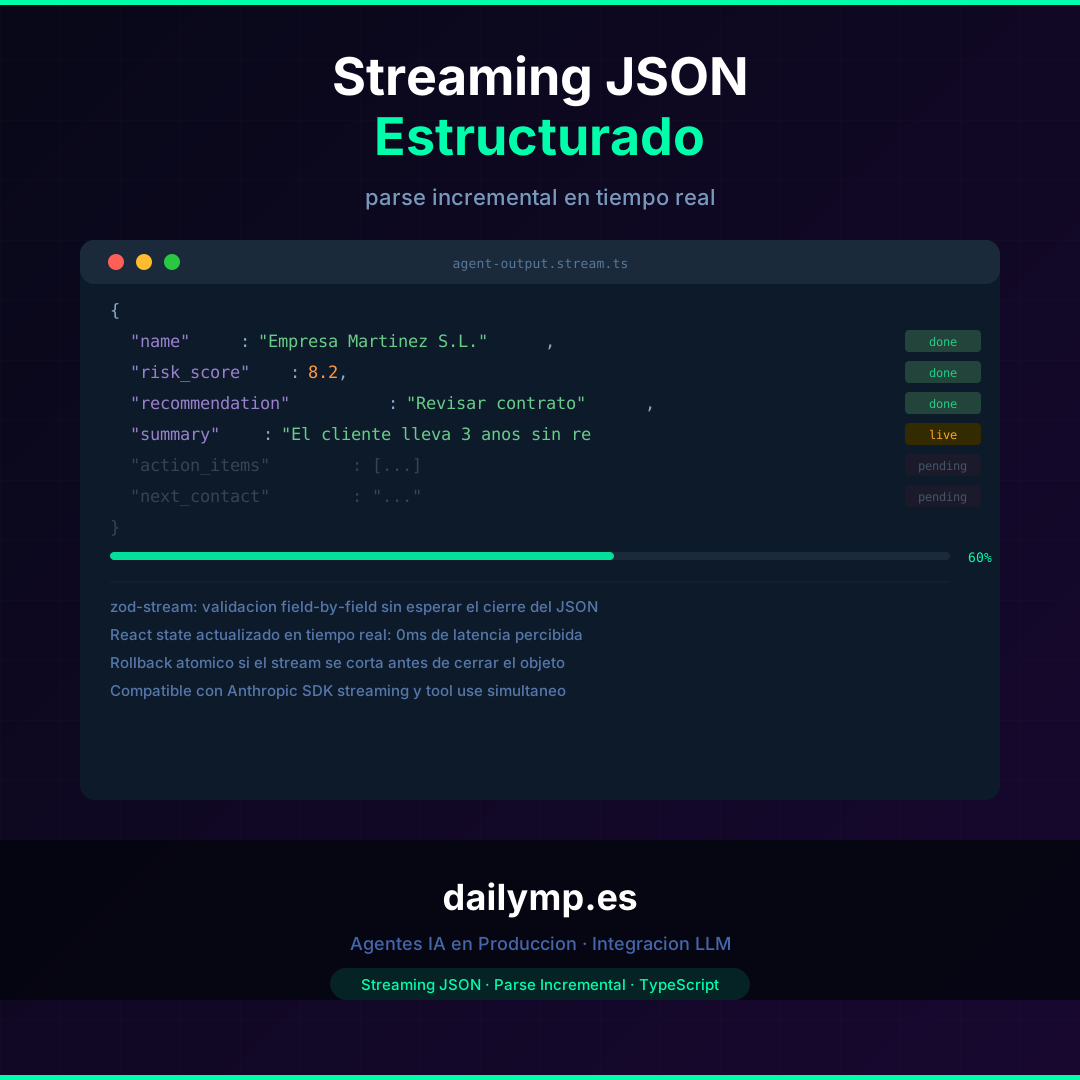
Structured JSON Streaming: Parse Your Agent Output Live
You ask the agent to analyze a client and return a JSON object with ten fields: name, risk score, recommendation, summary, next steps. The agent starts generating. The user's screen goes blank. Twelve seconds later, all the fields appear at once.
That "twelve-second blank" is an architecture problem, not a speed problem. The tokens are arriving. The LLM is generating from the very first moment. The problem is that your implementation doesn't know what to do with a partial JSON.
Why structured JSON breaks streaming
When an LLM generates free text, each arriving token is directly consumable: you add it to state, the user sees it. When you generate structured JSON, the object isn't valid until the closing brace arrives. A JSON.parse on {"name": "Company M throws a SyntaxError. The natural response is to wait for the full object before rendering.
The result: the user sees a blank screen even though the model has been active since the first second.
The three anti-patterns that lead to this:
- Waiting for the full stream before parsing. Simple, safe, terrible for UX.
- Parsing with
try/catchon each chunk. Works for the last lines, but ignores fields that arrived seconds earlier. - Using tool calls to get structure. The agent calls a tool with the data as an argument — it works, but adds a full LLM round-trip and doesn't solve real streaming.
The right pattern: field-by-field incremental parsing
The solution is a parser that understands partial JSON: instead of waiting for the complete object, it extracts fields as they complete, even though the global object isn't closed yet.
Using zod-stream (part of the instructor-js ecosystem):
import Anthropic from "@anthropic-ai/sdk";
import { OAIStream, withResponseModel } from "zod-stream";
import { z } from "zod";

const ClientAnalysisSchema = z.object({
  name: z.string(),
  risk_score: z.number().min(0).max(10),
  recommendation: z.string(),
  summary: z.string(),
  action_items: z.array(z.string()),
  next_contact: z.string(),
});

type ClientAnalysis = z.infer<typeof ClientAnalysisSchema>;

async function analyzeClientStreaming(
  clientData: string,
  onPartialUpdate: (partial: Partial<ClientAnalysis>) => void
) {
  const client = new Anthropic();

  const params = withResponseModel({
    response_model: { schema: ClientAnalysisSchema, name: "ClientAnalysis" },
    params: {
      model: "claude-opus-5-5",
      max_tokens: 1024,
      messages: [
        {
          role: "user",
          content: `Analyze this client and return the structured analysis: ${clientData}`,
        },
      ],
    },
    mode: "TOOLS",
  });

  const stream = await client.chat.completions.create({
    ...params,
    stream: true,
  });

  const oaiStream = OAIStream({ res: stream });

  for await (const partial of oaiStream) {
    onPartialUpdate(partial as Partial<ClientAnalysis>);
  }
}
Each call to onPartialUpdate contains the fields that have finished generating so far. The name field might be available at 200ms, risk_score at 400ms. You don't need to wait for the full 12-second object.
React integration: progressive state
In the React component, state updates with each partial:
// components/ClientAnalysis.tsx
import { useState } from "react";

type PartialAnalysis = Partial<ClientAnalysis>;

export function ClientAnalysisCard({ clientId }: { clientId: string }) {
  const [analysis, setAnalysis] = useState<PartialAnalysis>({});
  const [isStreaming, setIsStreaming] = useState(false);

  async function runAnalysis() {
    setIsStreaming(true);
    setAnalysis({});

    await analyzeClientStreaming(
      clientId,
      (partial) => {
        setAnalysis((prev) => ({ ...prev, ...partial }));
      }
    );

    setIsStreaming(false);
  }

  return (
    <div>
      {analysis.name && <h2>{analysis.name}</h2>}
      {analysis.risk_score !== undefined && (
        <RiskBadge score={analysis.risk_score} />
      )}
      {analysis.recommendation && <p>{analysis.recommendation}</p>}
      {analysis.summary ? (
        <p>{analysis.summary}</p>
      ) : isStreaming ? (
        <SkeletonLine />
      ) : null}
    </div>
  );
}
The user sees the name at 200ms, the risk score at 400ms, the recommendation at 800ms. The perceived experience is a fast response even if the full analysis takes 12 seconds.
Manual implementation without zod-stream
If you'd rather not add the dependency, you can implement partial JSON parsing with a buffer:
function parsePartialJSON(buffer: string): Partial<ClientAnalysis> {
  let attempt = buffer.trim();

  if (!attempt.startsWith("{")) return {};

  let braces = 0;
  let brackets = 0;
  let inString = false;
  let escaped = false;

  for (const char of attempt) {
    if (escaped) { escaped = false; continue; }
    if (char === "\\") { escaped = true; continue; }
    if (char === '"') { inString = !inString; continue; }
    if (inString) continue;
    if (char === "{") braces++;
    else if (char === "}") braces--;
    else if (char === "[") brackets++;
    else if (char === "]") brackets--;
  }

  if (inString) attempt += '"';
  attempt += "]".repeat(Math.max(0, brackets));
  attempt += "}".repeat(Math.max(0, braces));

  try {
    return JSON.parse(attempt);
  } catch {
    return {};
  }
}
Handling stream interruptions
Streams can break: Vercel timeouts, unstable networks, the user closing the tab. With structured JSON, an interrupted stream means an incomplete object. Two strategies:
Atomic rollback: if the stream cuts before a critical field arrives, you revert to the previous state and show a clear error. Useful when a partial analysis has no value without the essential fields.
Incremental commit: you mark which fields arrived as "confirmed" and which as "pending". If the stream breaks, you have the confirmed fields available. Useful when each field has independent value.
const confirmedFields = new Set<keyof ClientAnalysis>();

onPartialUpdate((partial) => {
  Object.entries(partial).forEach(([key, value]) => {
    if (value !== undefined && value !== null) {
      confirmedFields.add(key as keyof ClientAnalysis);
    }
  });
  setAnalysis((prev) => ({ ...prev, ...partial }));
});
The UX leap this represents
The difference between an agent that waits and one that updates in real time is not cosmetic. In client analysis, report generation, or any flow where the user waits for a structured response, incremental parsing reduces the time to first useful information from seconds to fractions of a second.
At DAILYMP we implement this pattern in the agents we build for clients: agent UX is part of the design, not an implementation detail. If you're building an agent with structured outputs and want the experience to be fluid, the technical foundation is in our AI Integration service.
Want to implement this in your project? Message me on WhatsApp and I'll walk you through how to apply it to your stack.