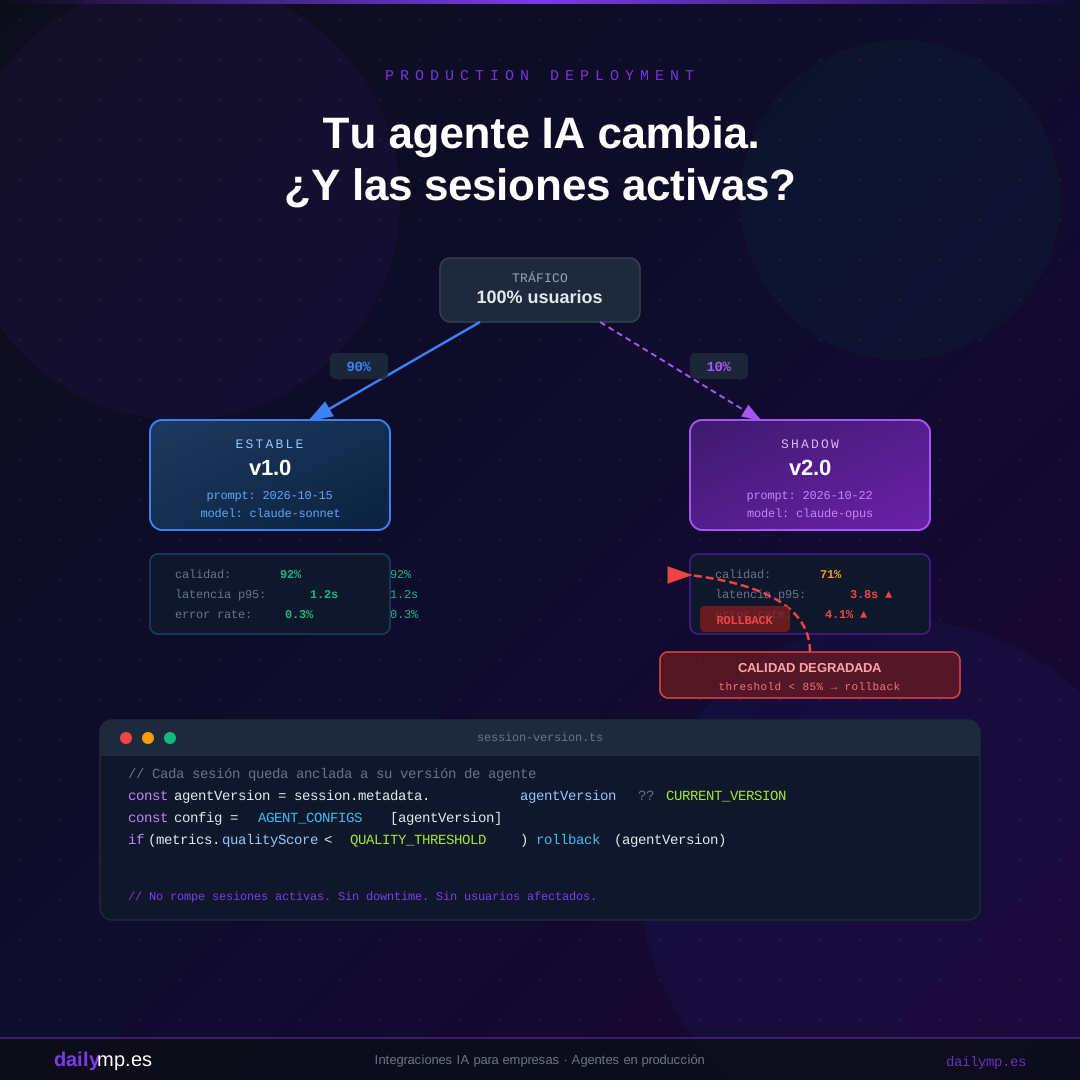
Deploy Your AI Agent Without Breaking Active Sessions
You have an AI agent running in production. You've spent weeks refining the prompt, swapped the model, improved the system message. Staging tests pass. You ship it.
Three minutes later, support gets two tickets. One user is mid-way through an onboarding conversation and the agent is asking for their name again. Another user's incident-management session has an agent that just "forgot" the last five messages of context.
This isn't a code bug. You just replaced the agent while users were inside it.
Why AI Agent Deployment Is Different from Web Deployment
When you deploy a new React component version, the browser loads new code and everything is fine. There's no in-flight state to lose. Every HTTP request is stateless.
A stateful AI agent with persistent memory doesn't work this way. Each active conversation has:
- A stored message history (Redis, Postgres, in-memory)
- A
system_promptthat established the initial context - Implicit user expectations about agent behavior
- Registered tools the agent knows how to call
If you switch from claude-sonnet-4-5 to claude-opus-5-5 or modify the system_prompt between two messages in the same session, the behavior can change visibly — not necessarily breaking the application, but breaking the coherence of the experience.
This is called mid-flight state mutation in software engineering. The solution isn't "don't deploy during peak hours." It's designing the system so it can change without affecting in-progress sessions.
Pattern 1: Session Versioning (Pinning)
The most direct approach. When a new session is created, you stamp it with the current agent version. That version is stored in the session metadata and never changes, even when you ship a new version.
// lib/agent-config.ts
export const AGENT_CONFIGS: Record<string, AgentConfig> = {
  "v1.2": {
    model: "claude-sonnet-4-5",
    systemPrompt: PROMPTS.v1_2,
    tools: TOOLS_V1,
  },
  "v1.3": {
    model: "claude-opus-5-5",
    systemPrompt: PROMPTS.v1_3,
    tools: TOOLS_V1_3,
  },
};

export const CURRENT_VERSION = "v1.3";

// app/api/chat/route.ts
export async function POST(req: Request) {
  const { sessionId, message } = await req.json();

  const session = await getSession(sessionId);

  // Existing session: use the version it started with
  const agentVersion = session?.metadata?.agentVersion ?? CURRENT_VERSION;
  const config = AGENT_CONFIGS[agentVersion];

  const response = await anthropic.messages.create({
    model: config.model,
    system: config.systemPrompt,
    messages: session.history,
    tools: config.tools,
  });

  await updateSession(sessionId, {
    history: [...session.history, { role: "assistant", content: response.content }],
    metadata: { agentVersion }, // persist the version
  });

  return Response.json(response);
}
With this pattern, new sessions start at v1.3, but sessions that started on v1.2 keep using v1.2 until the user closes them. No downtime, no broken coherence.
The cost: you need to keep old version configs alive until no active sessions use them. In practice, a 24-48h TTL covers 99% of cases.
Pattern 2: Shadow Deployment with Quality Metrics
Before routing all users to the new version, run it in parallel for a small subset and measure real-world quality.
// lib/routing.ts
export function getAgentVersion(userId: string): string {
  const isInShadowGroup = hashUserId(userId) % 100 < SHADOW_PERCENTAGE;
  return isInShadowGroup ? SHADOW_VERSION : STABLE_VERSION;
}

// lib/metrics.ts
export async function trackAgentQuality(
  version: string,
  sessionId: string,
  score: number
) {
  await redis.lpush(`quality:${version}`, score);
  await redis.ltrim(`quality:${version}`, 0, 999); // last 1000 sessions

  const avg = await getAverageQuality(version);
  if (avg < QUALITY_THRESHOLD) {
    await triggerRollback(version);
  }
}
The key is what you measure as "quality." For a support agent: first-contact resolution rate, time to close, number of user re-asks. For an onboarding agent: flow completion rate, messages per step. Don't rely on latency or error rate alone — those catch technical failures, but an agent can be fast and still give bad answers.
Pattern 3: Automatic Rollback with Circuit Breaker
The critical scenario: you ship to 100% of production and something degrades faster than you can react manually.
// lib/deployment.ts
const QUALITY_FLOOR = 0.85; // 85% of conversations without detectable degradation
const ERROR_CEILING = 0.03; // max 3% tool call errors

export async function checkAndRollback(version: string) {
  const [quality, errorRate] = await Promise.all([
    getAverageQuality(version),
    getErrorRate(version),
  ]);

  if (quality < QUALITY_FLOOR || errorRate > ERROR_CEILING) {
    console.error(`Rolling back ${version}: quality=${quality}, errors=${errorRate}`);
    await setCurrentVersion(PREVIOUS_STABLE_VERSION);
    await notifyTeam({ version, quality, errorRate });
  }
}

// Run every 5 minutes in production
setInterval(() => checkAndRollback(CURRENT_VERSION), 5 * 60 * 1000);
The rollback doesn't interrupt existing sessions: it only changes which version new sessions get assigned. In-flight sessions continue on their pinned version.
What Staging Tests Can't Catch
You can have full staging coverage and still have production issues. Real conversations are longer, messier, and more diverse than the test cases you wrote.
That's why shadow deployment is non-negotiable when you change the model or make deep system prompt modifications. It's the only mechanism that gives you real data before committing 100% of traffic.
At DAILYMP, we wire these patterns in from the initial design — not as a retrofit. The reason is practical: an agent that works well but can't be updated safely doesn't scale. Every improvement carries risk, and risk without a rollback system is technical debt that gets repaid in incidents.
If you want to see how this integrates with the AI agents and automation service you're already running in your business, the kickoff call takes 30 minutes.
Your agent is in production and none of these systems exist yet? Let's review it together.