Multilingual AI Agents in Production: Keep Context Intact
The agent processes the customer's message in Spanish. It calls a tool that returns data in English. The agent keeps responding... in English.
Nobody programmed it that way. It happens because the model infers the language from its immediate context, not from the system configuration. When the context gets contaminated, the response follows. This is the core problem of multilingual AI agents in production: it's not a translation problem — it's an architecture problem.
Why detecting language at input isn't enough
The standard solution is to detect the user's language with a library and instruct the model to respond in that language. It works for simple conversations. It breaks as soon as tools are involved.
Three concrete scenarios where it fails:
The agent calls a tool that returns text in English. The conversation history now contains messages in Spanish and tool results in English. The model, balancing attention across the entire context, may slide into English on the next response.
Tool output formats don't respect locale. A billing tool returns "date": "11/02/2026". For a user in Spain, that's November 2nd in US format — but the European user expects February 11th in DD/MM/YYYY. The agent uses that date in its response without converting it.
Formality level is not configured. Spanish has tú and usted. German has du and Sie. French has tu and vous. Without explicit formality instructions, the model defaults to whatever its training data preferred — usually informal in Spanish, formal in English.
The result: an agent that mixes languages, uses inconsistent dates, and uses informal address when it should be formal. In production, this is perceived as a broken agent regardless of how correct its reasoning is.
Locale ≠ Language: the distinction that matters
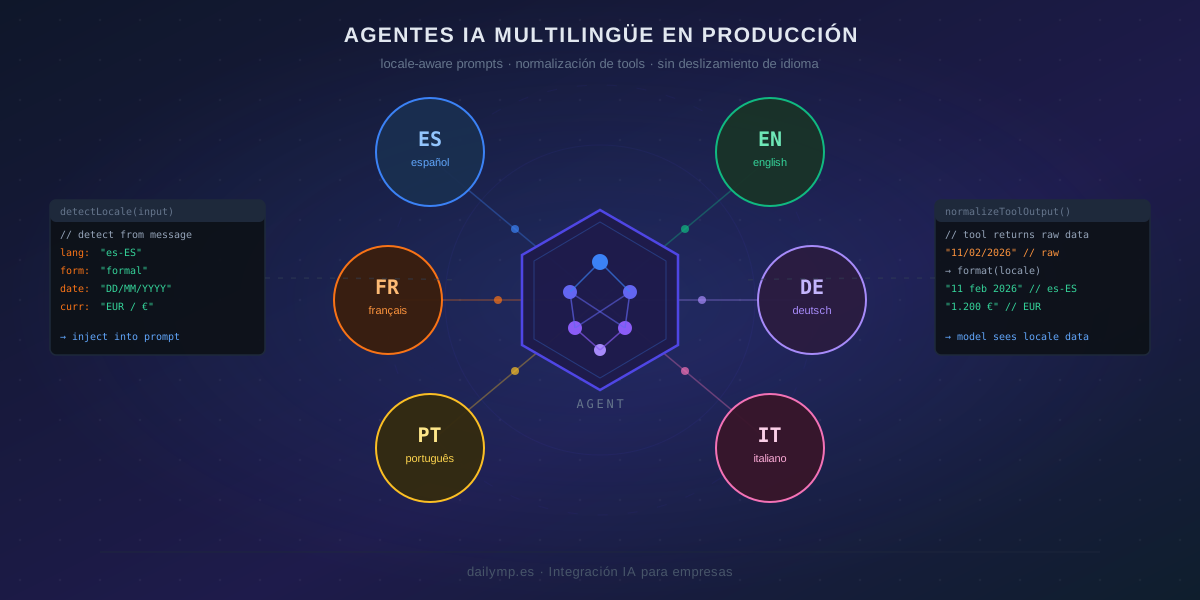
A locale is es-ES, not es. It carries language, region, and formatting conventions. The right architecture separates three layers:
- Locale detection — determines
es-ES,en-US,fr-FR, etc. - Context injection — passes locale to the system prompt with explicit instructions
- Tool output normalization — converts tool results to locale-consistent formats before the model sees them
interface AgentLocale {
  language: string;        // "es"
  region: string;          // "ES"
  formality: "formal" | "informal";
  dateFormat: string;      // "DD/MM/YYYY"
  currency: string;        // "EUR"
  currencySymbol: string;  // "€"
}

function buildSystemPrompt(basePrompt: string, locale: AgentLocale): string {
  return `${basePrompt}

LOCALE CONFIGURATION:
- Respond always in: ${locale.language}-${locale.region}
- Use ${locale.formality} address forms
- Format dates as: ${locale.dateFormat}
- Currency: ${locale.currencySymbol} (${locale.currency})
- Do not change language regardless of tool output language`;
}
The Do not change language regardless of tool output language instruction is the anchor. Without it, tool content bleeds into the response language. The model has no explicit constraint to resist the language drift.
Normalizing tool output before the model sees it
Tools return data in whatever format they have. Normalizing that output is your responsibility, not the model's.
A wrapper that applies locale to any tool's output:
function wrapToolWithLocale<T extends Record<string, unknown>>(
  toolFn: () => Promise<T>,
  locale: AgentLocale
): () => Promise<T> {
  return async () => {
    const result = await toolFn();
    return normalizeToLocale(result, locale) as T;
  };
}

function normalizeToLocale(
  data: Record<string, unknown>,
  locale: AgentLocale
): Record<string, unknown> {
  const normalized: Record<string, unknown> = {};

  for (const [key, value] of Object.entries(data)) {
    if (isISODate(value)) {
      normalized[key] = formatDate(value as string, locale.dateFormat);
    } else if (isUSDollarAmount(value)) {
      normalized[key] = convertCurrency(value as string, locale);
    } else if (typeof value === "string" && isEnglishText(value)) {
      normalized[key] = `[${value}]`; // signal to model: don't switch language
    } else {
      normalized[key] = value;
    }
  }

  return normalized;
}
This pattern works with any tool without modifying it. Locale becomes an integration concern, not a responsibility scattered across individual tool implementations.
Locale detection in the input pipeline
Detection should go beyond language identification. A user may write in English from Spain — in that case the relevant locale may be en-ES (English language, European date formats) or es-ES depending on business context.
async function detectLocale(
  userMessage: string,
  userProfile?: { country?: string; language?: string }
): Promise<AgentLocale> {
  // Prefer explicit profile settings
  if (userProfile?.language && userProfile?.country) {
    return buildLocale(userProfile.language, userProfile.country);
  }

  // Detect from message content
  const detectedLang = await detectLanguage(userMessage);

  // Fallback chain: message language → browser Accept-Language → default
  const region = userProfile?.country ?? getRegionFromBrowser() ?? "US";

  return buildLocale(detectedLang, region);
}
The key is the fallback chain: don't assume message language determines the full locale. A Spanish customer writing in English still expects European date formats and formal address.
Testing language consistency
The most basic test you should have: for each supported locale, verify the agent responds in that language even when tools return data in English.
const localeTests = [
  { locale: "es-ES", input: "¿Cuándo vence el contrato?", expected: "es" },
  { locale: "fr-FR", input: "Quand expire le contrat?",   expected: "fr" },
  { locale: "de-DE", input: "Wann läuft der Vertrag ab?", expected: "de" },
];

for (const test of localeTests) {
  const response = await runAgent(test.input, { locale: test.locale });
  const responseLang = detectLanguage(response.text);
  expect(responseLang).toBe(test.expected);
}
This test frequently fails for agents without proper locale injection. When it passes green consistently — including cases where tools return English data — the agent is genuinely multilingual, not just "language-detecting."
Why this matters in production
An agent that mixes languages is perceived as unreliable even when its reasoning is correct. A customer who wrote in French and gets a response in English sees a broken product, regardless of answer quality.
The problem compounds at scale: if you operate across European markets, each market has different expectations for date format, number separators, formality level, and currency display. An agent calibrated for US English makes consistent mistakes in every other market.
In our AI integration projects for businesses with international operations, we build the locale layer as part of the agent design from day one — not as a post-launch patch. The gap between doing it right from the start and fixing language behavior in production with real users is typically several weeks of debugging.
If you're building an agent that serves customers in multiple languages, or planning to expand to new markets, this architecture prevents an entire class of bugs that don't appear in staging but show up immediately in production.
Want us to review how your agent is configured and what it needs to be genuinely multilingual?