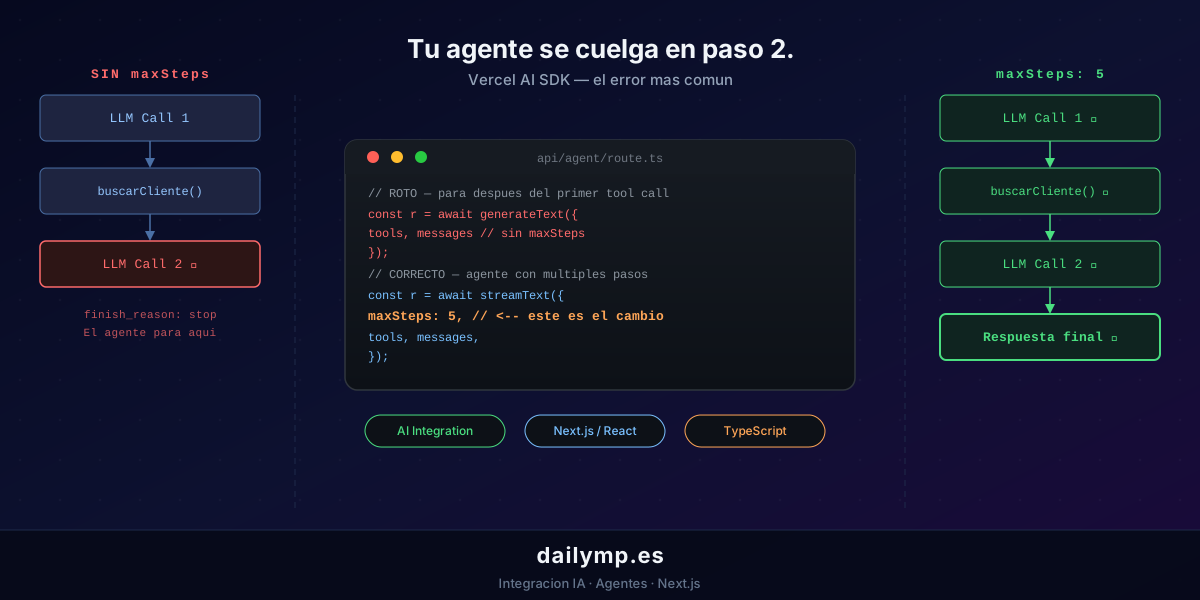
Vercel AI SDK: Why Your Agent Stops at Step 2
The agent starts fine. It receives the query, calls its first tool, gets the data… and stops. No second call. No final answer. The log shows finish_reason: "stop" right after the first tool call, as if the agent decided it was already done.
This isn't a model bug or a Vercel issue. The agent just never got permission to continue.
The problem: generateText only runs one cycle
Most Vercel AI SDK tutorials start with generateText. It works perfectly for simple text generation. The problem surfaces when you add tools and expect the agent to use them sequentially.
Without an explicit maxSteps, generateText runs exactly one full cycle: it calls the LLM, the LLM decides to use a tool, the tool executes, the result comes back, and the cycle ends. The LLM never gets a chance to reason about the result and take the next step.
// This agent ALWAYS stops after the first tool call
const result = await generateText({
  model: anthropic('claude-sonnet-5-5'),
  tools: {
    fetchOrder: tool({
      description: 'Fetch an order by ID',
      parameters: z.object({ orderId: z.string() }),
      execute: async ({ orderId }) => getOrder(orderId),
    }),
    updateStatus: tool({
      description: 'Update an order status',
      parameters: z.object({ orderId: z.string(), status: z.string() }),
      execute: async ({ orderId, status }) => setOrderStatus(orderId, status),
    }),
  },
  messages,
});
// updateStatus never runs even if the model wants to call it.
The agent fetches the order, receives the data, and the cycle ends there. updateStatus is never called even though that was the whole point.
The fix: streamText with maxSteps
For agents that need to reason across multiple steps — fetching data, processing it, acting on it — you need streamText with maxSteps configured:
// app/api/agent/route.ts
import { streamText, tool } from 'ai';
import { anthropic } from '@ai-sdk/anthropic';
import { z } from 'zod';

export async function POST(req: Request) {
  const { messages } = await req.json();

  const result = await streamText({
    model: anthropic('claude-sonnet-5-5'),
    maxSteps: 5, // up to 5 LLM ↔ tool cycles
    tools: {
      fetchOrder: tool({
        description: 'Fetch an order by ID',
        parameters: z.object({ orderId: z.string() }),
        execute: async ({ orderId }) => {
          const order = await getOrder(orderId);
          if (!order) return { error: 'Order not found', orderId };
          return { data: order };
        },
      }),
      updateStatus: tool({
        description: 'Update an order status',
        parameters: z.object({ orderId: z.string(), status: z.string() }),
        execute: async ({ orderId, status }) => {
          await setOrderStatus(orderId, status);
          return { success: true, orderId, newStatus: status };
        },
      }),
    },
    messages,
  });

  return result.toDataStreamResponse();
}
maxSteps: 5 allows up to 5 full cycles: LLM decides → tool executes → result returns to LLM → LLM decides again. Exactly what you need for tasks that require combining multiple data sources before giving a final answer.
Three more patterns that break the loop
1. Tool execute that throws exceptions
When a tool throws an error, the stream dies and the agent loop ends abruptly. The LLM receives no context about what went wrong and can't take an alternative path.
// BAD: an exception kills the entire stream
execute: async ({ orderId }) => {
  const order = await getOrder(orderId);
  if (!order) throw new Error('Not found'); // stream dead
  return order;
}

// GOOD: return an error object the LLM can reason about
execute: async ({ orderId }) => {
  const order = await getOrder(orderId);
  if (!order) return { error: 'Order not found', orderId };
  return order;
}
Returning an error object instead of throwing gives the model a chance to adapt: try with a different identifier, ask the user for clarification, or report the issue gracefully.
2. maxSteps out of sync between server and client
If you use useChat on the client, maxSteps must match between server and client. The client needs to know how many intermediate responses to expect before the final text arrives.
// app/components/AgentChat.tsx
'use client';
import { useChat } from 'ai/react';

export function AgentChat() {
  const { messages, input, handleInputChange, handleSubmit, isLoading } =
    useChat({
      api: '/api/agent',
      maxSteps: 5, // must match the server
    });

  return (
    <form onSubmit={handleSubmit}>
      {messages.map((m) => (
        <div key={m.id}>
          <strong>{m.role}:</strong> {m.content}
        </div>
      ))}
      <input value={input} onChange={handleInputChange} disabled={isLoading} />
      <button type="submit" disabled={isLoading}>Send</button>
    </form>
  );
}
3. Reading result.text before the stream finishes
If you use streamText in a non-streaming context (a webhook, a cron job, a background task), you must await the stream before reading the result:
const result = await streamText({ ... });

// Wait for the stream to complete
const text = await result.text;
const toolResults = await result.toolResults;
Without the await, you access the stream before it completes and get undefined or a partial value.
The full production pattern
For a support agent that looks up information and updates records, the complete setup is:
Server (app/api/agent/route.ts): streamText with maxSteps: 5, tools with execute functions that return objects — never throw — and result.toDataStreamResponse() to stream the response to the client.
Client (useChat with api: '/api/agent' and maxSteps: 5): the hook handles tool_result messages automatically and waits for the final text before updating the UI.
This pattern works for support agents, order management, data analysis, or any flow that combines multiple tools before giving a final answer.
If you're building this kind of integration and want it done right the first time, at DAILYMP we implement production-ready multi-step agents on Next.js — with error handling, observability, and architecture that holds up under real load. See how we work in AI Integration or through the AI Driven Development approach for teams that want to integrate agents into existing workflows.
Got an agent that keeps stalling? Tell me how it's set up and we'll figure it out together.