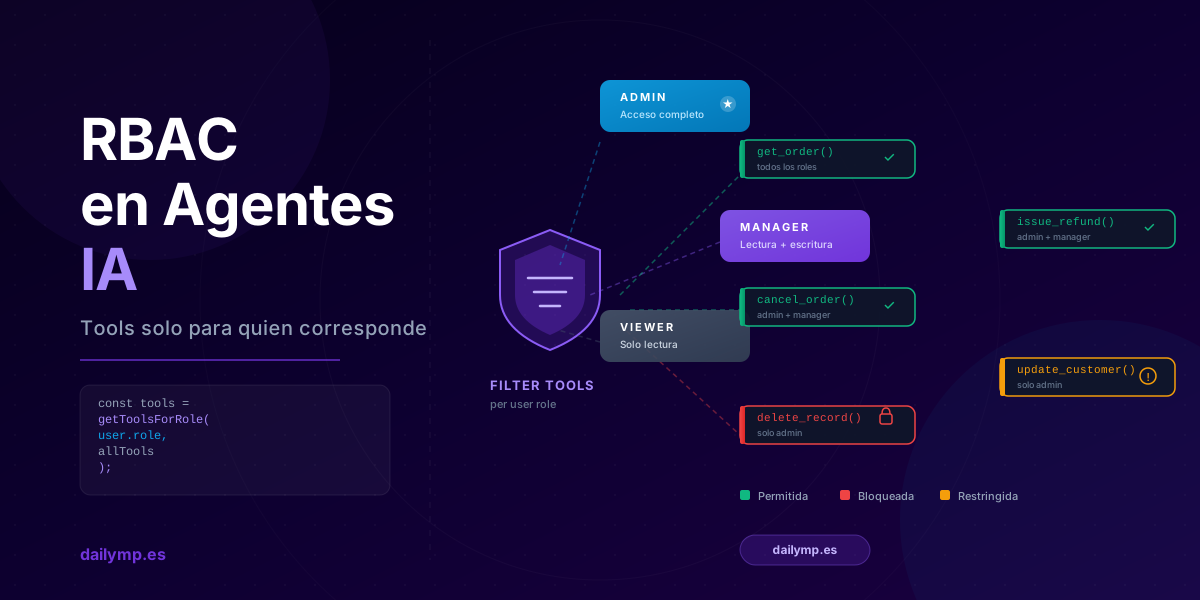
RBAC for AI Agents: Scope Tools by User Role
Your AI agent has four tools: get_order(), cancel_order(), issue_refund(), and delete_record(). Your internal team uses them daily without issue. You decide to open the same agent to customers so they can check their order status.
What happens the first time a customer types "I want to cancel"?
The model has cancel_order() available. The conversational flow makes sense to it. It calls the tool. And you find out when the order is already cancelled.
This is the most overlooked architecture mistake in multi-role AI agents: defining tools once and exposing them identically to everyone.
Why static tool lists break multi-role systems
The standard way to register tools in an agent is a fixed list passed to the model on every request. This works fine with a single user type. When you have multiple roles — internal staff, customers, admins, read-only viewers — the system has a structural problem.
The model has no concept of "this user shouldn't do that." It has the conversation context and the available tool list. If the tool exists and the context pushes toward it, the model will use it.
Common approaches that don't actually solve this:
- System prompt instruction: "Don't use
cancel_orderif the user is a customer." The problem is that system prompt instructions can conflict with conversation context, and in edge cases the model may interpret them differently. - Post-execution validation: check which tool the model called and block it if unauthorized. This protects execution, but the model already made a decision that may have influenced the rest of its response.
The real solution is simpler: the model can't call a tool it can't see. If the tool isn't in the list, it doesn't exist for the model.
RBAC for tools: the pattern that actually works
The core idea is to filter available tools before calling the LLM, based on the authenticated user's role. The model only sees the tools that are appropriate for that role.
// Role-to-tools mapping
type UserRole = 'admin' | 'manager' | 'viewer' | 'customer';

const TOOLS_BY_ROLE: Record<UserRole, string[]> = {
  admin: [
    'get_order', 'cancel_order', 'issue_refund',
    'update_customer', 'delete_record',
  ],
  manager: [
    'get_order', 'cancel_order', 'issue_refund', 'update_customer',
  ],
  viewer: [
    'get_order', 'get_customer',
  ],
  customer: [
    'get_own_orders', 'get_product_info',
  ],
};

function getToolsForRole(role: UserRole, allTools: Tool[]): Tool[] {
  const allowed = new Set(TOOLS_BY_ROLE[role] ?? []);
  return allTools.filter(tool => allowed.has(tool.name));
}
The filtering happens at the business layer, not in the prompt. We're not relying on the model to decide what it can do — we decide before the model ever receives the request.
Implementation in Next.js App Router
Here's the full pattern for an agent endpoint with RBAC in Next.js:
// app/api/agent/route.ts
import { NextRequest, NextResponse } from 'next/server';
import { jwtVerify } from 'jose';
import { generateText } from 'ai';
import { anthropic } from '@ai-sdk/anthropic';
import { allTools, getToolsForRole } from '@/lib/agent-tools';

const JWT_SECRET = new TextEncoder().encode(process.env.JWT_SECRET!);

export async function POST(req: NextRequest) {
  // 1. Authenticate and extract role from JWT
  const authHeader = req.headers.get('authorization');
  if (!authHeader?.startsWith('Bearer ')) {
    return NextResponse.json({ error: 'Unauthorized' }, { status: 401 });
  }

  const { payload } = await jwtVerify(
    authHeader.slice(7),
    JWT_SECRET
  );

  const role = (payload.role as UserRole) ?? 'viewer';
  const userId = payload.sub as string;

  // 2. Filter tools by role — before calling the LLM
  const tools = getToolsForRole(role, allTools);

  // 3. Parse request body
  const { messages } = await req.json();

  // 4. The agent only sees tools allowed for this role
  const { text, toolCalls } = await generateText({
    model: anthropic('claude-sonnet-4-6'),
    system: buildSystemPrompt(role),
    messages,
    tools: Object.fromEntries(tools.map(t => [t.name, t])),
    maxSteps: 5,
  });

  // 5. Audit log what tools were actually called
  if (toolCalls?.length) {
    await logToolUsage(userId, role, toolCalls);
  }

  return NextResponse.json({ text });
}
Three things worth calling out in this pattern:
Filtering happens before the LLM. It's not a post-response guard — the model never receives tools it's not allowed to use.
The role comes from the verified JWT, not the request body. A client can't self-declare admin by sending { role: 'admin' } in the payload.
The audit log records what was called. When something goes wrong, you know exactly which tools were available for that user and which one was executed.
RBAC vs ABAC: when you need finer granularity
RBAC works for user-type restrictions. But some situations require authorization based on the data being accessed, not just the role:
- A manager can cancel orders, but only orders in their region
- A customer can view their history, but not other accounts
- A viewer can export reports, but only for the last 30 days
This is ABAC (Attribute-Based Access Control): authorization depends on attributes of both the resource and the user, not just the role. Implementing it inside the agent requires an additional layer within each tool, not just at the access filter.
// Inside cancel_order() — ABAC validation
async function cancelOrder({ orderId }: { orderId: string }) {
  const order = await db.orders.findById(orderId);

  // The tool may exist for the role, but this specific operation
  // may be restricted by resource attributes
  if (order.region !== currentUser.region) {
    throw new ToolAuthorizationError(
      `User ${currentUser.id} has no access to orders in region ${order.region}`
    );
  }

  return await db.orders.cancel(orderId);
}
The practical difference: RBAC filters tools before the LLM, ABAC validates within each tool during execution. Both layers are complementary. For most of the AI agent integration projects we build, we start with RBAC at the access layer and add ABAC only where business logic requires it.
Why this also improves model behavior
There's a positive side effect teams don't anticipate: the model makes better decisions with fewer tools.
With a list of 20 tools, the model has more ambiguity when deciding which one to call. With 4 or 5 role-specific tools, the decision space is smaller and selection more precise. Tool selection errors — very common in agents with large tool sets — decrease naturally.
This connects directly to tool schema ambiguity issues: the fewer tools the model has to choose from, the easier it is to choose correctly.
What changes when this is properly implemented
- The customer-facing agent cannot cancel or modify anything — there's nothing to call
- The manager never sees delete options because they don't exist for them
- If someone tries to exploit the conversation context to force a restricted action, the tool doesn't exist — there's nothing to exploit
- Every tool call is logged with the role that made it, making security auditing trivial
This is the kind of architecture that makes an AI agent viable in real production, with real users who don't always behave as expected.
If you're building an agent that serves multiple user types and want the access design to be right from the start, tell us how it's currently set up →