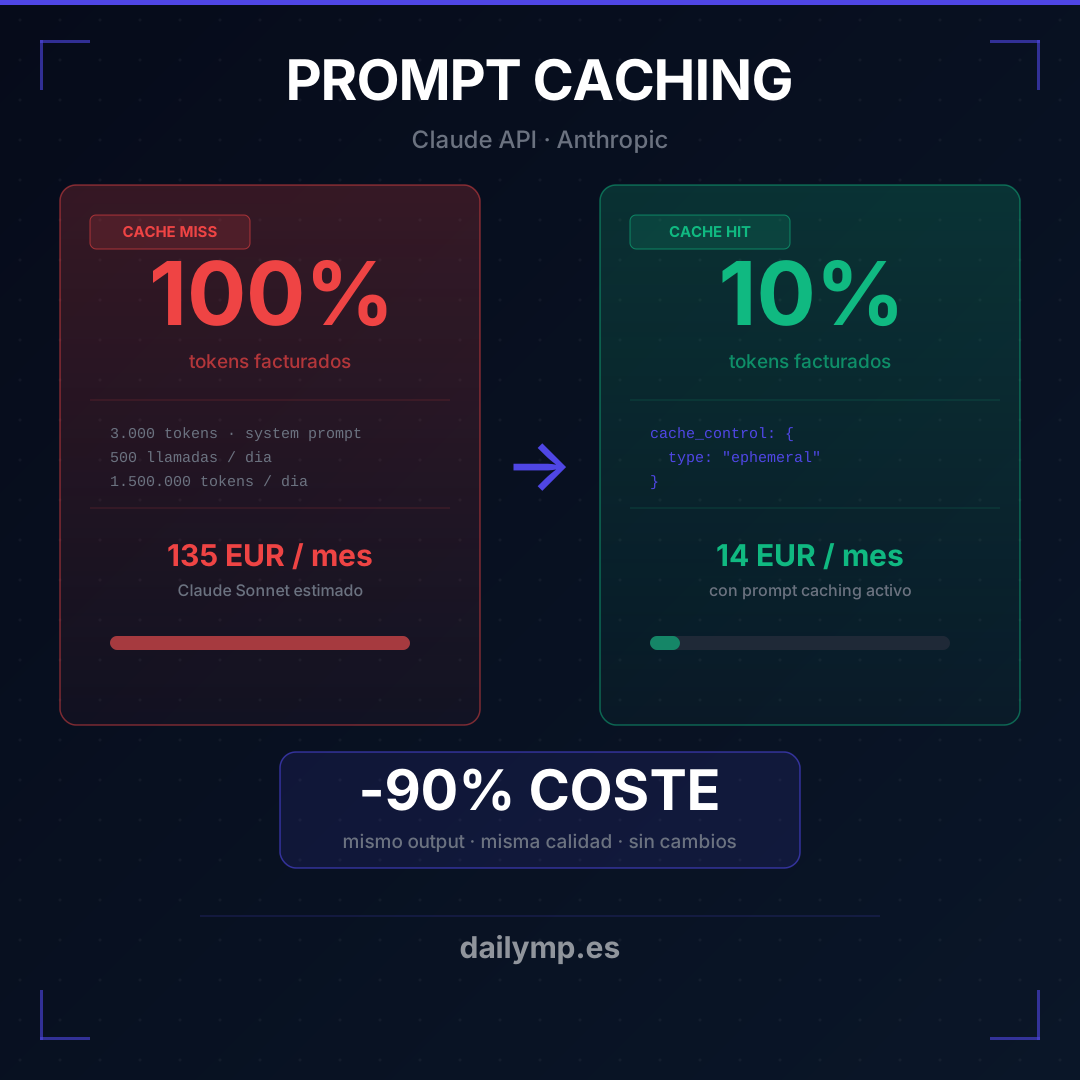
Claude Prompt Caching: 90% cheaper per API call
Your agent has a 3,000-token system prompt. You send it on every single request. At 500 calls per day, you're paying for 1,500,000 input tokens daily — for the exact same text, unchanged.
Most teams treat this as a fixed cost. It isn't. You can cut it by 90% in under an hour.
Prompt caching is a native feature of the Anthropic API. Mark a block as cacheable, and the first request writes the cache. Every subsequent request reads it at 10% of the input cost. The model reuses the computed state — no quality loss, no output changes, no extra latency.
Why prompt caching changes your cost structure
At 500 calls/day with a 3,000-token system prompt:
- Without caching: 1,500,000 input tokens/day → ~$135/month
- With caching: 3,000 tokens × 500 reads × 10% → ~$14/month
Same agent. Same output. Same quality. $121 per month difference from three lines of code.
At scale — 5,000 daily calls, longer prompts, multiple tools — the gap exceeds $1,000/month. This is production money left on the table.
TypeScript implementation
The change is minimal. Add cache_control: { type: "ephemeral" } to the block you want cached:
import Anthropic from '@anthropic-ai/sdk';

const client = new Anthropic();

const response = await client.messages.create({
  model: "claude-opus-4-7-20250514",
  max_tokens: 1024,
  system: [
    {
      type: "text",
      text: `You are the support assistant for ACME Corp.
Your goal is to resolve questions about orders, returns, and account status.

Rules:
- Always respond in the customer's language
- Do not offer discounts without authorization
- If the case exceeds your scope, escalate to human support
[... rest of static system prompt ...]`,
      cache_control: { type: "ephemeral" }
    }
  ],
  messages: [
    {
      role: "user",
      content: userMessage
    }
  ]
});

const { input_tokens, cache_read_input_tokens, cache_creation_input_tokens } = response.usage;

console.log(`Input tokens: ${input_tokens}`);
console.log(`Cache read: ${cache_read_input_tokens}`);    // this is what you want high
console.log(`Cache write: ${cache_creation_input_tokens}`); // only on first call per 5 min
The first request activates the cache (cache_creation_input_tokens > 0). Subsequent requests read it (cache_read_input_tokens > 0). That second number is your signal that the optimization is working.
Where to place breakpoints for maximum savings
Three places with the highest impact:
1. Long system prompts If your system prompt exceeds 1,024 tokens (the minimum to activate caching), mark the whole block. This is where token-hours accumulate fastest in high-frequency agents.
2. Tool definitions
With 5+ tools, their definitions can add up to 2,000–4,000 tokens. You can cache the tools block by marking the last element with cache_control — same pattern as the system prompt.
3. Static RAG context If your agent injects documents that don't change between requests — internal manuals, knowledge bases, product catalogs — that context is a strong caching candidate. The block must be byte-identical between calls for the cache to hit.
Mistakes that silently kill your cache hits
Mistake 1: dynamic content before the breakpoint
If anything variable appears before your cache marker — a timestamp, session ID, user name — the cache invalidates on every request.
// ❌ This invalidates the cache on every single call
const system = `Current time: ${new Date().toISOString()}
[... 3,000 tokens of instructions ...] ← cache never applies here`;

// ✅ Dynamic content goes AFTER the breakpoint, in the user message
messages: [
  {
    role: "user",
    content: `[${new Date().toISOString()}] ${userMessage}`
  }
]
Mistake 2: not measuring cache hits
You implement caching, skip monitoring, and don't know if it's working. Always log cache_read_input_tokens. If it stays at zero on calls that should be hitting the cache, something in your system prompt is changing between requests.
Mistake 3: caching a prompt that's too short
The minimum cacheable block is 1,024 tokens. If your system prompt is 500 tokens, caching doesn't apply. In that case, the right optimization is the Anthropic Batches API for processing multiple requests in parallel at lower cost.
Cache TTL and durability
Ephemeral cache lasts 5 minutes. For low-frequency agents (less than one request every 5 minutes), the cache expires before it amortizes. The write cost is slightly higher than a normal input call — 25% more per token — so you need enough hits within the 5-minute window to break even.
For high-frequency agents (support chatbots, real-time systems), caching is essentially free: the first request in each 5-minute window pays the write, all others read. At 500 requests per 5 minutes, the write represents 0.2% of total cost.
What good prompt caching architecture looks like
The structure of your system prompt matters. To get full cache efficiency:
- Static, large content first: company context, rules, documentation, tool definitions
- Cache breakpoint after the last static block
- Dynamic content in the user message: timestamps, session state, user-specific data
A well-structured prompt extracts the full value of caching. A poorly structured one — with dynamic content scattered through the system prompt — may place the breakpoint in the wrong position and cache nothing relevant.
The AI agents we build at DAILYMP include prompt caching by default for any agent with a system prompt over 1,024 tokens. It's not a nice-to-have — it's standard practice for production deployments.
The quick calculation
Before implementing, run the math:
- Count your system prompt tokens (use Anthropic's token counting endpoint)
- Multiply by daily call volume
- Compare: without caching vs. with caching (10% on reads, 25% premium on writes)
If the monthly saving exceeds $20–30, implementation pays for itself immediately. If your prompt is under 1,024 tokens, find a different optimization.
If you're running agents in production without prompt caching, you're likely paying $50–500/month more than necessary depending on your volume. It's a small technical adjustment with direct P&L impact.
If you want to review your agent costs and implement this properly, we can have it done in a week.