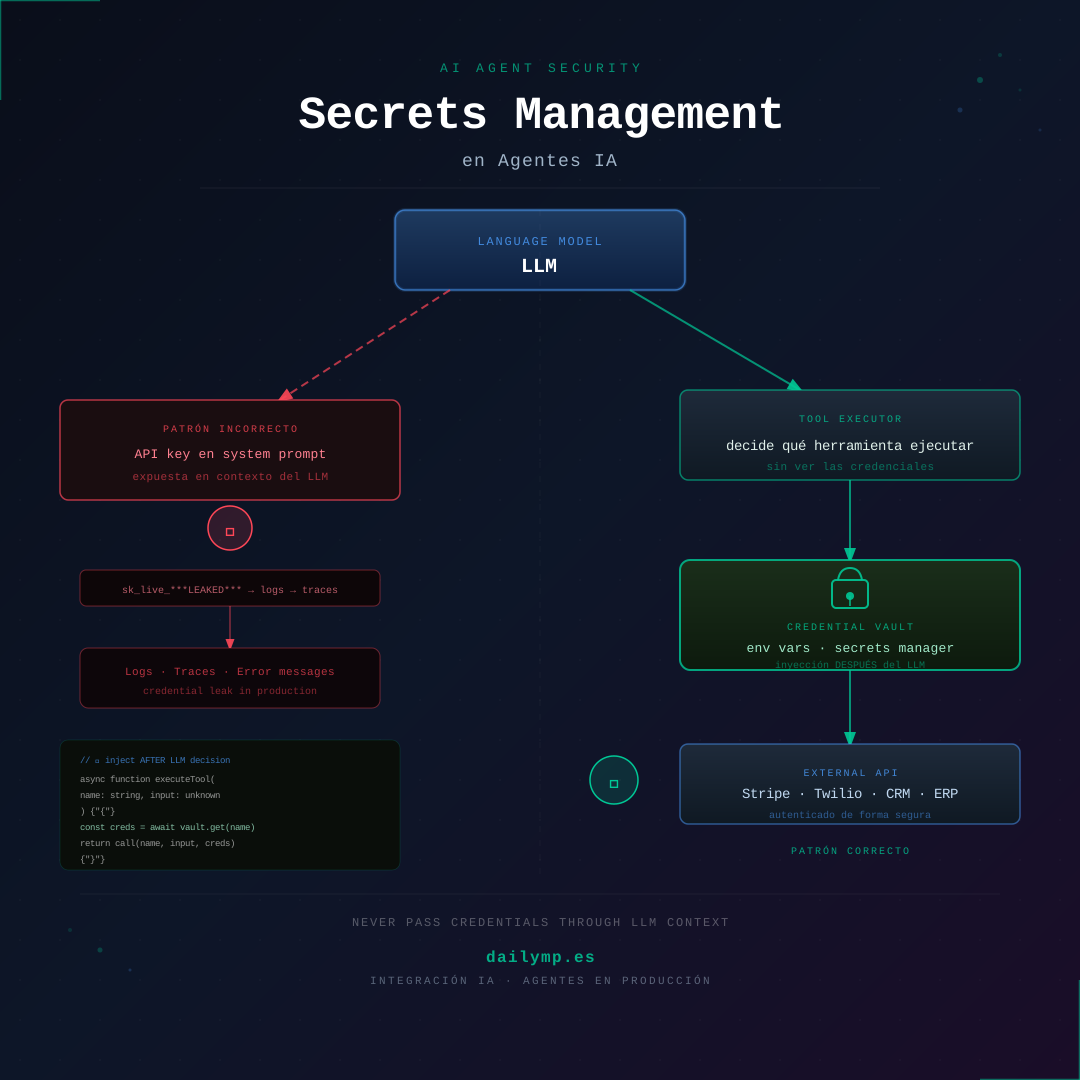
AI Agent Secrets: Inject Credentials Without Leaking
Your agent just decided to charge a customer €500. To execute it, it needs the Stripe API key.
Where exactly is that key in your architecture?
If the answer is "in the system prompt," "in the tool_result," or "as a parameter the LLM fills in," you have an active leak. Not a potential vulnerability: a leak that's happening right now in every conversation, every trace, every error log Stripe sends back when something fails.
Why Agents Leak Credentials Differently Than Classic Software
In a normal application, API keys live in environment variables. The code reads them at startup, uses them internally, and they never leave the system. The problem with agents is a new intermediary: the LLM and its conversation context.
Any string that passes through that context—system prompt, messages, tool_use blocks, tool_result blocks—can:
- Be logged in your observability platform (Langfuse, Helicone, Langsmith)
- Surface in your cloud provider's error logs
- Be echoed by the model in a response if the prompt isn't tightly controlled
- Leak to the client in a stream you don't filter correctly
Semantic failures don't throw exceptions. An API key in the LLM context doesn't raise an error—it's just there, exposed.
The Three Anti-Patterns We See in Production Audits
1. The Key in the System Prompt
// ❌ NEVER do this
const systemPrompt = `
  You are a payment assistant.
  To process charges use the Stripe API key: ${process.env.STRIPE_KEY}
  Call the charge_card tool with amount and currency.
`
The key enters the conversation history with the very first message. From that point it travels in every LLM request and every log you record.
2. The Key as a Tool Parameter
// ❌ Travels through LLM context as a tool_result
const tools = [{
  name: "charge_card",
  input_schema: {
    properties: {
      amount: { type: "number" },
      apiKey: { type: "string" } // ❌ the LLM decides what to put here
    }
  }
}]
The LLM decides parameter values. If you tell it an apiKey field exists, it will try to populate it. If you don't, it may hallucinate one. Either way the result lands as a tool_use block in the history.
3. The Key Inside tool_result
// ❌ The result goes back to LLM context
const result = await stripe.charges.create({
  amount,
  currency,
  source: token,
}, { apiKey: process.env.STRIPE_KEY })

// If you include response headers in tool_result, the key may be there
return JSON.stringify(result) // can contain auth metadata
The Right Pattern: Post-LLM Credential Injection
The rule is simple: the LLM decides what to do and with what business parameters, but never touches credentials. Credentials are injected in the tool execution layer, after the LLM has made its decision.
type ToolCall = {
  name: string
  input: Record<string, unknown>
}

async function executeToolCall(toolCall: ToolCall): Promise<unknown> {
  switch (toolCall.name) {
    case 'charge_card': {
      // Key loaded HERE, AFTER the LLM's decision
      const stripeKey = process.env.STRIPE_SECRET_KEY
      if (!stripeKey) throw new Error('Stripe not configured')

      const stripe = new Stripe(stripeKey)
      const result = await stripe.paymentIntents.create({
        amount: toolCall.input.amount as number,
        currency: toolCall.input.currency as string,
      })

      // Return only what the LLM needs to know — no auth metadata
      return { id: result.id, status: result.status, amount: result.amount }
    }
    // ... other tools
  }
}
The LLM never sees STRIPE_SECRET_KEY. It only sees the clean operation result.
Masking in Traces: The Layer Almost Nobody Implements
Even with the right pattern, external API error messages can contain authentication information. Stripe, for example, includes the request ID and partial context in its errors.
Before sending any message to your observability platform, apply a mask:
const SENSITIVE_PATTERNS = [
  /sk_live_[a-zA-Z0-9]{24,}/g,
  /sk_test_[a-zA-Z0-9]{24,}/g,
  /Bearer [a-zA-Z0-9+/=_-]{20,}/g,
  /(?:api[_-]?key|apikey|api[_-]?token)["\s]*[:=]["\s]*([a-zA-Z0-9_-]{16,})/gi,
]

function maskSecrets(text: string): string {
  return SENSITIVE_PATTERNS.reduce(
    (masked, pattern) => masked.replace(pattern, '[REDACTED]'),
    text
  )
}

// Apply before logging any message
function sanitizeMessages(messages: Message[]): Message[] {
  return messages.map((m) => ({
    ...m,
    content: typeof m.content === 'string'
      ? maskSecrets(m.content)
      : m.content,
  }))
}
In our secure database access implementation, we apply this same sanitization pattern before any structured log.
Per-Tenant Credentials in Multi-Client Systems
If you're building an agent that multiple clients use with their own integrations—each with their own Stripe key, their own CRM, their own Twilio account—you need a per-tenant credential resolution layer:
interface CredentialStore {
  get(tenantId: string, service: string): Promise<string>
}

class EnvCredentialStore implements CredentialStore {
  async get(tenantId: string, service: string): Promise<string> {
    // In production: AWS Secrets Manager, Doppler, Vault
    // In dev: env variables prefixed by tenant
    const key = `${tenantId.toUpperCase()}_${service.toUpperCase()}_KEY`
    const value = process.env[key]
    if (!value) throw new Error(`Credential not found: ${key}`)
    return value
  }
}

// Tool executor receives tenantId per request
async function createToolExecutor(tenantId: string, store: CredentialStore) {
  return {
    async execute(toolCall: ToolCall) {
      const credential = await store.get(tenantId, toolCall.name)
      return runWithCredential(toolCall, credential)
    }
  }
}
This pattern complements per-client context isolation directly: credentials and context are two separate attack surfaces, both need their own protection layer.
What We Find When We Audit Production Systems
80% of agents that reach DAILYMP for an audit have at least one of these three situations:
- Keys in system prompts because it was the fastest way to prototype and was never revisited
- No masking in traces, with Langfuse or Datadog recording the full context without filtering
- Unsanitized tool results returning the complete API response object (with headers and metadata) to the LLM context
None of these failures cause a production error. The agent works. Tests pass. The key is just sitting there, in hundreds of traces, waiting for someone to look.
Getting It Right From the Start
The pattern is clear: the LLM makes business decisions, the execution layer handles credentials. Never the other way around.
If you already have an agent in production and want to audit where your credentials are, message me on WhatsApp and we'll review the stack together.