MCP Client in TypeScript: Multi-Server, Auto-Reconnect
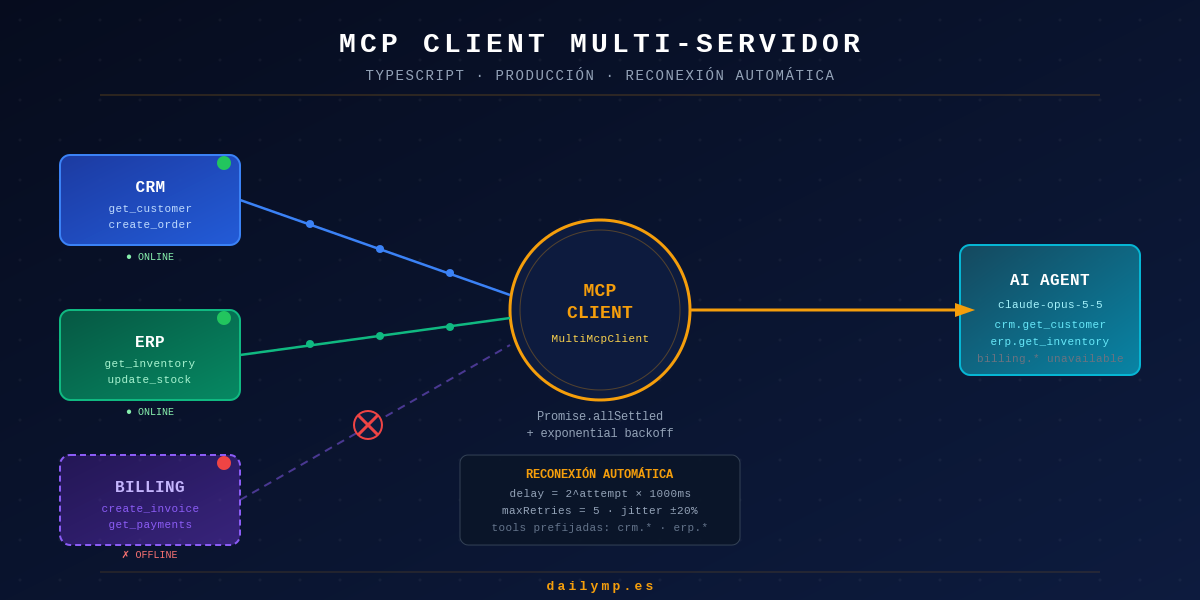
It's 3 PM. Your sales agent has been handling requests without issues since nine in the morning. Someone restarts the billing MCP server for a configuration update. No error is thrown. The agent keeps responding. But when a customer asks for a summary of their pending invoices, the agent says it doesn't have that information available — not because it failed, but because the billing tools no longer exist in its context.
The problem surfaces when the customer calls your sales rep at five.
This is the most silent failure pattern in agents that connect to multiple MCP servers: the tool disappears without the agent announcing it, without an error log, without any visible signal. The agent simply works with what it has.
The Fragile Pattern Almost Everyone Uses
Most implementations connect to the MCP server once at startup and assume that connection lasts forever.
// Fragile pattern — single server, no reconnection
const transport = new StreamableHTTPClientTransport(
  new URL("https://crm-mcp.internal/mcp")
);
const client = new Client({ name: "agent", version: "1.0.0" });
await client.connect(transport);

const { tools } = await client.listTools();
// If the server goes down after this, tools will be empty on the next restart
// and there's no logic to detect or correct it
When you add a second server, the problem compounds. Tools from different servers can share the same name — get_customer on the CRM and get_customer on the ERP mean different things. Without prefixes, the agent calls whichever one it finds first. Name collisions are the kind of bug that never shows up in tests and only surfaces in production, when order data maps to the wrong customer.
MultiMcpClient: Several Servers as One
The solution is a class that manages multiple connections with dynamic tool discovery, server-based prefixes, and automatic reconnection:
import { Client } from "@modelcontextprotocol/sdk/client/index.js";
import { StreamableHTTPClientTransport } from "@modelcontextprotocol/sdk/client/streamableHttp.js";
import type { Tool } from "@anthropic-ai/sdk/resources/messages.js";

type ServerConfig = {
  name: string;
  url: string;
  required?: boolean;
};

type ConnectedServer = {
  client: Client;
  tools: Tool[];
  online: boolean;
};

export class MultiMcpClient {
  private servers: Map<string, ConnectedServer> = new Map();

  async connect(configs: ServerConfig[]): Promise<void> {
    const results = await Promise.allSettled(
      configs.map(cfg => this.connectWithRetry(cfg))
    );

    results.forEach((result, i) => {
      const cfg = configs[i];
      if (result.status === "rejected" && cfg.required) {
        throw new Error(
          `Required server '${cfg.name}' unavailable: ${result.reason}`
        );
      }
      if (result.status === "rejected") {
        console.warn(`[MCP] Server '${cfg.name}' offline — continuing without it`);
        this.servers.set(cfg.name, {
          client: null as unknown as Client,
          tools: [],
          online: false,
        });
      }
    });
  }

  get allTools(): Tool[] {
    const tools: Tool[] = [];
    for (const [name, server] of this.servers) {
      if (!server.online) continue;
      // Prefix to avoid collisions: crm.get_customer, erp.get_customer
      for (const tool of server.tools) {
        tools.push({
          ...tool,
          name: `${name}.${tool.name}`,
        });
      }
    }
    return tools;
  }

  async callTool(
    prefixedName: string,
    input: Record<string, unknown>
  ): Promise<unknown> {
    const dotIdx = prefixedName.indexOf(".");
    if (dotIdx === -1) throw new Error(`Tool name missing prefix: ${prefixedName}`);

    const serverName = prefixedName.slice(0, dotIdx);
    const toolName = prefixedName.slice(dotIdx + 1);

    const server = this.servers.get(serverName);
    if (!server?.online) {
      throw new Error(`Server '${serverName}' not available`);
    }

    const result = await server.client.callTool({ name: toolName, arguments: input });
    return result.content;
  }

  private async connectWithRetry(
    cfg: ServerConfig,
    maxRetries = 5
  ): Promise<void> {
    for (let attempt = 0; attempt <= maxRetries; attempt++) {
      try {
        const transport = new StreamableHTTPClientTransport(new URL(cfg.url));
        const client = new Client({ name: "agent", version: "1.0.0" });
        await client.connect(transport);

        const { tools } = await client.listTools();
        // Convert to Anthropic SDK format
        const anthropicTools: Tool[] = tools.map(t => ({
          name: t.name,
          description: t.description ?? "",
          input_schema: t.inputSchema as Tool["input_schema"],
        }));

        this.servers.set(cfg.name, { client, tools: anthropicTools, online: true });
        return;
      } catch (err) {
        if (attempt === maxRetries) throw err;
        // Exponential backoff with ±20% jitter
        const base = Math.pow(2, attempt) * 1000;
        const jitter = base * (0.8 + Math.random() * 0.4);
        await new Promise(r => setTimeout(r, jitter));
      }
    }
  }
}
Using it from the agent is straightforward. Pass allTools to the Anthropic client like any tool list and dispatch callTool in the tool_use loop:
const mcp = new MultiMcpClient();
await mcp.connect([
  { name: "crm", url: "https://crm-mcp.internal/mcp", required: true },
  { name: "erp", url: "https://erp-mcp.internal/mcp", required: true },
  { name: "billing", url: "https://billing-mcp.internal/mcp" }, // optional
]);

const response = await anthropic.messages.create({
  model: "claude-opus-5-5",
  tools: mcp.allTools,
  messages: [{ role: "user", content: userMessage }],
  // ...
});

// In the tool_use loop:
if (block.type === "tool_use") {
  const result = await mcp.callTool(block.name, block.input as Record<string, unknown>);
  // ...
}
If billing is down, mcp.allTools simply won't include its tools. The agent works with CRM and ERP. When billing comes back up and you reconnect, its tools will appear again on the next mcp.allTools call.
Three Production Bugs Nobody Implements For
1. Schema drift between server and client
The MCP server updates a tool's schema. The client has the old schema cached. The LLM calls with old parameters, the server rejects with a 400 that the agent can't interpret.
The fix: don't cache listTools() across sessions. Call it fresh in every connect(), as MultiMcpClient does above. The network cost is negligible compared to the cost of a tool call with the wrong schema.
2. Tool call to a server that just went down
The server is online: true in the map, but it dropped 30 seconds ago. callTool() throws a network exception. Without handling, the error reaches the LLM as useless context.
The right pattern: catch the exception in callTool, mark the server online: false, and return a descriptive message to the LLM:
} catch (err) {
  this.servers.get(serverName)!.online = false;
  return `Error: server '${serverName}' is not available. Let the user know.`;
}
The agent can then inform the user cleanly instead of producing a nonsensical response.
3. Cold start: tool discovery takes longer than the first message
If the user sends a message while connect() is still resolving, the agent fires the Anthropic call with tools: []. The response arrives with no tool_use, the agent replies with generic text, and the user doesn't get what they asked for.
The fix: wait for connect() to resolve before accepting the first message. In a Next.js API route, initialize MultiMcpClient outside the handler as a singleton module and expose an isReady() method the handler can check before responding.
For how to build the server side that this client connects to, see the article on building an MCP server in TypeScript, and for securing it with OAuth, the article on MCP OAuth 2.0 authentication.
Real Results
Teams that implement this multi-server client architecture get three concrete things in production:
The agent never goes silent because a server went down. Available tools are always those of the servers that are up. The LLM adapts its response to the available subset instead of failing.
Name collisions disappear. With per-server prefixes, crm.get_customer and erp.get_customer are distinct entities. The agent calls exactly the one it needs, with zero ambiguity.
Reconnection is automatic and non-blocking. Exponential backoff with jitter distributes retries and prevents all clients from hammering a recovering server at the same instant.
The Cost of Building It Yourself
The pattern is straightforward. The edge cases are not: schema drift that silently corrupts the agent's context, tool calls to servers that just dropped, managing connection lifecycle in serverless environments where there's no persistent state between invocations, syncing tools when a server publishes a new version of a tool in-flight.
If you already have agents in production connecting to multiple systems and want this level of resilience without building it from scratch, at DAILYMP we have this implemented as part of our AI agent integration projects.